<?xml version="1.0" encoding="utf-8"?>
<feed xmlns="http://www.w3.org/2005/Atom">
  <title>Western Devs</title>
  
  <link href="/feeds/dave_paquette" rel="self" type="application/atom+xml"/>
  <link href="https://westerndevs.com" rel="alternate" type="application/atom+xml"/>
  
  <updated>2026-03-22T17:42:31.816Z</updated>
  <id>https://westerndevs.com/</id>
  
  <author>
    <name>Western Devs</name>
	<uri>https://westerndevs.com</uri>
    <email>info@westerndevs.com</email>
  </author>
  
  <generator uri="http://hexo.io/">Hexo</generator>
  
  <entry>
    <title type="html">Scaling Azure Functions from Consumption Plan to Premium Plan (and back again)</title>
    <link href="https://westerndevs.com/Azure/Azure-Functions/scaling-azure-functions-from-consumption-plan-to-premium-hosting-plan/" rel="alternate" type="text/html"/>
    <id>https://westerndevs.com/Azure/Azure-Functions/scaling-azure-functions-from-consumption-plan-to-premium-hosting-plan/</id>
    <published>2020-05-23T16:30:00.000Z</published>
    <updated>2026-03-22T17:42:31.816Z</updated>
	<author>
	
	  
	  <name>Dave Paquette</name>
	  <email>contactme@davepaquette.com</email>
	
	  <uri>https://westerndevs.com</uri>
	</author>
    
    <content type="html"><![CDATA[<p>Azure Functions, when hosted on a consumption plan, are great for most scenarios. You pay per use which is great for keeping costs down but there are some downsides and limitations. One of those is the time it takes to cold start your function app. If your function app hasn't been triggered in some time, it can take a while for the a new instance to start up to run your app. Likewise, if a very sudden spike in load occurs, it can take some time for the consumption plan to start up enough instances to handle that load. In the meantime, you might have clients getting timeouts or failed requests.</p><p>Azure Functions offers another hosting model called <a href="https://docs.microsoft.com/en-us/azure/azure-functions/functions-premium-plan" target="_blank" rel="noopener">Azure Functions Premium Plan</a>. With premium plans, instead of paying per function execution, you pay for the underlying compute instances that are hosting your functions. This is often more expensive, but it also ensures there are always a pre-set number of warmed instances ready to execute your function.</p><p>That's great, but what if I only really need those pre-warmed instances for a short period of time when I'm expecting a lot of incoming traffic. The rest of the time, I would rather use a Consumption Plan to save on hosting costs.</p><p>I thought the choice of hosting plan was something you needed to make up front but it turns out that you can actually move an Azure Function App from a consumption plan to a premium plan (and back again).</p><p>Thanks to <a href="https://twitter.com/stimms/" target="_blank" rel="noopener">Simon Timms</a> for starting this discussion on Twitter. We got very helpful responses from folks on the Azure Functions team:</p><p><a href="https://twitter.com/jeffhollan/" target="_blank" rel="noopener">Jeff Hollan</a> has a great <a href="https://github.com/Azure-Samples/functions-csharp-premium-scaler" target="_blank" rel="noopener">sample</a> using an Azure Durable Function to scale an Azure Function App to a premium plan for a specified amount of time, then automatically scale back down to a consumption plan.</p><blockquote class="twitter-tweet"><p lang="und" dir="ltr"><a href="https://t.co/6C9l3PQDoZ" target="_blank" rel="noopener">https://t.co/6C9l3PQDoZ</a></p>&mdash; Jeff Hollan (@jeffhollan) <a href="https://twitter.com/jeffhollan/status/1245779682961674240?ref_src=twsrc%5Etfw" target="_blank" rel="noopener">April 2, 2020</a></blockquote> <script async src="https://platform.twitter.com/widgets.js" charset="utf-8"></script><p>This is a super cool sample. It uses the <a href="https://docs.microsoft.com/en-us/rest/api/resources/" target="_blank" rel="noopener">Azure Resource Manager REST API</a> to make changes to the target function app resources. For my project however, I didn't really want to spin up another Azure Function to manage my Azure Functions. I just wanted an easy way to scale my 12 function apps up to premium plans for a couple hours, then scale them back down to a consumption plan.</p><p>I decided to try using the AZ CLI for this and it turned out really well. I was able to write a simple script to scale up and down.</p><h2>Setting up the AZ CLI</h2><p>First up, <a href="https://docs.microsoft.com/en-us/cli/azure/?view=azure-cli-latest" target="_blank" rel="noopener">install the az cli</a>.</p><p>Once installed, you'll need to login to your Azure Subscription.</p><figure class="highlight bash"><table><tr><td class="gutter"><pre><span class="line">1</span><br></pre></td><td class="code"><pre><span class="line">az login</span><br></pre></td></tr></table></figure><p>A browser window will popup, prompting you to log in to your Azure account. Once you've logged in, the browser window will close and the az cli will display a list of subscriptions available in your account. If you have more than one subscription, make sure you select the one you want to use.</p><figure class="highlight bash"><table><tr><td class="gutter"><pre><span class="line">1</span><br></pre></td><td class="code"><pre><span class="line">az account <span class="built_in">set</span> --subscription YourSubscriptionId</span><br></pre></td></tr></table></figure><h2>Create a Resource Group</h2><p>You will need a resource group for your Storage and CDN resources. If you don't already have one, create it here.</p><figure class="highlight bash"><table><tr><td class="gutter"><pre><span class="line">1</span><br></pre></td><td class="code"><pre><span class="line">az group create --name DavesFunctionApps --location WestUS2</span><br></pre></td></tr></table></figure><p>Most commands will require you to pass in a <code>--resource-group</code> and <code>--location</code> parameters. These parameters are <code>-g</code> and <code>-l</code> for short, but you can save yourself even more keystrokes by setting defaults for <code>az</code>.</p><figure class="highlight bash"><table><tr><td class="gutter"><pre><span class="line">1</span><br><span class="line">2</span><br></pre></td><td class="code"><pre><span class="line">az configure -d group=DavesFunctionApps</span><br><span class="line">az configure -d location=WestUS2</span><br></pre></td></tr></table></figure><h2>Creating a (temporary) Premium Hosting Plan</h2><p>There is a strange requirement with Azure Functions / App Service. As per Jeff Hollan's sample:</p><blockquote><p>The Azure Functions Premium plan is only available in a sub-set of infrastructure in each region. Internally we call these &quot;webspaces&quot; or &quot;stamps.&quot; You will only be able to move your function between plans if the webspace supports both consumption and premium. To make sure your consumption and premium functions land in an enabled webspace you should create a premium plan in a new resource group. Then create a consumption plan in the same resource group. You can then remove the premium plan. This will ensure the consumption function is in a premium-enabled webspace.</p><footer><strong>Jeff Hollan</strong><cite><a href="https://github.com/Azure-Samples/functions-csharp-premium-scaler" target="_blank" rel="noopener">github.com/Azure-Samples/functions-csharp-premium-scaler</a></cite></footer></blockquote><p>First, add an Azure Functions Premium plan to the resource group.</p><figure class="highlight bash"><table><tr><td class="gutter"><pre><span class="line">1</span><br></pre></td><td class="code"><pre><span class="line">az functionapp plan create -n dave_temp_premium_plan --sku EP1 --min-instances 1</span><br></pre></td></tr></table></figure><p>You can delete this premium plan using the command below <em>after</em> you've deployed a function app to this resource group . <strong>Don't forget to delete the premium plan. These cost $$$</strong></p><figure class="highlight bash"><table><tr><td class="gutter"><pre><span class="line">1</span><br></pre></td><td class="code"><pre><span class="line">az functionapp plan delete -n dave_temp_premium_plan</span><br></pre></td></tr></table></figure><h2>Creating a Function App</h2><p>There are many options for creating a new function app. I really like the <code>func</code> command line tool which I installed using npm. Check out the <a href="https://github.com/Azure/azure-functions-core-tools" target="_blank" rel="noopener">Azure Functions Core Tools GitHub Repo</a> for details on other options for installing the <code>func</code> tooling.</p><figure class="highlight bash"><table><tr><td class="gutter"><pre><span class="line">1</span><br></pre></td><td class="code"><pre><span class="line">npm i -g azure-functions-core-tools@3 --unsafe-perm <span class="literal">true</span></span><br></pre></td></tr></table></figure><p>The focus of this blog post is around scaling a function app. If you don't already have an app built, you can follow along with <a href="https://docs.microsoft.com/azure/azure-functions/functions-run-local?tabs=windows%2Ccsharp%2Cbash" target="_blank" rel="noopener">this walkthrough</a> to create a function app.</p><p>A function app requires a Storage Account resource. An Application Insights resource is also highly recommended as this really simplifies monitoring your function app after it has been deployed. Let's go ahead and create those 2 resources.</p><figure class="highlight bash"><table><tr><td class="gutter"><pre><span class="line">1</span><br><span class="line">2</span><br><span class="line">3</span><br><span class="line">4</span><br></pre></td><td class="code"><pre><span class="line">az storage account create -n davefuncappstorage</span><br><span class="line">az extension add -n application-insights</span><br><span class="line">az monitor app-insights component create --app davefuncappinsights</span><br><span class="line"></span><br></pre></td></tr></table></figure><p>Now we can create our Azure Function App resource with a consumption plan, passing in the name of the storage account and app insights resources that we just created. In my case, I'm specifying the dotnet runtime on a Windows host.</p><figure class="highlight bash"><table><tr><td class="gutter"><pre><span class="line">1</span><br></pre></td><td class="code"><pre><span class="line">az functionapp create --consumption-plan-location WestUS2 --name davefuncapp123 --os-type Windows --runtime dotnet --storage-account davefuncappstorage --app-insights davefuncappinsights --<span class="built_in">functions</span>-version 3</span><br></pre></td></tr></table></figure><p>Remember to delete that temporary Premium Hosting Plan now!</p><figure class="highlight bash"><table><tr><td class="gutter"><pre><span class="line">1</span><br></pre></td><td class="code"><pre><span class="line">az functionapp plan delete -n dave_temp_premium_plan</span><br></pre></td></tr></table></figure><h3>Deploying your Function App using the az cli</h3><p>This is a bit outside the scope of this blog post but I like using the <code>az</code> cli to deploy my function apps because it's easy to incorporate that into my CI/CD pipelines. Since my app is using the dotnet runtime, I use the <code>dotnet publish</code> command to build the app.</p><figure class="highlight bash"><table><tr><td class="gutter"><pre><span class="line">1</span><br></pre></td><td class="code"><pre><span class="line">dotnet publish -c release</span><br></pre></td></tr></table></figure><p>Then, zip the contents of the publish folder (<code>bin\release\netcoreapp3.1\publish\</code>).</p><p>In PowerShell:</p><figure class="highlight bash"><table><tr><td class="gutter"><pre><span class="line">1</span><br></pre></td><td class="code"><pre><span class="line">Compress-Archive -Path .\bin\release\netcoreapp3.1\publish\* -DestinationPath .\bin\release\netcoreapp3.1\package.zip</span><br></pre></td></tr></table></figure><p>or in Bash</p><figure class="highlight bash"><table><tr><td class="gutter"><pre><span class="line">1</span><br></pre></td><td class="code"><pre><span class="line">zip -r ./bin/release/netcoreapp3.1/package.zip ./bin/release/netcoreapp3.1/publish/</span><br></pre></td></tr></table></figure><p>Finally, use the <code>az functionapp deployment</code> command to deploy the function app.</p><figure class="highlight bash"><table><tr><td class="gutter"><pre><span class="line">1</span><br></pre></td><td class="code"><pre><span class="line">az functionapp deployment <span class="built_in">source</span> config-zip  -n davefuncapp123 --src ./bin/release/netcoreapp3.1/package.zip</span><br></pre></td></tr></table></figure><h2>Scale up to a premium plan</h2><p>Okay, now that we have a functioning (pun intended) app deployed and running on a consumption plan, let's see what it takes to scale this thing up to a premium plan.</p><p>First, create a new Premium Hosting Plan with the parameters that make sense for the load you are expecting. The <code>--sku</code> parameter refers to the size of the compute instance: EP1 is the smallest. The <code>--min-instancs</code> parameter is the number of pre-warmed instances that will always be running for this hosting plan. The <code>--max-burst</code> parameter is the upper bounds on the number of instances that the premium plan can elastically scale out if more instances are needed to handle load.</p><figure class="highlight bash"><table><tr><td class="gutter"><pre><span class="line">1</span><br></pre></td><td class="code"><pre><span class="line">az functionapp plan create -n davefuncapp123_premium_plan --sku EP1 --min-instances 4 --max-burst 12</span><br></pre></td></tr></table></figure><p>Next, move the function app to that premium hosting plan.</p><figure class="highlight bash"><table><tr><td class="gutter"><pre><span class="line">1</span><br></pre></td><td class="code"><pre><span class="line">az functionapp update --plan davefuncapp123_premium_plan -n davefuncapp123</span><br></pre></td></tr></table></figure><p>That's it! All it took was those 2 command and your function app is now running on a premium plan!</p><h2>Scale back down to a consumption plan</h2><p>Of course, that premium plan isn't cheap. You might only want your function app running on the premium plan for a short period of time. Scaling back down is equally easy.</p><p>First, move the function app back to the consumption based plan. In my case, the name of the consumption plan is <code>WestUS2Plan</code>. You should see a consumption plan in your resource group.</p><figure class="highlight bash"><table><tr><td class="gutter"><pre><span class="line">1</span><br></pre></td><td class="code"><pre><span class="line">az functionapp update --plan WestUS2Plan -n davefuncapp123</span><br></pre></td></tr></table></figure><p>Next, delete the premium hosting plan.</p><figure class="highlight bash"><table><tr><td class="gutter"><pre><span class="line">1</span><br></pre></td><td class="code"><pre><span class="line">az functionapp plan delete -n davefuncapp123_premium_plan </span><br></pre></td></tr></table></figure><h2>Wrapping it up</h2><p>In this post, we saw how easy it is to move a function app between Premium and Consumption plans. A couple very simple <code>az</code> commands can help you get the performance and features of the Premium plan <em>only</em> when you need it while taking advantages of the simplicity and cost savings of a Consumption plan the rest of the time.</p>]]></content>
    
    <summary type="html">
    
      In this post, we use the az cli to move an Azure Function app from a Consumption Plan to a Premium Plan (and back again).
    
    </summary>
    
      <category term="Azure" scheme="https://westerndevs.com/categories/Azure/"/>
    
      <category term="Azure Functions" scheme="https://westerndevs.com/categories/Azure/Azure-Functions/"/>
    
    
      <category term="Azure" scheme="https://westerndevs.com/tags/Azure/"/>
    
      <category term="Web Dev" scheme="https://westerndevs.com/tags/Web-Dev/"/>
    
      <category term="AZ CLI" scheme="https://westerndevs.com/tags/AZ-CLI/"/>
    
      <category term="Azure Functions" scheme="https://westerndevs.com/tags/Azure-Functions/"/>
    
  </entry>
  
  <entry>
    <title type="html">Deploying a Static Site to Azure Using the az CLI</title>
    <link href="https://westerndevs.com/Azure/deploying-a-static-site-to-azure-using-the-az-cli/" rel="alternate" type="text/html"/>
    <id>https://westerndevs.com/Azure/deploying-a-static-site-to-azure-using-the-az-cli/</id>
    <published>2020-05-10T22:30:00.000Z</published>
    <updated>2026-03-22T17:42:31.814Z</updated>
	<author>
	
	  
	  <name>Dave Paquette</name>
	  <email>contactme@davepaquette.com</email>
	
	  <uri>https://westerndevs.com</uri>
	</author>
    
    <content type="html"><![CDATA[<p>I was recently working on a project where the frontend was built in React. The project was hosted on Azure and we wanted to use Azure CDN to host the React app. I have been looking at the az cli recently and decided to use it on this project to script the setup of resources and deployments to Azure.</p><h2>Setting up the AZ CLI</h2><p>First up, <a href="https://docs.microsoft.com/en-us/cli/azure/?view=azure-cli-latest" target="_blank" rel="noopener">install the az cli</a>.</p><p>Once installed, you'll need to login to your Azure Subscription.</p><figure class="highlight ebnf"><table><tr><td class="gutter"><pre><span class="line">1</span><br></pre></td><td class="code"><pre><span class="line"><span class="attribute">az login</span></span><br></pre></td></tr></table></figure><p>A browser window will popup, prompting you to log in to your Azure account. Once you've logged in, the browser window will close and the az cli will display a list of subscriptions available in your account. If you have more than one subscription, make sure you select the one you want to use.</p><figure class="highlight applescript"><table><tr><td class="gutter"><pre><span class="line">1</span><br></pre></td><td class="code"><pre><span class="line">az account <span class="keyword">set</span> <span class="comment">--subscription YourSubscriptionId</span></span><br></pre></td></tr></table></figure><h2>Create a Resource Group</h2><p>You will need a resource group for your Storage and CDN resources. If you don't already have one, create it here.</p><figure class="highlight routeros"><table><tr><td class="gutter"><pre><span class="line">1</span><br></pre></td><td class="code"><pre><span class="line">az<span class="built_in"> group </span>create --name DavesFancyApp --location SouthCentralUs</span><br></pre></td></tr></table></figure><p>Most commands will require you to pass in a <code>--resource-group</code> and <code>--location</code> parameters. These parameters are <code>-g</code> and <code>-l</code> for short, but you can save yourself even more keystrokes by setting defaults for <code>az</code>.</p><figure class="highlight routeros"><table><tr><td class="gutter"><pre><span class="line">1</span><br><span class="line">2</span><br></pre></td><td class="code"><pre><span class="line">az configure -d <span class="attribute">group</span>=DavesFancyApp</span><br><span class="line">az configure -d <span class="attribute">location</span>=SouthCentralUs</span><br></pre></td></tr></table></figure><h2>Create a Storage Account for Static Hosting</h2><p>First, create a storage account:</p><figure class="highlight pgsql"><table><tr><td class="gutter"><pre><span class="line">1</span><br></pre></td><td class="code"><pre><span class="line">az <span class="keyword">storage</span> account <span class="keyword">create</span> <span class="comment">--name davefancyapp123</span></span><br></pre></td></tr></table></figure><p>Then, enable static site hosting for this account.</p><figure class="highlight brainfuck"><table><tr><td class="gutter"><pre><span class="line">1</span><br></pre></td><td class="code"><pre><span class="line"><span class="comment">az</span> <span class="comment">storage</span> <span class="comment">blob</span> <span class="comment">service</span><span class="literal">-</span><span class="comment">properties</span> <span class="comment">update</span> --<span class="comment">account</span><span class="literal">-</span><span class="comment">name</span> <span class="comment">davefancyapp123</span> --<span class="comment">static</span><span class="literal">-</span><span class="comment">website</span> --<span class="comment">404</span><span class="literal">-</span><span class="comment">document</span> <span class="comment">404</span><span class="string">.</span><span class="comment">html</span> --<span class="comment">index</span><span class="literal">-</span><span class="comment">document</span> <span class="comment">index</span><span class="string">.</span><span class="comment">html</span></span><br></pre></td></tr></table></figure><p>Your storage account will now have a blob container named <code>$web</code>. That contents of that container will be available on the URL <em>accountname</em>.z21.web.core.windows.net/. For example, https://davefancyapp123.z21.web.core.windows.net/.</p><h2>Deploying your app</h2><p>To deploy your app to the site, all you need to do is copy your app's static files to the <code>$web</code> container in the storage account you created above. For my react app, that means running <code>npm run build</code> and copying the build output to the <code>$web</code> container.</p><figure class="highlight armasm"><table><tr><td class="gutter"><pre><span class="line">1</span><br></pre></td><td class="code"><pre><span class="line"><span class="symbol">az</span> storage <span class="keyword">blob </span>upload-<span class="keyword">batch </span>--account-name davefancyapp123 -s ./<span class="keyword">build </span>-d <span class="string">'$web'</span></span><br></pre></td></tr></table></figure><p>Now your site should be available via the static hosting URL above. That was easy!</p><h2>Create a CDN Profile and Endpoint</h2><p>Next up, we are going to put a Content Delivery Network (CDN) endpoint in front of the blob storage account. We want to use a CDN for a couple reasons. First, it's going to provide much better performance overall. CDNs are optimized for delivering web content to user's devices and we should take advantage of that as much as possible. The second reason is that a CDN will allow us to configure SSL on a custom domain name.</p><p>First, we will need to create a CDN Profile. There are a few different of CDNs offerings available in Azure. You can read about them <a href="https://docs.microsoft.com/azure/cdn/cdn-features" target="_blank" rel="noopener">here</a>. In this example, we will us the Standard Microsoft CDN.</p><figure class="highlight routeros"><table><tr><td class="gutter"><pre><span class="line">1</span><br></pre></td><td class="code"><pre><span class="line">az cdn<span class="built_in"> profile </span>create -n davefancyapp123cdn --sku Standard_Microsoft</span><br></pre></td></tr></table></figure><p>Next, we will create the CDN endpoint. Here we need to set the origin to the static hosting URL from the previous step. Note that we don't include the protocol portion of the URL.</p><figure class="highlight stylus"><table><tr><td class="gutter"><pre><span class="line">1</span><br></pre></td><td class="code"><pre><span class="line">az cdn endpoint create -n davefancyapp123cdnendpoint --profile-name davefancyapp123cdn --origin davefancyapp123<span class="selector-class">.z21</span><span class="selector-class">.web</span><span class="selector-class">.core</span><span class="selector-class">.windows</span><span class="selector-class">.net</span> --origin-host-<span class="selector-tag">header</span> davefancyapp123<span class="selector-class">.z21</span><span class="selector-class">.web</span><span class="selector-class">.core</span><span class="selector-class">.windows</span><span class="selector-class">.net</span> --enable-compression</span><br></pre></td></tr></table></figure><p>Note: See the <a href="https://docs.microsoft.com/en-us/cli/azure/cdn/endpoint?view=azure-cli-latest#az-cdn-endpoint-create" target="_blank" rel="noopener">az cli docs</a> for more information on the options available when creating a CDN endpoint.</p><p>Now your site should be available from <em>endpointname</em>.azureedge.net. In my case https://davefancyapp123cdnendpoint.azureedge.net/. Note that the endpoint is created quickly but it can take some time for the actual content to propagate through the CDN. You might initially get a 404 when you visit the URL.</p><h3>Create CDN Endpoint Rules</h3><p>These 2 steps are optional. The first one is highly recommended. The second is optional depending on the type of app your deploying.</p><p>First, create URL Redirect rule to redirect any HTTP requests to HTTPS.</p><figure class="highlight dsconfig"><table><tr><td class="gutter"><pre><span class="line">1</span><br></pre></td><td class="code"><pre><span class="line"><span class="string">az </span><span class="string">cdn </span><span class="string">endpoint </span><span class="string">rule </span><span class="string">add </span>-n <span class="string">davefancyapp123cdnendpoint </span><span class="built_in">--profile-name</span> <span class="string">davefancyapp123cdn </span><span class="built_in">--rule-name</span> <span class="string">enforcehttps </span><span class="built_in">--order</span> 1 <span class="built_in">--action-name</span> <span class="string">"UrlRedirect"</span>  <span class="built_in">--redirect-type</span> <span class="string">Found </span><span class="built_in">--redirect-protocol</span> <span class="string">HTTPS </span><span class="built_in">--match-variable</span> <span class="string">RequestScheme </span><span class="built_in">--operator</span> <span class="string">Equal </span><span class="built_in">--match-value</span> <span class="string">HTTP</span></span><br></pre></td></tr></table></figure><p>Next, if you're deploying a Single Page Application (SPA) built in your favourite JavaScript framework (e.g. Vue, React, Angular), you will want a URL Rewrite rule that returns the app's root <code>index.html</code> file for any request to a path that isn't an actual file. There are many variations on how to write this rule. I found this to be the simplest one that worked for me. Basically if the request path is not for a specific file with a file extension, rewrite to <code>index.html</code>. This allows users to directly navigate to a route in my SPA and still have the CDN serve the <code>index.html</code> that bootstraps the application.</p><figure class="highlight jboss-cli"><table><tr><td class="gutter"><pre><span class="line">1</span><br></pre></td><td class="code"><pre><span class="line">az cdn endpoint rule add -n davefancyapp123cdnendpoint <span class="params">--profile-name</span> davefancyapp123cdn <span class="params">--rule-name</span> sparewrite <span class="params">--order</span> 2 <span class="params">--action-name</span> <span class="string">"UrlRewrite"</span> <span class="params">--source-pattern</span> '/' <span class="params">--destination</span> <span class="string">/index.html</span> <span class="params">--preserve-unmatched-path</span> <span class="literal">false</span> <span class="params">--match-variable</span> UrlFileExtension <span class="params">--operator</span> LessThan <span class="params">--match-value</span> 1</span><br></pre></td></tr></table></figure><h3>Configuring a domain with an Azure Managed Certificate</h3><p>The final step in configuring the CDN Endpoint is to configure a custom domain and enable HTTPS on that custom domain.</p><p>You will need access to update DNS records for the custom domain. Add a CNAME record for your subdomain that points to the CDN endpoint URL. For example, I created a CNAME record on my davepaquette.com domain:</p><figure class="highlight css"><table><tr><td class="gutter"><pre><span class="line">1</span><br></pre></td><td class="code"><pre><span class="line"><span class="selector-tag">CNAME</span>    <span class="selector-tag">fancyapp</span>   <span class="selector-tag">davefancyapp123cdnendpoint</span><span class="selector-class">.azureedge</span><span class="selector-class">.net</span></span><br></pre></td></tr></table></figure><p>Once the CNAME record has been created, create a custom domain for your endpoint.</p><figure class="highlight brainfuck"><table><tr><td class="gutter"><pre><span class="line">1</span><br></pre></td><td class="code"><pre><span class="line"><span class="comment">az</span> <span class="comment">cdn</span> <span class="comment">custom</span><span class="literal">-</span><span class="comment">domain</span> <span class="comment">create</span> --<span class="comment">endpoint</span><span class="literal">-</span><span class="comment">name</span> <span class="comment">davefancyapp123cdnendpoint</span> --<span class="comment">profile</span><span class="literal">-</span><span class="comment">name</span> <span class="comment">davefancyapp123cdn</span> <span class="literal">-</span><span class="comment">n</span> <span class="comment">fancyapp</span><span class="literal">-</span><span class="comment">domain</span> --<span class="comment">hostname</span> <span class="comment">fancyapp</span><span class="string">.</span><span class="comment">davepaquette</span><span class="string">.</span><span class="comment">com</span></span><br></pre></td></tr></table></figure><p>And finally, enable HTTPs. Unfortunately, this step fails due to a <a href="https://github.com/Azure/azure-cli/issues/12152" target="_blank" rel="noopener">bug</a> in the AZ CLI. There's <a href="https://github.com/Azure/azure-cli/pull/12648" target="_blank" rel="noopener">a fix</a> on it's way for this but it hasn't been merged into the CLI tool yet.</p><figure class="highlight brainfuck"><table><tr><td class="gutter"><pre><span class="line">1</span><br></pre></td><td class="code"><pre><span class="line"><span class="comment">az</span> <span class="comment">cdn</span> <span class="comment">custom</span><span class="literal">-</span><span class="comment">domain</span> <span class="comment">enable</span><span class="literal">-</span><span class="comment">https</span> --<span class="comment">endpoint</span><span class="literal">-</span><span class="comment">name</span> <span class="comment">davefancyapp123cdnendpoint</span> --<span class="comment">profile</span><span class="literal">-</span><span class="comment">name</span> <span class="comment">davefancyapp123cdn</span> --<span class="comment">name</span> <span class="comment">fancyapp</span><span class="literal">-</span><span class="comment">domain</span></span><br></pre></td></tr></table></figure><p>Due to the bug, this command returns <code>InvalidResource - The resource format is invalid</code>.  For now, you can <a href="https://docs.microsoft.com/en-us/azure/cdn/cdn-custom-ssl?tabs=option-1-default-enable-https-with-a-cdn-managed-certificate" target="_blank" rel="noopener">do this step manually</a> in the Azure Portal. When using CDN Managed Certificates, the process is full automated. Azure will verify your domain using the CNAME record above, provision a certificate and configure the CDN endpoint to use that certificate. Certificates are fully managed by Azure. That includes generating new certificates so you don't need to worry about your certificate expiring.</p><h4>CDN Managed Certificates for Root Domain</h4><p>My biggest frustration with Azure CDN Endpoints is that CDN managed certificates are not supported for the apex/root domain. You can still use HTTPS but you need to bring your own certificate.</p><p>The same limitation exists for managed certificates on App Service. If you share my frustration, <a href="https://feedback.azure.com/forums/169385-web-apps/suggestions/38981932-add-naked-domain-support-to-app-service-managed-ce" target="_blank" rel="noopener">please upvote here</a>.</p><h2>Deploying updates to your application</h2><p>The CDN will cache your files. That's great for performance but can be a royal pain when trying to deploy updates to your application. For SPA apps, I have found that simply telling the CDN to purge <code>index.html</code> is enough to ensure updates are available very shortly after deploying a new version. This works because most JavaScript frameworks today use WebPack which does a good job of cache-busting your JavaScript and CSS assets. You just need to make sure the browser is able to get the latest version of <code>index.html</code> and updates flow through nicely.</p><p>When you upload your latest files to blob storage, follow it with a purge command for <code>index.html</code> on the CDN endpoint.</p><figure class="highlight dsconfig"><table><tr><td class="gutter"><pre><span class="line">1</span><br><span class="line">2</span><br></pre></td><td class="code"><pre><span class="line"><span class="string">az </span><span class="string">storage </span><span class="string">blob </span><span class="string">upload-batch </span><span class="built_in">--account-name</span> <span class="string">davefancyapp123 </span>-s ./<span class="string">build </span>-d <span class="string">'$web'</span></span><br><span class="line"><span class="string">az </span><span class="string">cdn </span><span class="string">endpoint </span><span class="string">purge </span>-n <span class="string">davefancyapp123cdnendpoint </span><span class="built_in">--profile-name</span> <span class="string">davefancyapp123cdn </span><span class="built_in">--no-wait</span> <span class="built_in">--content-paths</span> <span class="string">'/'</span> <span class="string">'/index.html'</span></span><br></pre></td></tr></table></figure><p>The purge command can take a while to complete. We pass the <code>--no-wait</code> option so the command returns immediately.</p><h2>My thoughts on az</h2><p>Aside from the bug I ran in to with enabling HTTPS on the CDN endpoint, I've really enjoyed my experience with the <code>az</code> cli. I was able to fully automate resource creation and deployments using the <a href="https://github.com/marketplace/actions/azure-cli-action" target="_blank" rel="noopener">GitHub Actions az cli action</a>. I can see <code>az</code> becoming my preferred method of managing Azure resources.</p>]]></content>
    
    <summary type="html">
    
      The az command line interface (cli) is a powerful tool for creating, modifying and deploying to Azure resources. Since it&#39;s a cli AND cross platform, it&#39;s also a great tool for automating your deployments. In this post, we&#39;ll use the az cli to deploy a static site to Azure.
    
    </summary>
    
      <category term="Azure" scheme="https://westerndevs.com/categories/Azure/"/>
    
    
      <category term="Azure" scheme="https://westerndevs.com/tags/Azure/"/>
    
      <category term="Web Dev" scheme="https://westerndevs.com/tags/Web-Dev/"/>
    
      <category term="AZ CLI" scheme="https://westerndevs.com/tags/AZ-CLI/"/>
    
  </entry>
  
  <entry>
    <title type="html">Enhancing Application Insights Request Telemetry</title>
    <link href="https://westerndevs.com/Application-Insights/enhancing-application-insights-request-telemetry/" rel="alternate" type="text/html"/>
    <id>https://westerndevs.com/Application-Insights/enhancing-application-insights-request-telemetry/</id>
    <published>2020-03-08T00:24:26.000Z</published>
    <updated>2026-03-22T17:42:31.814Z</updated>
	<author>
	
	  
	  <name>Dave Paquette</name>
	  <email>contactme@davepaquette.com</email>
	
	  <uri>https://westerndevs.com</uri>
	</author>
    
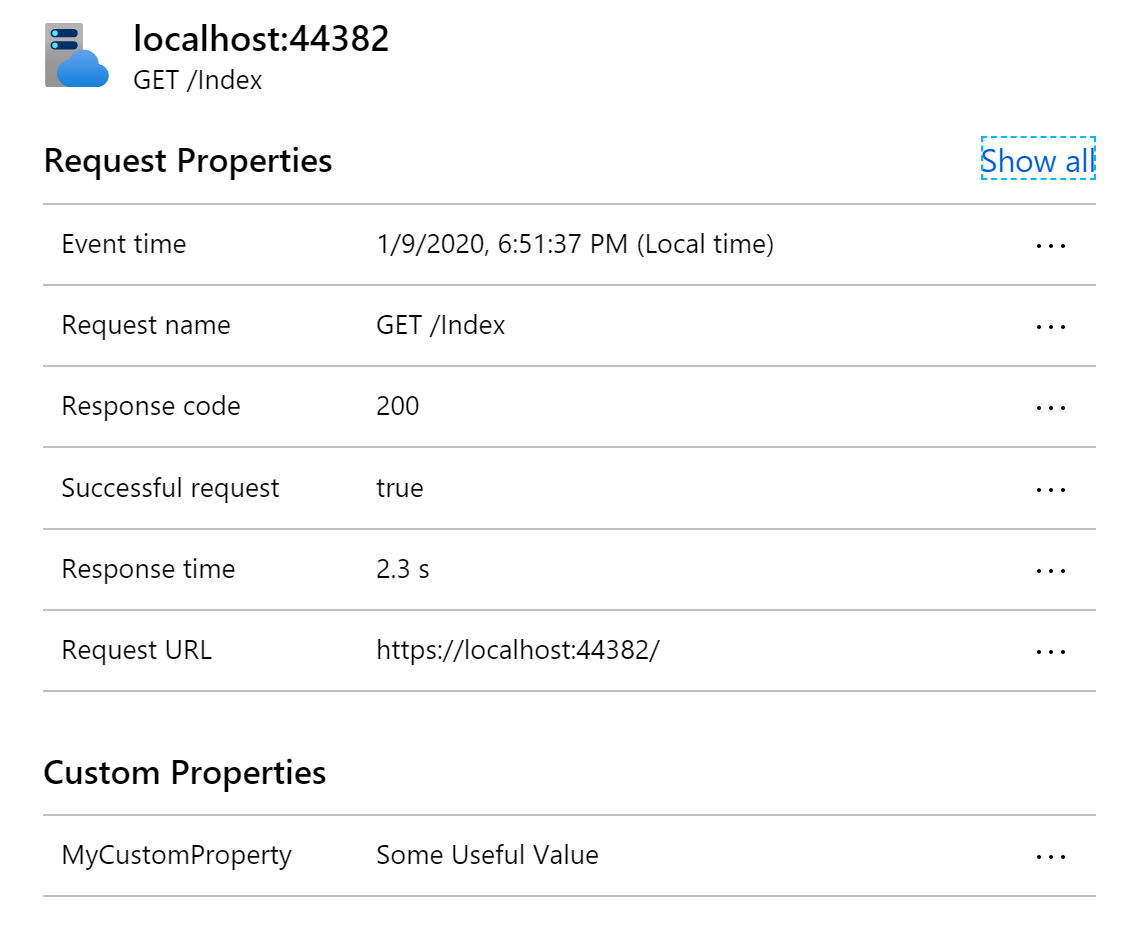
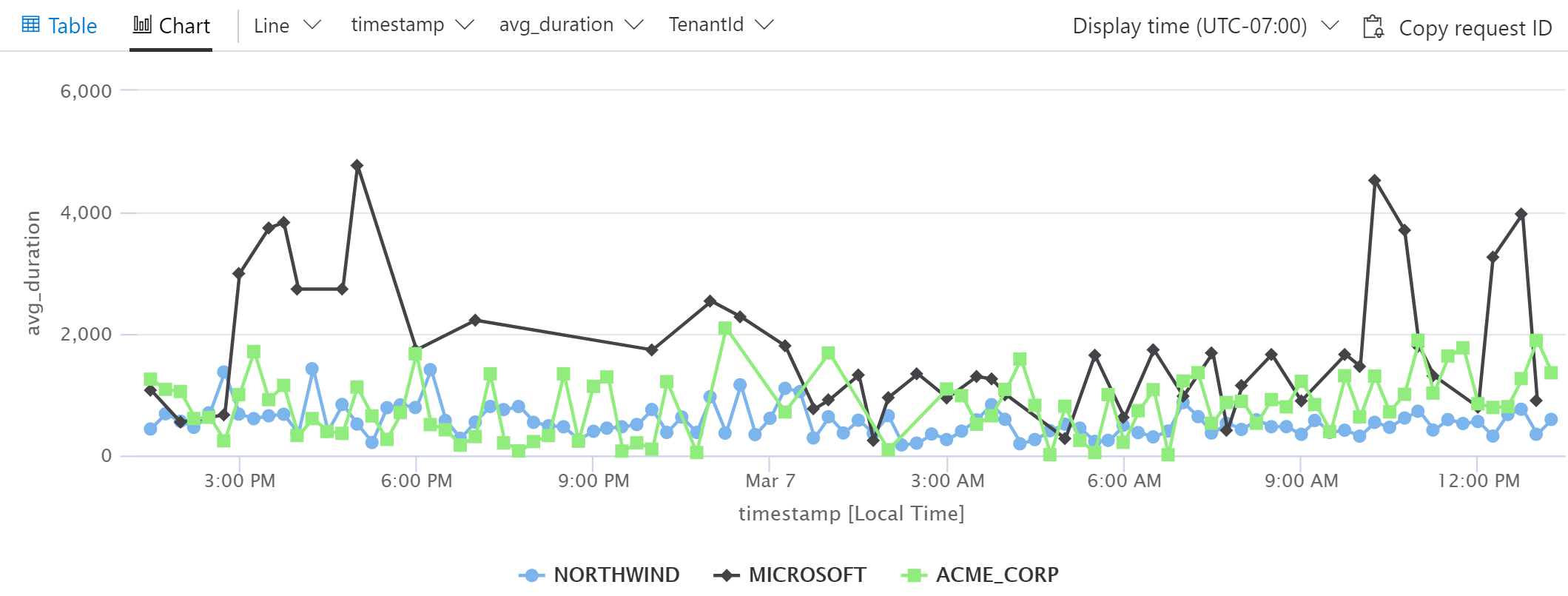
    <content type="html"><![CDATA[<p>This post is a continuation of my series about using <a href="https://www.davepaquette.com/archive/2020/01/20/getting-the-most-out-of-application-insights-for-net-core-apps.aspx" target="_blank" rel="noopener">Application Insights in ASP.NET Core</a>. Today we will take a deeper dive into Request telemetry.</p><h1>Request Telemetry</h1><p>For an ASP.NET Core process, the Application Insights SDK will automatically collect data about every request that the server process receives. This specific type of telemetry is called <a href="https://docs.microsoft.com/azure/azure-monitor/app/data-model-request-telemetry" target="_blank" rel="noopener">Request telemetry</a> and it contains a ton of very useful data including: the request path, the HTTP verb, the response status code, the duration, the timestamp when the request was received.</p><p><img src="https://www.davepaquette.com/images/app_insights/request_telemetry.png" alt="Sample Request Telemetry"></p><p>The default data is great, but I often find myself wanting more information. For example, in a multi-tenant application, it would be very useful to track the tenant id as part of the request telemetry. This would allow us to filter data more effectively in the Application Insights portal and craft some very useful log analytics queries.</p><h1>Adding custom data to Request Telemetry</h1><p>All types of telemetry in Application Insights provide an option to store custom properties. In the <a href="https://www.davepaquette.com/archive/2020/02/05/setting-cloud-role-name-in-application-insights.aspx" target="_blank" rel="noopener">previous post</a>, we saw how to create an <code>ITelemetryInitializer</code> to set properties on a particular telemetry instance. We could easily add custom properties to our Request telemetry using a telemetry initializer.</p><figure class="highlight cs"><table><tr><td class="gutter"><pre><span class="line">1</span><br><span class="line">2</span><br><span class="line">3</span><br><span class="line">4</span><br><span class="line">5</span><br><span class="line">6</span><br><span class="line">7</span><br></pre></td><td class="code"><pre><span class="line"><span class="keyword">public</span> <span class="keyword">class</span> <span class="title">CustomPropertyTelemetryInitializer</span> : <span class="title">ITelemetryInitializer</span></span><br><span class="line">&#123;</span><br><span class="line">    <span class="function"><span class="keyword">public</span> <span class="keyword">void</span> <span class="title">Initialize</span>(<span class="params">ITelemetry telemetry</span>)</span></span><br><span class="line"><span class="function"></span>    &#123;</span><br><span class="line">      requestTelemetry.Properties[<span class="string">"MyCustomProperty"</span>] = <span class="string">"Some Useful Value"</span>;</span><br><span class="line">    &#125;</span><br><span class="line">&#125;</span><br></pre></td></tr></table></figure><p>Any custom properties you add will be listed under Custom Properties in the Application Insights portal.</p><p><img src="https://www.davepaquette.com/images/app_insights/request_telemetry_custom_property.png" alt="Sample Request Telemetry with Custom Properties"></p><p>But telemetry initializers are singletons and often don't have access to the useful data that we want to add to request telemetry. Typically the data we want is related in some way to the current request and that data wouldn't be available in a singleton service. Fortunately, there is another easy way to get an instance of the request telemetry for the current request.</p><figure class="highlight cs"><table><tr><td class="gutter"><pre><span class="line">1</span><br><span class="line">2</span><br></pre></td><td class="code"><pre><span class="line"><span class="keyword">var</span> requestTelemetry = HttpContext.Features.Get&lt;RequestTelemetry&gt;();</span><br><span class="line">requestTelemetry.Properties[<span class="string">"TenantId"</span>] = <span class="string">"ACME_CORP"</span>; </span><br></pre></td></tr></table></figure><p>You can do it anywhere you have access to an HTTP Context. Some examples I have seen include: <code>Middleware</code>, <code>ActionFilters</code>, <code>Controller</code> action methods, <code>OnActionExecuting</code> in a base <code>Controller</code> class and <code>PageModel</code> classes in Razor Pages.</p><h1>Filtering by Custom Properties in the Portal</h1><p>Once you've added custom properties to Request Telemetry, you can use those custom properties to filter data in the Application Insights portal. For example, you might want to investigate failures that are occurring for a specific tenant or investigate performance for a particular tenant.</p><p><img src="https://www.davepaquette.com/images/app_insights/filer_by_custom_property.png" alt="Filtering by Custom Property"></p><p>This type of filtering can be applied almost anywhere in the portal and can help narrow things down when investigating problems.</p><h1>Writing Useful Log Analytics Queries</h1><p>Now this is where things get really interesting for me. What if we had one particular tenant complaining about performance. Wouldn't it be interesting to plot out the average request duration for all tenants? We can easily accomplish this using a log analytics query.</p><figure class="highlight coq"><table><tr><td class="gutter"><pre><span class="line">1</span><br><span class="line">2</span><br><span class="line">3</span><br></pre></td><td class="code"><pre><span class="line">requests</span><br><span class="line">| <span class="type">summarize</span> avg(duration) <span class="built_in">by</span> tostring(customDimensions.TenantId), bin(timestamp, <span class="number">15</span>m)</span><br><span class="line">| <span class="type">render</span> timechart</span><br></pre></td></tr></table></figure><p>This simple query will produce the following chart:</p><p><img src="https://www.davepaquette.com/images/app_insights/log_analytics_by_custom_property.png" alt="Log Analytics Query Summarize by Custom Property"></p><p>Small variations on this query can be extremely useful in comparing response times, failure rates, usage and pretty much anything else you can think of.</p><h1>Wrapping it up</h1><p>TenantId is just an example of a custom property. The custom properties that are useful for a particular application tend to emerge naturally as you're investigating issues and sifting through telemetry in Application Insights. You will eventually find yourself saying &quot;I wish I knew what <code>xxx</code> was for this request`. When that happens, stop and add that as a custom property to the request telemetry. You'll thank yourself later.</p>]]></content>
    
    <summary type="html">
    
      A continuation in my series of love letters about Application Insights. Today I explore a method of enhancing the request telemetry that is automatically collected by the Application Insights SDK.
    
    </summary>
    
      <category term="Application Insights" scheme="https://westerndevs.com/categories/Application-Insights/"/>
    
    
      <category term=".NET Core" scheme="https://westerndevs.com/tags/NET-Core/"/>
    
      <category term=".NET" scheme="https://westerndevs.com/tags/NET/"/>
    
      <category term="Azure" scheme="https://westerndevs.com/tags/Azure/"/>
    
      <category term="Application Insights" scheme="https://westerndevs.com/tags/Application-Insights/"/>
    
  </entry>
  
  <entry>
    <title type="html">Setting Cloud Role Name in Application Insights</title>
    <link href="https://westerndevs.com/Application-Insights/setting-cloud-role-name-in-application-insights/" rel="alternate" type="text/html"/>
    <id>https://westerndevs.com/Application-Insights/setting-cloud-role-name-in-application-insights/</id>
    <published>2020-02-06T00:59:38.000Z</published>
    <updated>2026-03-22T17:42:31.814Z</updated>
	<author>
	
	  
	  <name>Dave Paquette</name>
	  <email>contactme@davepaquette.com</email>
	
	  <uri>https://westerndevs.com</uri>
	</author>
    
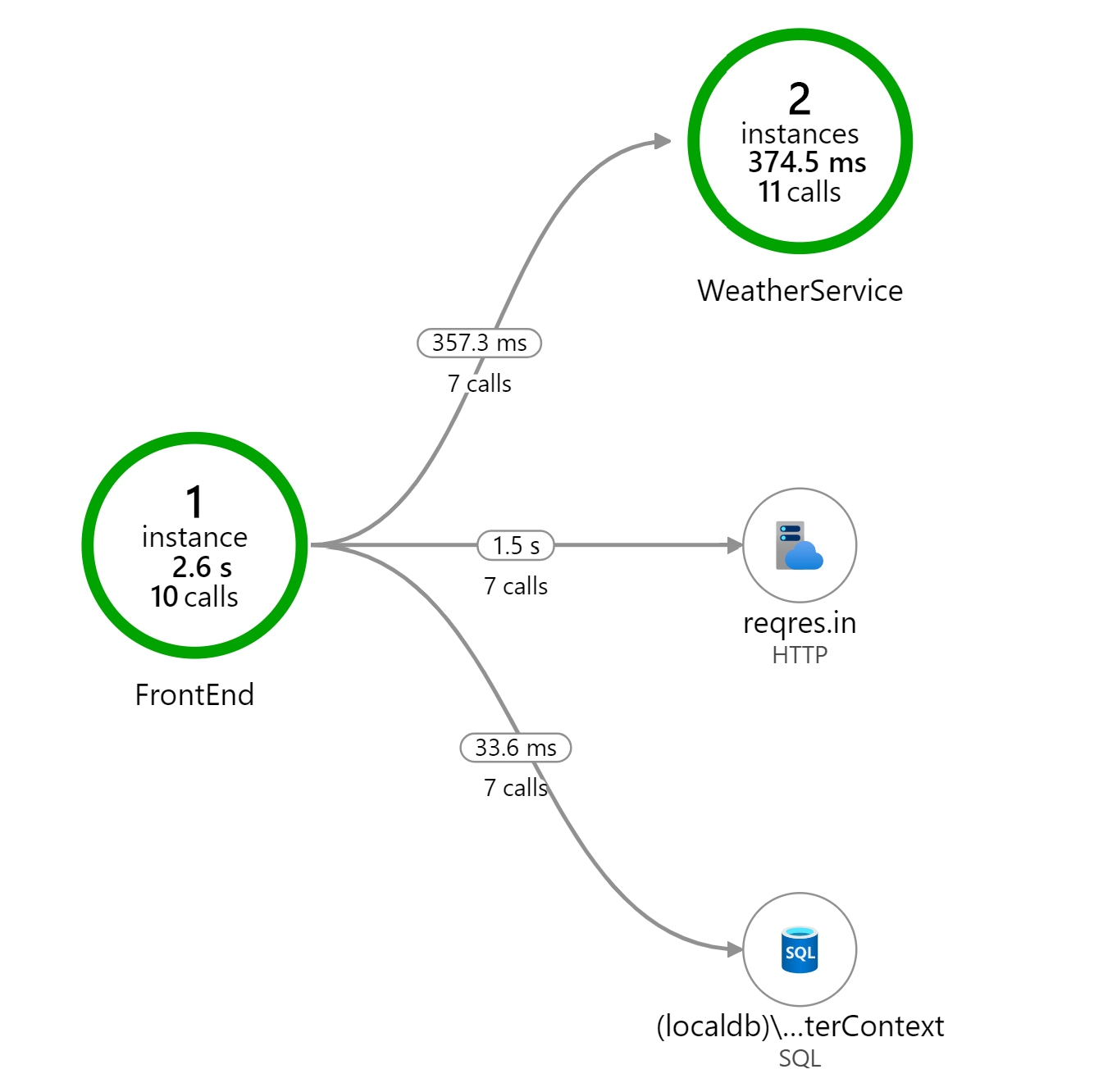
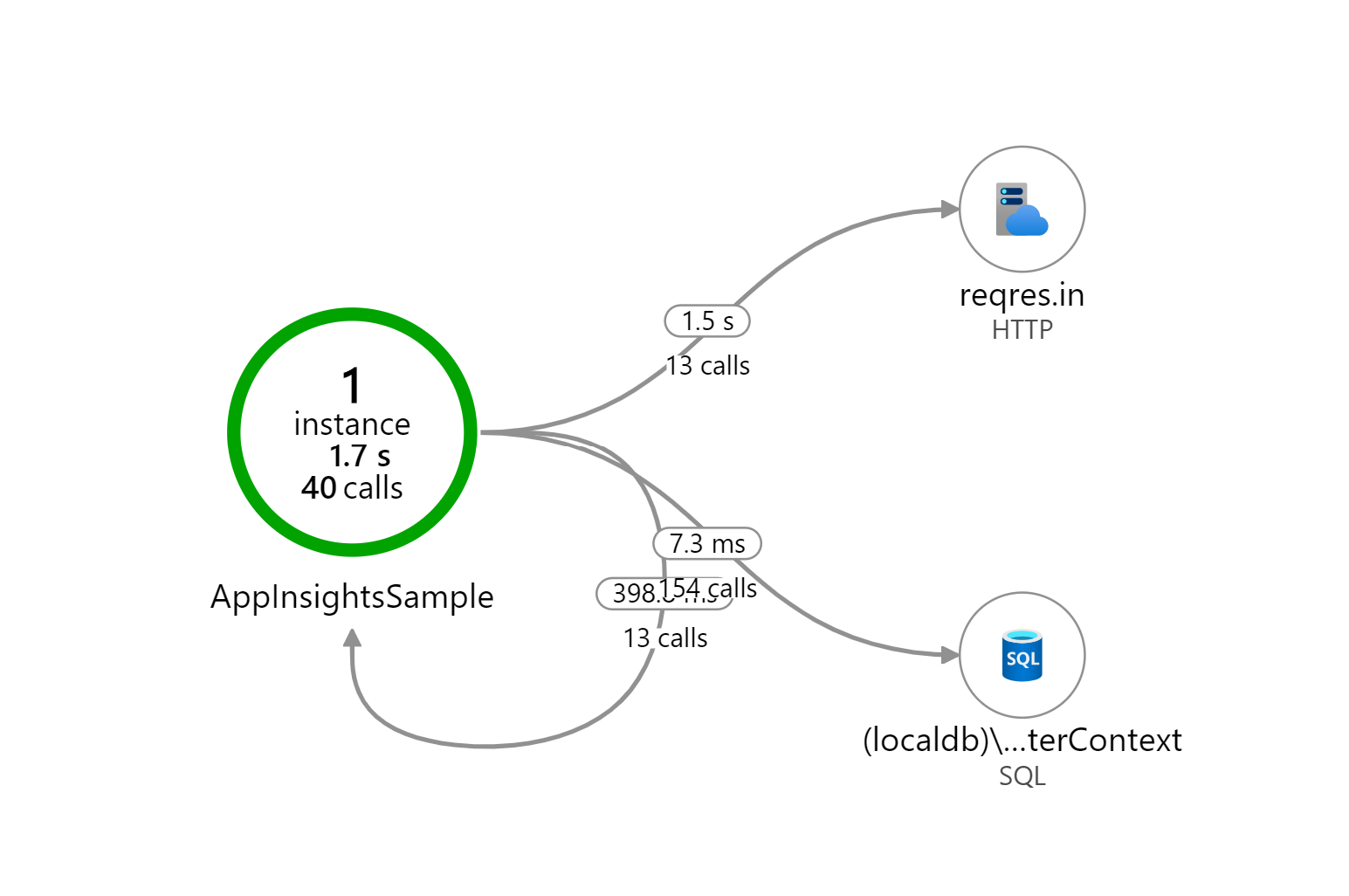
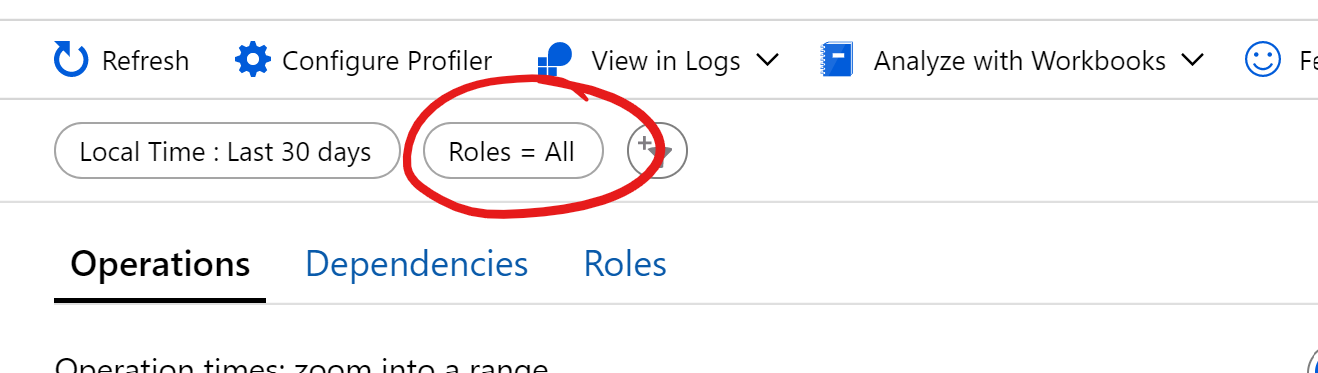
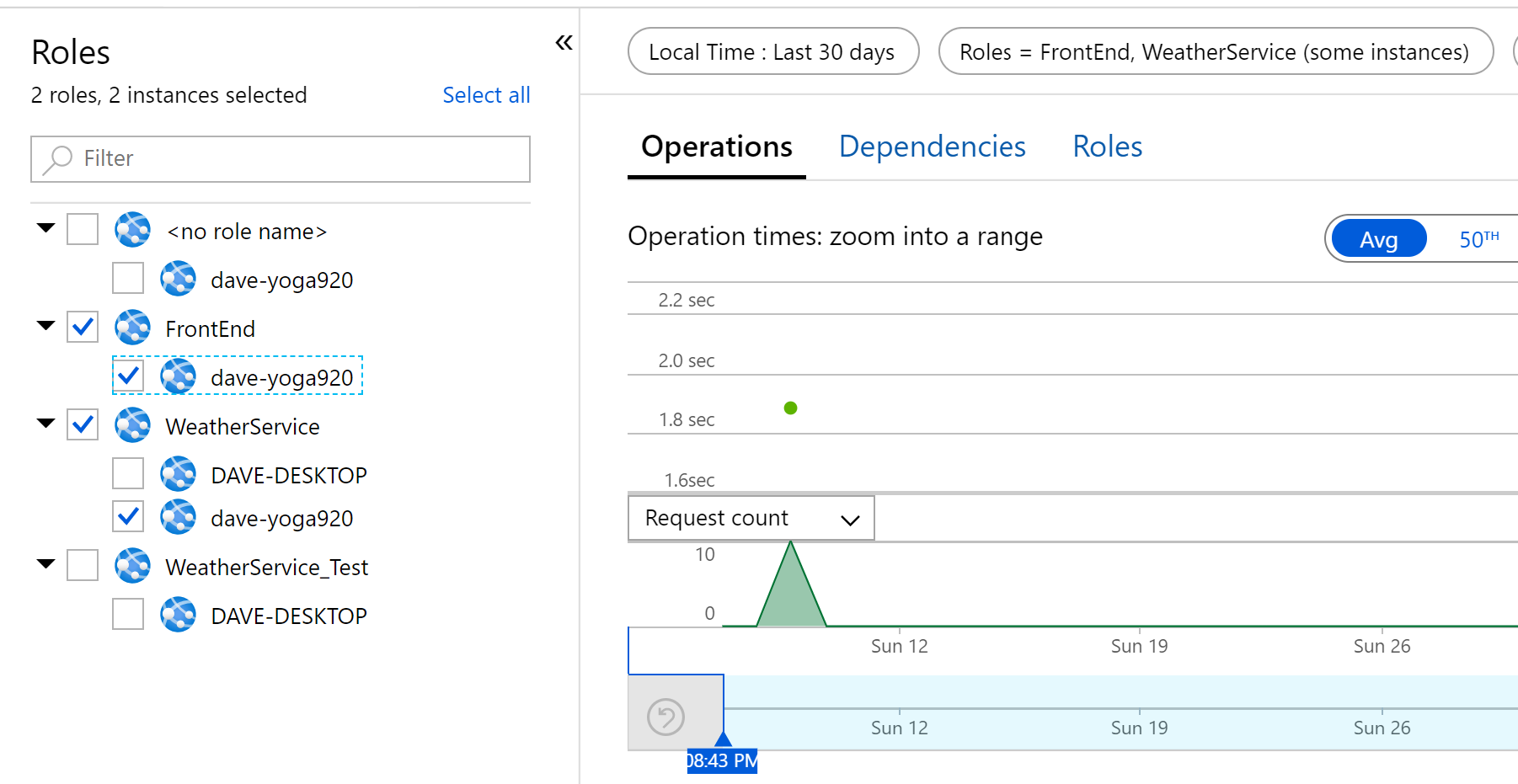
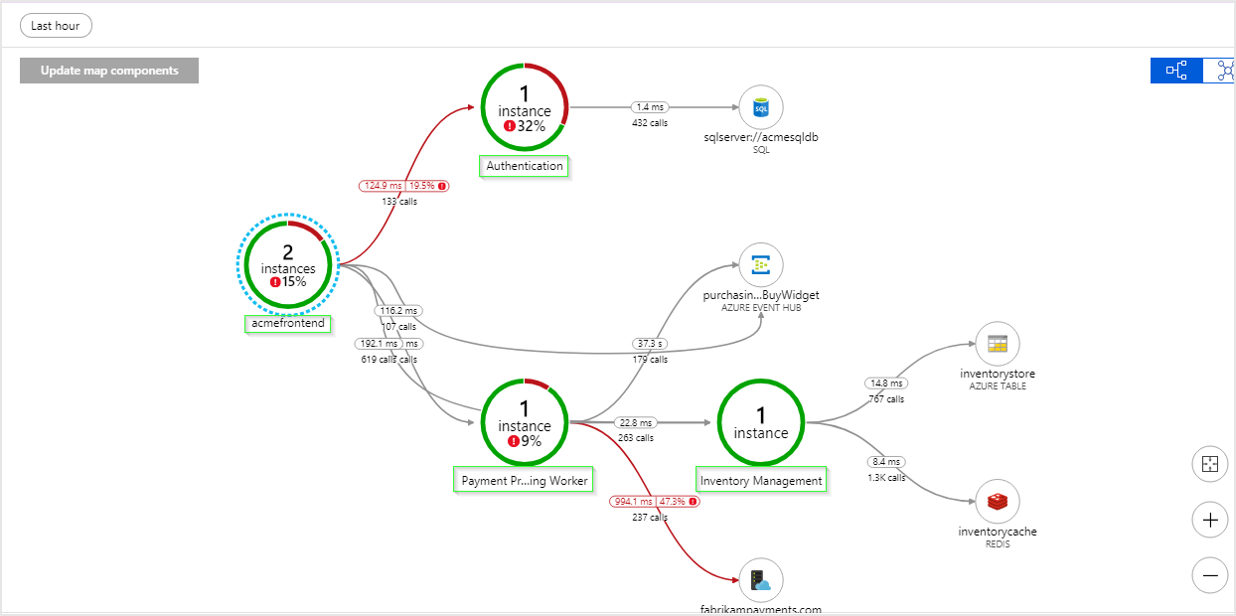
    <content type="html"><![CDATA[<p>This post is a continuation of my series about using <a href="https://www.davepaquette.com/archive/2020/01/20/getting-the-most-out-of-application-insights-for-net-core-apps.aspx" target="_blank" rel="noopener">Application Insights in ASP.NET Core</a>. Today we will explore the concept of Cloud Role and why it's an important thing to get right for your application.</p><p>In any application that involves more than a single server process/service, the concept of <em>Cloud Role</em> becomes really important in Application Insights. A Cloud Role roughly represents a process that runs somewhere on a server or possibly on a number of servers. A cloud role made up of 2 things: a <em>cloud role name</em> and a <em>cloud role instance</em>.</p><h2>Cloud Role Name</h2><p>The cloud role name is a logical name for a particular process. For example, I might have a cloud role name of &quot;Front End&quot; for my front end web server and a name of &quot;Weather Service&quot; for a service that is responsible for providing weather data.</p><p>When a cloud role name is set, it will appear as a node in the Application Map. Here is an example showing a Front End role and a Weather Service role.</p><p><img src="https://www.davepaquette.com/images/app_insights/example_application_map.png" alt="Application Map when Cloud Role Name is set "></p><p>However, when Cloud Role Name is not set, we end up with a misleading visual representation of how our services communicate.<img src="https://www.davepaquette.com/images/app_insights/example_application_map_no_cloud_role_name.png" alt="Application Map when Cloud Role Name is not set "></p><p>By default, the application insights SDK attempts to set the cloud role name for you. For example, when you're running in Azure App Service, the name of the web app is used. However, when you are running in an on-premise VM, the cloud role name is often blank.</p><h2>Cloud Role Instance</h2><p>The cloud role instance tells us which specific server the cloud role is running on. This is important when scaling out your application. For example, if my Front End web server was running 2 instances behind a load balancer, I might have a cloud role instance of &quot;frontend_prod_1&quot; and another instance of &quot;frontend_prod_2&quot;.</p><p>The application insights SDK sets the cloud role instance to the name of the server hosting the service. For example, the name of the VM or the name of the underlying compute instance hosting the app in App Service. In my experience, the SDK does a good job here and I don't usually need to override the cloud role instance.</p><h2>Setting Cloud Role Name using a Telemetry Initializer</h2><p>Telemetry Initializers are a powerful mechanism for customizing the telemetry that is collected by the Application Insights SDK. By creating and registering a telemetry initializer, you can overwrite or extend the properties of any piece of telemetry collected by Application Insights.</p><p>To set the Cloud Role Name, create a class that implements <code>ITelemetryInitializer</code> and in the <code>Initialize</code> method set the <code>telemetry.Context.Cloud.RoleName</code> to the cloud role name for the current application.</p><figure class="highlight cs"><table><tr><td class="gutter"><pre><span class="line">1</span><br><span class="line">2</span><br><span class="line">3</span><br><span class="line">4</span><br><span class="line">5</span><br><span class="line">6</span><br><span class="line">7</span><br><span class="line">8</span><br></pre></td><td class="code"><pre><span class="line"><span class="keyword">public</span> <span class="keyword">class</span> <span class="title">CloudRoleNameTelemetryInitializer</span> : <span class="title">ITelemetryInitializer</span></span><br><span class="line">&#123;</span><br><span class="line">    <span class="function"><span class="keyword">public</span> <span class="keyword">void</span> <span class="title">Initialize</span>(<span class="params">ITelemetry telemetry</span>)</span></span><br><span class="line"><span class="function"></span>    &#123;</span><br><span class="line">      <span class="comment">// set custom role name here</span></span><br><span class="line">      telemetry.Context.Cloud.RoleName = <span class="string">"Custom RoleName"</span>;</span><br><span class="line">    &#125;</span><br><span class="line">&#125;</span><br></pre></td></tr></table></figure><p>Next, in the <code>Startup.ConfigureServices</code> method, register that telemetry initializer as a singleton.</p><figure class="highlight cs"><table><tr><td class="gutter"><pre><span class="line">1</span><br></pre></td><td class="code"><pre><span class="line">services.AddSingleton&lt;ITelemetryInitializer, CloudRoleNameTelemetryInitializer&gt;();</span><br></pre></td></tr></table></figure><p>For those who learn by watching, I have recorded a video talking about using telemetry initializers to customize application insights.</p><iframe width="640" height="360" src="https://www.youtube.com/embed/1OAaYb_HL5g?list=PLFHLo5Y9d4JaGXNF80SzymGTkbmED6VoO" frameborder="0" allow="accelerometer; autoplay; encrypted-media; gyroscope; picture-in-picture" allowfullscreen></iframe><h2>Using a Nuget Package</h2><p>Creating a custom telemetry initializer to set the cloud role name is a simple enough, but it's something I've done so many times that I decided to publish a <a href="https://www.nuget.org/packages/AspNetMonsters.ApplicationInsights.AspNetCore/" target="_blank" rel="noopener">Nuget package</a> to simplify it even further.</p><p>First, add the <code>AspNetMonsters.ApplicationInsights.AspNetCore</code> Nuget package:</p><figure class="highlight ada"><table><tr><td class="gutter"><pre><span class="line">1</span><br></pre></td><td class="code"><pre><span class="line">dotnet add <span class="keyword">package</span> <span class="title">AspNetMonsters.ApplicationInsights.AspNetCore</span></span><br></pre></td></tr></table></figure><p>Next, in call <code>AddCloudRoleNameInitializer</code> in your application's <code>Startup.ConfigureServices</code> method:</p><figure class="highlight abnf"><table><tr><td class="gutter"><pre><span class="line">1</span><br></pre></td><td class="code"><pre><span class="line">services.AddCloudRoleNameInitializer(<span class="string">"WeatherService"</span>)<span class="comment">;</span></span><br></pre></td></tr></table></figure><h2>Filtering by Cloud Role</h2><p>Setting the Cloud Role Name / Instance is about a lot more than seeing your services laid out properly in the Application Map. It's also really important when you starting digging in to the performance and failures tabs in the Application Insights portal. In fact, on most of the sections of the portal, you'll see this Roles filter.</p><p><img src="https://www.davepaquette.com/images/app_insights/roles_pill.png" alt="Roles pill"></p><p>The default setting is <em>all</em>. When you click on it, you have the option to select any combination of your application's role names / instances. For example, maybe I'm only interested in the <em>FrontEnd</em> service and <em>WeatherService</em> that were running on the dave_yoga920 instance.</p><p><img src="https://www.davepaquette.com/images/app_insights/roles_filter.png" alt="Roles filter"></p><p>These filters are extremely useful when investigating performance or errors on a specific server or within a specific service. The more services your application is made up of, the more useful and essential this filtering become. These filters really help focus in on specific areas of an application within the Application Insights portal.</p><h2>Next Steps</h2><p>In this post, we saw how to customize telemetry data using telemetry initializers. Setting the cloud role name is a simple customization that can help you navigate the massive amount of telemetry that application insights collects. In the next post, we will explore a more in complex example of using telemetry initializers.</p>]]></content>
    
    <summary type="html">
    
      A continuation in my series of love letters about Application Insights. Today I dig into the importance of setting cloud role name.
    
    </summary>
    
      <category term="Application Insights" scheme="https://westerndevs.com/categories/Application-Insights/"/>
    
    
      <category term=".NET Core" scheme="https://westerndevs.com/tags/NET-Core/"/>
    
      <category term=".NET" scheme="https://westerndevs.com/tags/NET/"/>
    
      <category term="Azure" scheme="https://westerndevs.com/tags/Azure/"/>
    
      <category term="Application Insights" scheme="https://westerndevs.com/tags/Application-Insights/"/>
    
  </entry>
  
  <entry>
    <title type="html">Getting the Most Out of Application Insights for .NET (Core) Apps</title>
    <link href="https://westerndevs.com/Application-Insights/getting-the-most-out-of-application-insights-for-net-core-apps/" rel="alternate" type="text/html"/>
    <id>https://westerndevs.com/Application-Insights/getting-the-most-out-of-application-insights-for-net-core-apps/</id>
    <published>2020-01-20T16:50:18.000Z</published>
    <updated>2026-03-22T17:42:31.814Z</updated>
	<author>
	
	  
	  <name>Dave Paquette</name>
	  <email>contactme@davepaquette.com</email>
	
	  <uri>https://westerndevs.com</uri>
	</author>
    
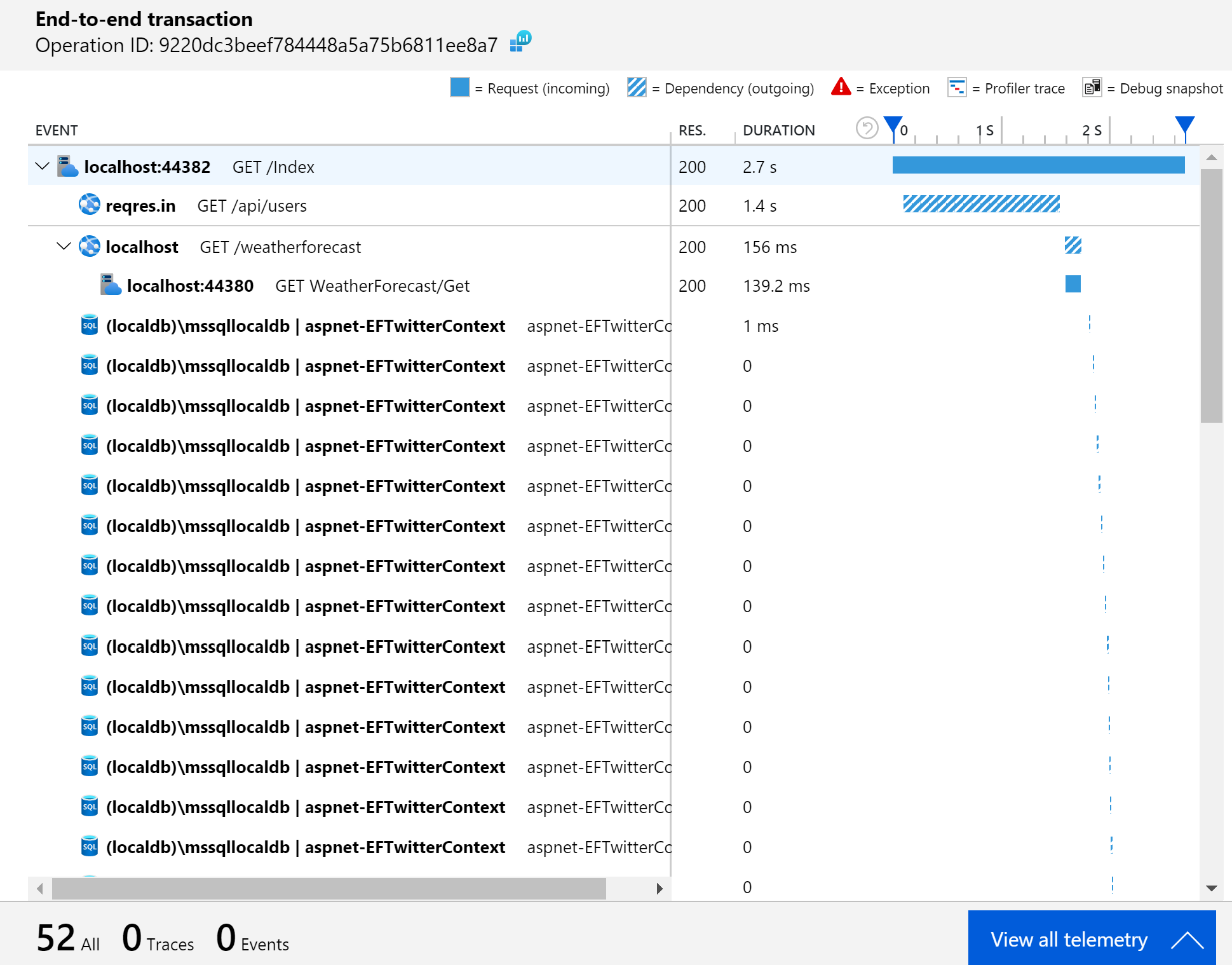
    <content type="html"><![CDATA[<p><a href="https://docs.microsoft.com/azure/azure-monitor/app/app-insights-overview" target="_blank" rel="noopener">Application Insights</a> is a powerful and surprisingly flexible application performance monitoring (APM) service hosted in Azure. Every time I've used Application Insights on a project, it has opened the team's eyes to what is happening with our application in production. In fact, this might just be one of the best named Microsoft products ever. It literally provides <strong>insights</strong> into your <strong>applications</strong>.</p><p><img src="https://www.davepaquette.com/images/app_insights/example_application_map.png" alt="Application Map provides a visual representation of your app's dependencies "></p><p>Application Insights has built-in support for .NET, Java, Node.js, Python, and Client-side JavaScript based applications. This blog post is specifically about .NET applications. If you're application is built in another language, head over to the <a href="https://docs.microsoft.com/azure/azure-monitor/app/app-insights-overview" target="_blank" rel="noopener">docs</a> to learn more.</p><h2>Codeless Monitoring vs Code-based Monitoring</h2><p>With codeless monitoring, you can configure a monitoring tool to run on the server (or service) that is hosting your application. The monitoring tool will monitor running processes and collect whatever information is available for that particular platform. There is built in support for <a href="https://docs.microsoft.com/en-us/azure/azure-monitor/app/azure-vm-vmss-apps" target="_blank" rel="noopener">Azure VM and scale sets</a>, <a href="https://docs.microsoft.com/en-us/azure/azure-monitor/app/azure-web-apps" target="_blank" rel="noopener">Azure App Service</a>, <a href="https://docs.microsoft.com/en-us/azure/azure-monitor/app/cloudservices" target="_blank" rel="noopener">Azure Cloud Services</a>, <a href="https://docs.microsoft.com/en-us/azure/azure-functions/functions-monitoring" target="_blank" rel="noopener">Azure Functions</a>, <a href="https://docs.microsoft.com/en-us/azure/azure-monitor/app/monitor-performance-live-website-now" target="_blank" rel="noopener">Kubernetes applications</a> and <a href="https://docs.microsoft.com/en-us/azure/azure-monitor/app/status-monitor-v2-overview" target="_blank" rel="noopener">On-Premises VMs</a>. Codeless monitoring is a good option if you want to collect information for applications that have already been built and deployed, but you are generally going to get more information using Code-based monitoring.</p><p>With code-based monitoring, you add the Application Insights SDK. The steps for adding the SDK are well document for <a href="https://docs.microsoft.com/en-us/azure/azure-monitor/app/asp-net-core" target="_blank" rel="noopener">ASP.NET Core</a>, <a href="https://docs.microsoft.com/en-us/azure/azure-monitor/app/asp-net" target="_blank" rel="noopener">ASP.NET</a>, and <a href="https://docs.microsoft.com/en-us/azure/azure-monitor/app/console" target="_blank" rel="noopener">.NET Console</a> applications so I don't need to re-hash that here.</p><p>If you prefer, I have recorded a video showing how to add Application Insights to an existing ASP.NET Core application.</p><iframe width="640" height="360" src="https://www.youtube.com/embed/C4G1rRgY9OI" frameborder="0" allow="accelerometer; autoplay; encrypted-media; gyroscope; picture-in-picture" allowfullscreen></iframe><h2>Telemetry</h2><p>Once you've added the Application Insights SDK to your application, it will start collecting telemetry data at runtime and sending it to Application Insights. That telemetry data is what feeds the UI in the Application Insights portal. The SDK will automatically collection information about your dependencies calls to SQL Server, HTTP calls and calls to many popular Azure Services. It's the dependencies that often are the most insightful. In a complex system it's difficult to know exactly what dependencies your application calls in order to process an incoming request. With App Insights, you can see exactly what dependencies are called by drilling in to the End-to-End Transaction view.</p><p><img src="https://www.davepaquette.com/images/app_insights/end-to-end-transaction-view.png" alt="End-to-end transaction view showing an excess number of calls to SQL Server"></p><p>In addition to dependencies, the SDK will also collect requests, exceptions, traces, customEvents, and performanceCounters. If your application has a web front-end and you add the JavaScript client SDK, you'll also find pageViews and browserTimings.</p><h2>Separate your Environments</h2><p>The SDK decides which Application Insights instance to send the collected telemetry based on the configured Instrumentation Key.</p><p>In the ASP.NET Core SDK, this is done through app settings:</p><figure class="highlight js"><table><tr><td class="gutter"><pre><span class="line">1</span><br><span class="line">2</span><br><span class="line">3</span><br><span class="line">4</span><br><span class="line">5</span><br></pre></td><td class="code"><pre><span class="line">&#123;</span><br><span class="line">  <span class="string">"ApplicationInsights"</span>: &#123;</span><br><span class="line">    <span class="string">"InstrumentationKey"</span>: <span class="string">"ccbe3f84-0f5b-44e5-b40e-48f58df563e1"</span></span><br><span class="line">  &#125;</span><br><span class="line">&#125;</span><br></pre></td></tr></table></figure><p>When you're diagnosing an issue in production or investigating performance in your production systems, you don't want any noise from your development or staging environments. I always recommend creating an Application Insights resource per environment. In the Azure Portal, you'll find the instrumentation key in the top section of the Overview page for your Application Insights resource. Just grab that instrumentation key and add it to your environment specific configuration.</p><h2>Use a single instance for all your production services</h2><p>Consider a micro-services type architecture where your application is composed of a number of services, each hosted within it's own process. It might be tempting to have each service point to a separate instance of Application Insights.</p><p>Contrary to the guidance of separating your environments, you'll actually get the most value from Application Insights if you point all your related production services to a single Application Insights instance. The reason for this is that Application Insights automatically correlates telemetry so you can track a particular request across a series of separate services. That might sound a little like magic but it's <a href="https://docs.microsoft.com/en-us/azure/azure-monitor/app/correlation" target="_blank" rel="noopener">not actually as complicated as it sounds</a>.</p><p>It's this correlation that allows the Application Map in App Insights to show exactly how all your services interact with each other.</p><p><img src="https://www.davepaquette.com/images/app_insights/detailed_application_map.png" alt="Application Map showing multiple services "></p><p>It also enables the end-to-end transaction view to show a timeline of all the calls between your services when you are drilling in to a specific request.</p><p>This is all contingent on all your services sending telemetry to the same Application Insights instance. The Application Insights UI in the Azure Portal has no ability to display this visualizations across multiple Application Insights instances.</p><h2>You don't need to be on Azure</h2><p>I've often heard developers say &quot;I can't use Application Insights because we're not on Azure&quot;. Well, you don't need to host your application on Azure to use Application Insights. Yes, you will need an Azure subscription for the Application Insights resource, but your application can be hosted anywhere. That includes your own on-premise services, AWS or any other public/private cloud.</p><h2>Next Steps</h2><p>Out of the box, Application Insights provides a tremendous amount of value but I always find myself having to customize a few things to really get the most out of the telemetry. Fortunately, the SDK provides some useful extension points. My plan is to follow up this post with a few more posts that go over those customizations in detail. I also have started to create a <a href="https://github.com/AspNetMonsters/ApplicationInsights" target="_blank" rel="noopener">NuGet package</a> to simplify those customizations so stay tuned!</p><h2>*Update</h2><p>Other posts in this series:<a href="https://www.davepaquette.com/archive/2020/02/05/setting-cloud-role-name-in-application-insights.aspx" target="_blank" rel="noopener">Setting Cloud Role Name</a><a href="https://www.davepaquette.com/archive/2020/03/07/enhancing-application-insights-request-telemetry.aspx" target="_blank" rel="noopener">Enhancing Application Insights Request Telemetry</a></p>]]></content>
    
    <summary type="html">
    
      If you&#39;ve worked with me in the last couple years, you know that I&#39;ve fallen in love with Application Insights.  This is the first in a series of posts designed to help you get the most out of Application Insights for .NET Core applications.
    
    </summary>
    
      <category term="Application Insights" scheme="https://westerndevs.com/categories/Application-Insights/"/>
    
    
      <category term=".NET Core" scheme="https://westerndevs.com/tags/NET-Core/"/>
    
      <category term=".NET" scheme="https://westerndevs.com/tags/NET/"/>
    
      <category term="Azure" scheme="https://westerndevs.com/tags/Azure/"/>
    
      <category term="Application Insights" scheme="https://westerndevs.com/tags/Application-Insights/"/>
    
  </entry>
  
  <entry>
    <title type="html">Using NodaTime with Dapper</title>
    <link href="https://westerndevs.com/Dapper/using-noda-time-with-dapper/" rel="alternate" type="text/html"/>
    <id>https://westerndevs.com/Dapper/using-noda-time-with-dapper/</id>
    <published>2019-03-28T00:00:00.000Z</published>
    <updated>2026-03-22T17:42:31.813Z</updated>
	<author>
	
	  
	  <name>Dave Paquette</name>
	  <email>contactme@davepaquette.com</email>
	
	  <uri>https://westerndevs.com</uri>
	</author>
    
    <content type="html"><![CDATA[<p>This is a part of a series of blog posts on data access with Dapper. To see the full list of posts, visit the <a href="https://www.davepaquette.com/archive/2018/01/21/exploring-dapper-series.aspx" target="_blank" rel="noopener">Dapper Series Index Page</a>.</p><p>After my recent misadventures attempting to use Noda Time with <a href="https://www.davepaquette.com/archive/2019/03/26/using-noda-time-with-ef-core.aspx" target="_blank" rel="noopener">Entity Framework Core</a>, I decided to see what it would take to use Dapper in a the same scenario.</p><h2>A quick recap</h2><p>In my app, I needed to model an <code>Event</code> that occurs on a particular date. It might be initially tempting to store the date of the event as a DateTime in UTC, but that's not necessarily accurate unless the event happens to be held at the Royal Observatory Greenwich. I don't want to deal with time at all, I'm only interested in the date the event is being held.</p><p>NodaTime provides a <code>LocalDate</code> type that is perfect for this scenario so I declared a <code>LocalDate</code> property named <code>Date</code> on my <code>Event</code> class.</p><figure class="highlight csharp"><table><tr><td class="gutter"><pre><span class="line">1</span><br><span class="line">2</span><br><span class="line">3</span><br><span class="line">4</span><br><span class="line">5</span><br><span class="line">6</span><br><span class="line">7</span><br></pre></td><td class="code"><pre><span class="line"><span class="keyword">public</span> <span class="keyword">class</span> <span class="title">Event</span></span><br><span class="line">&#123;</span><br><span class="line">    <span class="keyword">public</span> Guid Id &#123; <span class="keyword">get</span>; <span class="keyword">set</span>; &#125;</span><br><span class="line">    <span class="keyword">public</span> <span class="keyword">string</span> Name &#123; <span class="keyword">get</span>; <span class="keyword">set</span>; &#125;</span><br><span class="line">    <span class="keyword">public</span> <span class="keyword">string</span> Description &#123; <span class="keyword">get</span>; <span class="keyword">set</span>; &#125;</span><br><span class="line">    <span class="keyword">public</span> LocalDate Date &#123;<span class="keyword">get</span>; <span class="keyword">set</span>;&#125;</span><br><span class="line">&#125;</span><br></pre></td></tr></table></figure><h2>Querying using Dapper</h2><p>I modified my app to query for the <code>Event</code> entities using Dapper:</p><figure class="highlight csharp"><table><tr><td class="gutter"><pre><span class="line">1</span><br><span class="line">2</span><br><span class="line">3</span><br><span class="line">4</span><br><span class="line">5</span><br><span class="line">6</span><br><span class="line">7</span><br></pre></td><td class="code"><pre><span class="line"><span class="keyword">var</span> queryDate = <span class="keyword">new</span> LocalDate(<span class="number">2019</span>, <span class="number">3</span>, <span class="number">26</span>);</span><br><span class="line"><span class="keyword">using</span> (<span class="keyword">var</span> connection = <span class="keyword">new</span> SqlConnection(myConnectionString))</span><br><span class="line">&#123;</span><br><span class="line">    <span class="keyword">await</span> connection.OpenAsync();</span><br><span class="line">    Events = <span class="keyword">await</span> connection.QueryAsync&lt;Event&gt;(<span class="string">@"SELECT [e].[Id], [e].[Date], [e].[Description], [e].[Name]</span></span><br><span class="line"><span class="string">FROM [Events] AS[e]"</span>);</span><br><span class="line">&#125;</span><br></pre></td></tr></table></figure><p>The app started up just fine, but gave me an error when I tried to query for events.</p><blockquote><p>System.Data.DataException: Error parsing column 1 (Date=3/26/19 12:00:00 AM - DateTime) ---&gt; System.InvalidCastException: Invalid cast from 'System.DateTime' to 'NodaTime.LocalDate'.</p></blockquote><p>Likewise, if I attempted to query for events using a <code>LocalDate</code> parameter, I got another error:</p><figure class="highlight csharp"><table><tr><td class="gutter"><pre><span class="line">1</span><br><span class="line">2</span><br><span class="line">3</span><br><span class="line">4</span><br><span class="line">5</span><br><span class="line">6</span><br><span class="line">7</span><br><span class="line">8</span><br><span class="line">9</span><br></pre></td><td class="code"><pre><span class="line"><span class="keyword">var</span> queryDate = <span class="keyword">new</span> LocalDate(<span class="number">2019</span>, <span class="number">3</span>, <span class="number">26</span>);</span><br><span class="line"><span class="keyword">using</span> (<span class="keyword">var</span> connection = <span class="keyword">new</span> SqlConnection(<span class="string">"myConnectionString"</span>))</span><br><span class="line">&#123;</span><br><span class="line">    <span class="keyword">await</span> connection.OpenAsync();</span><br><span class="line"></span><br><span class="line">    Events = <span class="keyword">await</span> connection.QueryAsync&lt;Event&gt;(<span class="string">@"SELECT [e].[Id], [e].[Date], [e].[Description], [e].[Name]</span></span><br><span class="line"><span class="string">FROM [Events] AS[e]</span></span><br><span class="line"><span class="string">WHERE [e].[Date] = @Date"</span>, <span class="keyword">new</span> &#123; Date = queryDate &#125;);</span><br><span class="line">&#125;</span><br></pre></td></tr></table></figure><blockquote><p>NotSupportedException: The member Date of type NodaTime.LocalDate cannot be used as a parameter value</p></blockquote><p>Fortunately, both these problems can be solved by implementing a simple <code>TypeHandler</code>.</p><h2>Implementing a Custom Type Handler</h2><p>Out of the box, Dapper already knows how to map to the standard .NET types like Int32, Int64, string and DateTime. The problem we are running into here is that Dapper doesn't know anything about the <code>LocalDate</code> type. If you want to map to a type that Dapper doesn't know about, you can implement a custom type handler. To implement a type handler, create a class that inherits from <code>TypeHandler&lt;T&gt;</code>, where <code>T</code> is the type that you want to map to. In your type handler class, implement the <code>Parse</code> and <code>SetValue</code> methods. These methods will be used by Dapper when mapping to and from properties that are of type <code>T</code>.</p><p>Here is an example of a type handler for <code>LocalDate</code>.</p><figure class="highlight csharp"><table><tr><td class="gutter"><pre><span class="line">1</span><br><span class="line">2</span><br><span class="line">3</span><br><span class="line">4</span><br><span class="line">5</span><br><span class="line">6</span><br><span class="line">7</span><br><span class="line">8</span><br><span class="line">9</span><br><span class="line">10</span><br><span class="line">11</span><br><span class="line">12</span><br><span class="line">13</span><br><span class="line">14</span><br><span class="line">15</span><br><span class="line">16</span><br><span class="line">17</span><br></pre></td><td class="code"><pre><span class="line">public class LocalDateTypeHandler : TypeHandler&lt;LocalDate&gt;</span><br><span class="line">&#123;</span><br><span class="line">    <span class="function"><span class="keyword">public</span> <span class="keyword">override</span> LocalDate <span class="title">Parse</span>(<span class="params"><span class="keyword">object</span> <span class="keyword">value</span></span>)</span></span><br><span class="line"><span class="function"></span>    &#123;</span><br><span class="line">        <span class="keyword">if</span> (<span class="keyword">value</span> <span class="keyword">is</span> DateTime)</span><br><span class="line">        &#123;</span><br><span class="line">            <span class="keyword">return</span> LocalDate.FromDateTime((DateTime)<span class="keyword">value</span>);</span><br><span class="line">        &#125;</span><br><span class="line"></span><br><span class="line">        <span class="keyword">throw</span> <span class="keyword">new</span> DataException(<span class="string">$"Unable to convert <span class="subst">&#123;<span class="keyword">value</span>&#125;</span> to LocalDate"</span>);</span><br><span class="line">    &#125;</span><br><span class="line"></span><br><span class="line">    <span class="function"><span class="keyword">public</span> <span class="keyword">override</span> <span class="keyword">void</span> <span class="title">SetValue</span>(<span class="params">IDbDataParameter parameter, LocalDate <span class="keyword">value</span></span>)</span></span><br><span class="line"><span class="function"></span>    &#123;</span><br><span class="line">        parameter.Value = <span class="keyword">value</span>.ToDateTimeUnspecified();</span><br><span class="line">    &#125;</span><br><span class="line">&#125;</span><br></pre></td></tr></table></figure><p>Finally, you need to tell Dapper about your new custom type handler. To do that, register the type handler somewhere in your application's startup class by calling <code>Dapper.SqlMapper.AddTypeHandler</code>.</p><figure class="highlight csharp"><table><tr><td class="gutter"><pre><span class="line">1</span><br></pre></td><td class="code"><pre><span class="line">Dapper.SqlMapper.AddTypeHandler(<span class="keyword">new</span> LocalDateTypeHandler());</span><br></pre></td></tr></table></figure><h2>There's a NuGet for that</h2><p>As it turns out, someone has already created a helpful NuGet package containing TypeHandlers for many of the NodaTime types so you probably don't need to write these yourself. Use the <a href="http://mj1856.github.io/Dapper-NodaTime/" target="_blank" rel="noopener">Dapper.NodaTime package</a> instead.</p><h2>Wrapping it up</h2><p>TypeHandlers are a simple extension point that allows for Dapper to handle types that are not already handled by Dapper. You can write your own type handlers but you might also want to check if someone has already published a NuGet package that handles your types.</p>]]></content>
    
    <summary type="html">
    
      After my recent misadventures attempting to use Noda Time with Entity Framework Core, I decided to see what it would take to use Dapper in a the same scenario.
    
    </summary>
    
      <category term="Dapper" scheme="https://westerndevs.com/categories/Dapper/"/>
    
    
      <category term=".NET Core" scheme="https://westerndevs.com/tags/NET-Core/"/>
    
      <category term="Dapper" scheme="https://westerndevs.com/tags/Dapper/"/>
    
      <category term=".NET" scheme="https://westerndevs.com/tags/NET/"/>
    
      <category term="Micro ORM" scheme="https://westerndevs.com/tags/Micro-ORM/"/>
    
      <category term="Noda Time" scheme="https://westerndevs.com/tags/Noda-Time/"/>
    
  </entry>
  
  <entry>
    <title type="html">Using Noda Time with Entity Framework Core</title>
    <link href="https://westerndevs.com/Entity-Framework-Core/using-noda-time-with-ef-core/" rel="alternate" type="text/html"/>
    <id>https://westerndevs.com/Entity-Framework-Core/using-noda-time-with-ef-core/</id>
    <published>2019-03-26T11:00:00.000Z</published>
    <updated>2026-03-22T17:42:31.813Z</updated>
	<author>
	
	  
	  <name>Dave Paquette</name>
	  <email>contactme@davepaquette.com</email>
	
	  <uri>https://westerndevs.com</uri>
	</author>
    
    <content type="html"><![CDATA[<p>If you have ever dealt dates/times in an environment that crosses time zones, you know who difficult it can be to handle all scenarios properly. This situation isn't made any better by .NET's somewhat limited representation of date and time values through the one <code>DateTime</code> class. For example, how to I represent a date in .NET when I don't care about the time. There is no type that represents a <code>Date</code> on it's own. That's why the <a href="https://nodatime.org/" target="_blank" rel="noopener">Noda Time</a> library was created, billing itself as a better date and time API for .NET.</p><blockquote><p>Noda Time is an alternative date and time API for .NET. It helps you to think about your data more clearly, and express operations on that data more precisely.</p></blockquote><h2>An example using NodaTime</h2><p>In my app, I needed to model an <code>Event</code> that occurs on a particular date. It might be initially tempting to store the date of the event as a DateTime in UTC, but that's not necessarily accurate unless the event happens to be held at the Royal Observatory Greenwich. I don't want to deal with time at all, I'm only interested in the date the event is being held.</p><p>NodaTime provides a <code>LocalDate</code> type that is perfect for this scenario so I declared a <code>LocalDate</code> property named <code>Date</code> on my <code>Event</code> class.</p><figure class="highlight csharp"><table><tr><td class="gutter"><pre><span class="line">1</span><br><span class="line">2</span><br><span class="line">3</span><br><span class="line">4</span><br><span class="line">5</span><br><span class="line">6</span><br><span class="line">7</span><br></pre></td><td class="code"><pre><span class="line"><span class="keyword">public</span> <span class="keyword">class</span> <span class="title">Event</span></span><br><span class="line">&#123;</span><br><span class="line">    <span class="keyword">public</span> Guid Id &#123; <span class="keyword">get</span>; <span class="keyword">set</span>; &#125;</span><br><span class="line">    <span class="keyword">public</span> <span class="keyword">string</span> Name &#123; <span class="keyword">get</span>; <span class="keyword">set</span>; &#125;</span><br><span class="line">    <span class="keyword">public</span> <span class="keyword">string</span> Description &#123; <span class="keyword">get</span>; <span class="keyword">set</span>; &#125;</span><br><span class="line">    <span class="keyword">public</span> LocalDate Date &#123;<span class="keyword">get</span>; <span class="keyword">set</span>;&#125;</span><br><span class="line">&#125;</span><br></pre></td></tr></table></figure><h2>Using Entity Framework</h2><p>This app was using Entity Framework Core and there was a <code>DbSet</code> for the <code>Event</code> class.</p><figure class="highlight csharp"><table><tr><td class="gutter"><pre><span class="line">1</span><br><span class="line">2</span><br><span class="line">3</span><br><span class="line">4</span><br><span class="line">5</span><br><span class="line">6</span><br><span class="line">7</span><br><span class="line">8</span><br></pre></td><td class="code"><pre><span class="line"><span class="keyword">public</span> <span class="keyword">class</span> <span class="title">EventContext</span> : <span class="title">DbContext</span></span><br><span class="line">&#123;</span><br><span class="line">    <span class="function"><span class="keyword">public</span> <span class="title">EventContext</span>(<span class="params">DbContextOptions&lt;EventContext&gt; options</span>) : <span class="title">base</span>(<span class="params">options</span>)</span></span><br><span class="line"><span class="function"></span>    &#123;</span><br><span class="line">    &#125;</span><br><span class="line"></span><br><span class="line">    <span class="keyword">public</span> DbSet&lt;Event&gt; Events &#123; <span class="keyword">get</span>; <span class="keyword">set</span>; &#125;</span><br><span class="line">&#125;</span><br></pre></td></tr></table></figure><p>This is where I ran into my first problem. Attempting to run the app, I was greeted with a friendly <code>InvalidOperationException</code>:</p><blockquote><p>InvalidOperationException: The property 'Event.Date' could not be mapped, because it is of type 'LocalDate' which is not a supported primitive type or a valid entity type. Either explicitly map this property, or ignore it using the '[NotMapped]' attribute or by using 'EntityTypeBuilder.Ignore' in 'OnModelCreating'.</p></blockquote><p>This first problem was actually easy enough to solve using a <a href="https://docs.microsoft.com/ef/core/modeling/value-conversions" target="_blank" rel="noopener"><code>ValueConverter</code></a>. By adding the following <code>OnModelCreating</code> code to my <code>EventContext</code>, I was able to tell Entity Framework Core to store the <code>Date</code> property as a <code>DateTime</code> with the Kind set to <a href="https://docs.microsoft.com/dotnet/api/system.datetimekind#System_DateTimeKind_Unspecified" target="_blank" rel="noopener"><code>DateTimeKind.Unspecified</code></a>. This has the effect of avoiding any unwanted shifts in the date time based on the local time of the running process.</p><figure class="highlight csharp"><table><tr><td class="gutter"><pre><span class="line">1</span><br><span class="line">2</span><br><span class="line">3</span><br><span class="line">4</span><br><span class="line">5</span><br><span class="line">6</span><br><span class="line">7</span><br><span class="line">8</span><br><span class="line">9</span><br><span class="line">10</span><br><span class="line">11</span><br><span class="line">12</span><br><span class="line">13</span><br><span class="line">14</span><br><span class="line">15</span><br><span class="line">16</span><br><span class="line">17</span><br><span class="line">18</span><br><span class="line">19</span><br><span class="line">20</span><br><span class="line">21</span><br></pre></td><td class="code"><pre><span class="line"><span class="keyword">public</span> <span class="keyword">class</span> <span class="title">EventContext</span> : <span class="title">DbContext</span></span><br><span class="line">&#123;</span><br><span class="line">    <span class="function"><span class="keyword">public</span> <span class="title">EventContext</span>(<span class="params">DbContextOptions&lt;EventContext&gt; options</span>) : <span class="title">base</span>(<span class="params">options</span>)</span></span><br><span class="line"><span class="function"></span>    &#123;</span><br><span class="line">    &#125;</span><br><span class="line"></span><br><span class="line">    <span class="keyword">public</span> DbSet&lt;Event&gt; Events &#123; <span class="keyword">get</span>; <span class="keyword">set</span>; &#125;</span><br><span class="line"></span><br><span class="line">    <span class="function"><span class="keyword">protected</span> <span class="keyword">override</span> <span class="keyword">void</span> <span class="title">OnModelCreating</span>(<span class="params">ModelBuilder modelBuilder</span>)</span></span><br><span class="line"><span class="function"></span>    &#123;</span><br><span class="line">        <span class="keyword">base</span>.OnModelCreating(modelBuilder);</span><br><span class="line">        <span class="keyword">var</span> localDateConverter = </span><br><span class="line">            <span class="keyword">new</span> ValueConverter&lt;LocalDate, DateTime&gt;(v =&gt;  </span><br><span class="line">                v.ToDateTimeUnspecified(), </span><br><span class="line">                v =&gt; LocalDate.FromDateTime(v));</span><br><span class="line"></span><br><span class="line">        modelBuilder.Entity&lt;Event&gt;()</span><br><span class="line">            .Property(e =&gt; e.Date)</span><br><span class="line">            .HasConversion(localDateConverter);</span><br><span class="line">    &#125;</span><br><span class="line">&#125;</span><br></pre></td></tr></table></figure><p>With that small change, my application now worked as expected. The value conversions all happen behind the scenes so I can just use the <code>Event</code> entity and deal strictly with the <code>LocalDate</code> type.</p><h2>But what about queries</h2><p>I actually had this application running in a test environment for a week before I noticed a serious problem in the log files.</p><p>In my app, I was executing a simple query to retrieve the list of events for a particular date.</p><figure class="highlight csharp"><table><tr><td class="gutter"><pre><span class="line">1</span><br><span class="line">2</span><br></pre></td><td class="code"><pre><span class="line"><span class="keyword">var</span> queryDate = <span class="keyword">new</span> LocalDate(<span class="number">2019</span>, <span class="number">3</span>, <span class="number">25</span>);</span><br><span class="line">Events = <span class="keyword">await</span> context.Events.Where(e =&gt; e.Date == queryDate).ToListAsync();</span><br></pre></td></tr></table></figure><p>In the app's log file, I noticed the following warning:</p><blockquote><p>Microsoft.EntityFrameworkCore.Query:Warning: The LINQ expression 'where ([e].Date == __queryDate_0)' could not be translated and will be evaluated locally.</p></blockquote><p>Uh oh, that sounds bad. I did a little more investigation and confirmed that the query was in fact executing SQL without a <code>WHERE</code> clause.</p><figure class="highlight sql"><table><tr><td class="gutter"><pre><span class="line">1</span><br><span class="line">2</span><br></pre></td><td class="code"><pre><span class="line"><span class="keyword">SELECT</span> [e].[<span class="keyword">Id</span>], [e].[<span class="built_in">Date</span>], [e].[Description], [e].[<span class="keyword">Name</span>]</span><br><span class="line"><span class="keyword">FROM</span> [<span class="keyword">Events</span>] <span class="keyword">AS</span> [e]</span><br></pre></td></tr></table></figure><p>So my app was retrieving <strong>EVERY ROW</strong> from <code>Events</code> table, then applying the where filter in the .NET process. That's really not what I intended to do and would most certainly cause me some performance troubles when I get to production.</p><p>So, the first thing I did was modified my EF Core configuration to throw an error when a client side evaluation like this occurs. I don't want this kind of thing accidently creeping in to this app again. Over in <code>Startup.ConfigureServices</code>, I added the following option to <code>ConfigureWarnings</code>.</p><figure class="highlight csharp"><table><tr><td class="gutter"><pre><span class="line">1</span><br><span class="line">2</span><br><span class="line">3</span><br><span class="line">4</span><br></pre></td><td class="code"><pre><span class="line">services.AddDbContext&lt;EventContext&gt;(options =&gt;</span><br><span class="line">        options.UseSqlServer(myConnectionString)</span><br><span class="line">        .ConfigureWarnings(warnings =&gt; </span><br><span class="line">            warnings.Throw(RelationalEventId.QueryClientEvaluationWarning)));</span><br></pre></td></tr></table></figure><p>Throwing an error by default is the correct behavior here and this is actually something that will be fixed in Entity Framework Core 3.0. The default behavior in EF Core 3 will be to throw an error any time a LINQ expression results in client side evaluation. You will then have the option to allow those client side evaluations.</p><h2>Fixing the query</h2><p>Now that I had the app throwing an error for this query, I needed to find a way for EF Core to properly translate my simple <code>e.Date == queryDate</code> expression to SQL. After carefully re-reading the EF Core documentation related for value converters, I noticed a bullet point under Limitations:</p><blockquote><p>Use of value conversions may impact the ability of EF Core to translate expressions to SQL. A warning will be logged for such cases. Removal of these limitations is being considered for a future release.</p></blockquote><p>Well that just plain sucks. It turns out that when you use a value converter for a property, Entity Framework Core just gives up trying to convert any LINQ expression that references that property. The only solution I found was to query for my entities using SQL.</p><figure class="highlight csharp"><table><tr><td class="gutter"><pre><span class="line">1</span><br><span class="line">2</span><br><span class="line">3</span><br><span class="line">4</span><br><span class="line">5</span><br></pre></td><td class="code"><pre><span class="line"><span class="keyword">var</span> queryDate = <span class="keyword">new</span> LocalDate(<span class="number">2019</span>, <span class="number">3</span>, <span class="number">25</span>);</span><br><span class="line">Events = <span class="keyword">await</span> context.Events.</span><br><span class="line">    FromSql(<span class="string">@"SELECT [e].[Id], [e].[Date], [e].[Description], [e].[Name]</span></span><br><span class="line"><span class="string">FROM[Events] AS[e]</span></span><br><span class="line"><span class="string">WHERE [e].[Date] = &#123;0&#125;"</span>, queryDate.ToDateTimeUnspecified()).ToListAsync();</span><br></pre></td></tr></table></figure><h2>Wrapping it up</h2><p>NodaTime is a fantastic date and time library for .NET and you should definitely consider using it in your app. Unfortunately, Entity Framework Core has some serious limitations when it comes to using value converters so you will need to be careful. I almost got myself into some problems with it. While there are work-arounds, writing custom SQL for any query that references a NodaTime type is less than ideal. Hopefully those will be addressed in Entity Framework Core 3.</p>]]></content>
    
    <summary type="html">
    
      Noda Time is a fantastic date/time library for .NET. I started using it recently and it really simplified the logic around handling dates. Unfortunately, I ran in to some problems with using Noda Time together with Entity Framework Core.
    
    </summary>
    
      <category term="Entity Framework Core" scheme="https://westerndevs.com/categories/Entity-Framework-Core/"/>
    
    
      <category term="Entity Framework" scheme="https://westerndevs.com/tags/Entity-Framework/"/>
    
      <category term="Noda Time" scheme="https://westerndevs.com/tags/Noda-Time/"/>
    
  </entry>
  
  <entry>
    <title type="html">Optimistic Concurrency Tracking with Dapper and SQL Server</title>
    <link href="https://westerndevs.com/Dapper/optimistic-concurrency-tracking-with-dapper-and-sql-server/" rel="alternate" type="text/html"/>
    <id>https://westerndevs.com/Dapper/optimistic-concurrency-tracking-with-dapper-and-sql-server/</id>
    <published>2019-03-20T13:45:36.000Z</published>
    <updated>2026-03-22T17:42:31.813Z</updated>
	<author>
	
	  
	  <name>Dave Paquette</name>
	  <email>contactme@davepaquette.com</email>
	
	  <uri>https://westerndevs.com</uri>
	</author>
    
    <content type="html"><![CDATA[<p>This is a part of a series of blog posts on data access with Dapper. To see the full list of posts, visit the <a href="https://www.davepaquette.com/archive/2018/01/21/exploring-dapper-series.aspx" target="_blank" rel="noopener">Dapper Series Index Page</a>.</p><p>In today's post, we explore a pattern to prevent multiple users (or processes) from accidentally overwriting each other's change. Given our <a href="https://www.davepaquette.com/archive/2019/02/04/basic-insert-update-delete-with-dapper.aspx" target="_blank" rel="noopener">current implementation for updating the <code>Aircraft</code> record</a>, there is potential for data loss if there are multiple active sessions are attempting to update the same <code>Aircraft</code> record at the same time. In the example shown below, Bob accidentally overwrites Jane's changes without even knowing that Jane made changes to the same <code>Aircraft</code> record</p><p><img src="https://www.davepaquette.com/images/dapper/concurrency.png" alt="Concurrent Updates"></p><p>The pattern we will use here is <a href="https://martinfowler.com/eaaCatalog/optimisticOfflineLock.html" target="_blank" rel="noopener">Optimistic Offline Lock</a>, which is often also referred to as Optimistic Concurrency Control.</p><h2>Modifying the Database and Entities</h2><p>To implement this approach, we will use a <a href="https://docs.microsoft.com/sql/t-sql/data-types/rowversion-transact-sql" target="_blank" rel="noopener">rowversion column in SQL Server</a>. Essentially, this is a column that automatically version stamps a row in a table. Any time a row is modified, the <code>rowversion</code> column will is automatically incremented for that row. We will start by adding the column to our <code>Aircraft</code> table.</p><figure class="highlight sql"><table><tr><td class="gutter"><pre><span class="line">1</span><br></pre></td><td class="code"><pre><span class="line"><span class="keyword">ALTER</span> <span class="keyword">TABLE</span> Aircraft <span class="keyword">ADD</span> RowVer rowversion</span><br></pre></td></tr></table></figure><p>Next, we add a <code>RowVer</code> property to the <code>Aircraft</code> table. The property is a <code>byte</code> array. When we read the <code>RowVer</code> column from the database, we will get an array of 8 bytes.</p><figure class="highlight csharp"><table><tr><td class="gutter"><pre><span class="line">1</span><br><span class="line">2</span><br><span class="line">3</span><br><span class="line">4</span><br><span class="line">5</span><br><span class="line">6</span><br><span class="line">7</span><br><span class="line">8</span><br><span class="line">9</span><br><span class="line">10</span><br><span class="line">11</span><br><span class="line">12</span><br><span class="line">13</span><br><span class="line">14</span><br><span class="line">15</span><br></pre></td><td class="code"><pre><span class="line"><span class="keyword">public</span> <span class="keyword">class</span> <span class="title">Aircraft</span> </span><br><span class="line">&#123;</span><br><span class="line">    <span class="keyword">public</span> <span class="keyword">int</span> Id &#123; <span class="keyword">get</span>; <span class="keyword">set</span>; &#125;</span><br><span class="line">    <span class="keyword">public</span> <span class="keyword">string</span> Manufacturer &#123;<span class="keyword">get</span>; <span class="keyword">set</span>;&#125;</span><br><span class="line">    <span class="keyword">public</span> <span class="keyword">string</span> Model &#123;<span class="keyword">get</span>; <span class="keyword">set</span>;&#125;</span><br><span class="line">    <span class="keyword">public</span> <span class="keyword">string</span> RegistrationNumber &#123;<span class="keyword">get</span>; <span class="keyword">set</span>;&#125;</span><br><span class="line">    <span class="keyword">public</span> <span class="keyword">int</span> FirstClassCapacity &#123;<span class="keyword">get</span>; <span class="keyword">set</span>;&#125;</span><br><span class="line">    <span class="keyword">public</span> <span class="keyword">int</span> RegularClassCapacity &#123;<span class="keyword">get</span>; <span class="keyword">set</span>;&#125;</span><br><span class="line">    <span class="keyword">public</span> <span class="keyword">int</span> CrewCapacity &#123;<span class="keyword">get</span>; <span class="keyword">set</span>;&#125;</span><br><span class="line">    <span class="keyword">public</span> DateTime ManufactureDate &#123;<span class="keyword">get</span>; <span class="keyword">set</span>; &#125;</span><br><span class="line">    <span class="keyword">public</span> <span class="keyword">int</span> NumberOfEngines &#123;<span class="keyword">get</span>; <span class="keyword">set</span>;&#125;</span><br><span class="line">    <span class="keyword">public</span> <span class="keyword">int</span> EmptyWeight &#123;<span class="keyword">get</span>; <span class="keyword">set</span>;&#125;</span><br><span class="line">    <span class="keyword">public</span> <span class="keyword">int</span> MaxTakeoffWeight &#123;<span class="keyword">get</span>; <span class="keyword">set</span>;&#125;</span><br><span class="line">    <span class="keyword">public</span> <span class="keyword">byte</span>[] RowVer &#123; <span class="keyword">get</span>; <span class="keyword">set</span>; &#125;</span><br><span class="line">&#125;   </span><br></pre></td></tr></table></figure><p>Finally, we will modify the query used to load <code>Aircraft</code> entities so it returns the <code>RowVer</code> column. We don't need to change any of the Dapper code here.</p><figure class="highlight csharp"><table><tr><td class="gutter"><pre><span class="line">1</span><br><span class="line">2</span><br><span class="line">3</span><br><span class="line">4</span><br><span class="line">5</span><br><span class="line">6</span><br><span class="line">7</span><br><span class="line">8</span><br><span class="line">9</span><br><span class="line">10</span><br><span class="line">11</span><br><span class="line">12</span><br><span class="line">13</span><br><span class="line">14</span><br><span class="line">15</span><br><span class="line">16</span><br><span class="line">17</span><br><span class="line">18</span><br><span class="line">19</span><br><span class="line">20</span><br><span class="line">21</span><br><span class="line">22</span><br><span class="line">23</span><br><span class="line">24</span><br><span class="line">25</span><br></pre></td><td class="code"><pre><span class="line"><span class="function"><span class="keyword">public</span> <span class="keyword">async</span> Task&lt;Aircraft&gt; <span class="title">Get</span>(<span class="params"><span class="keyword">int</span> id</span>)</span></span><br><span class="line"><span class="function"></span>&#123; </span><br><span class="line">    Aircraft aircraft;</span><br><span class="line">    <span class="keyword">using</span> (<span class="keyword">var</span> connection = <span class="keyword">new</span> SqlConnection(_connectionString))</span><br><span class="line">    &#123;</span><br><span class="line">        <span class="keyword">await</span> connection.OpenAsync();</span><br><span class="line">        <span class="keyword">var</span> query = <span class="string">@"</span></span><br><span class="line"><span class="string">SELECT </span></span><br><span class="line"><span class="string">Id</span></span><br><span class="line"><span class="string">,Manufacturer</span></span><br><span class="line"><span class="string">,Model</span></span><br><span class="line"><span class="string">,RegistrationNumber</span></span><br><span class="line"><span class="string">,FirstClassCapacity</span></span><br><span class="line"><span class="string">,RegularClassCapacity</span></span><br><span class="line"><span class="string">,CrewCapacity</span></span><br><span class="line"><span class="string">,ManufactureDate</span></span><br><span class="line"><span class="string">,NumberOfEngines</span></span><br><span class="line"><span class="string">,EmptyWeight</span></span><br><span class="line"><span class="string">,MaxTakeoffWeight</span></span><br><span class="line"><span class="string">,RowVer</span></span><br><span class="line"><span class="string">FROM Aircraft WHERE Id = @Id"</span>;</span><br><span class="line">        aircraft = <span class="keyword">await</span> connection.QuerySingleAsync&lt;Aircraft&gt;(query, <span class="keyword">new</span> &#123;Id = id&#125;);</span><br><span class="line">    &#125;</span><br><span class="line">    <span class="keyword">return</span> aircraft;</span><br><span class="line">&#125;</span><br></pre></td></tr></table></figure><h2>Adding the Concurrency Checks</h2><p>Now that we have the row version loaded in to our model, we need to add the checks to ensure that one user doesn't accidentally overwrite another users changes. To do this, we simply need to add the <code>RowVer</code> to the <code>WHERE</code> clause on the <code>UPDATE</code> statement. By adding this constraint to the <code>WHERE</code> clause, we we ensure that the updates will only be applied if the <code>RowVer</code> has not changed since this user originally loaded the <code>Aircraft</code> entity.</p><figure class="highlight csharp"><table><tr><td class="gutter"><pre><span class="line">1</span><br><span class="line">2</span><br><span class="line">3</span><br><span class="line">4</span><br><span class="line">5</span><br><span class="line">6</span><br><span class="line">7</span><br><span class="line">8</span><br><span class="line">9</span><br><span class="line">10</span><br><span class="line">11</span><br><span class="line">12</span><br><span class="line">13</span><br><span class="line">14</span><br><span class="line">15</span><br><span class="line">16</span><br><span class="line">17</span><br><span class="line">18</span><br><span class="line">19</span><br><span class="line">20</span><br><span class="line">21</span><br><span class="line">22</span><br><span class="line">23</span><br><span class="line">24</span><br><span class="line">25</span><br><span class="line">26</span><br><span class="line">27</span><br><span class="line">28</span><br><span class="line">29</span><br><span class="line">30</span><br></pre></td><td class="code"><pre><span class="line"><span class="function"><span class="keyword">public</span> <span class="keyword">async</span> Task&lt;IActionResult&gt; <span class="title">Put</span>(<span class="params"><span class="keyword">int</span> id, [FromBody] Aircraft model</span>)</span></span><br><span class="line"><span class="function"></span>&#123;</span><br><span class="line">    <span class="keyword">if</span> (id != model.Id) </span><br><span class="line">    &#123;</span><br><span class="line">        <span class="keyword">return</span> BadRequest();</span><br><span class="line">    &#125;</span><br><span class="line"></span><br><span class="line">    <span class="keyword">using</span> (<span class="keyword">var</span> connection = <span class="keyword">new</span> SqlConnection(_connectionString))</span><br><span class="line">    &#123;</span><br><span class="line">        <span class="keyword">await</span> connection.OpenAsync();</span><br><span class="line">        <span class="keyword">var</span> query = <span class="string">@"</span></span><br><span class="line"><span class="string">UPDATE Aircraft </span></span><br><span class="line"><span class="string">SET  Manufacturer = @Manufacturer</span></span><br><span class="line"><span class="string">  ,Model = @Model</span></span><br><span class="line"><span class="string">  ,RegistrationNumber = @RegistrationNumber </span></span><br><span class="line"><span class="string">  ,FirstClassCapacity = @FirstClassCapacity</span></span><br><span class="line"><span class="string">  ,RegularClassCapacity = @RegularClassCapacity</span></span><br><span class="line"><span class="string">  ,CrewCapacity = @CrewCapacity</span></span><br><span class="line"><span class="string">  ,ManufactureDate = @ManufactureDate</span></span><br><span class="line"><span class="string">  ,NumberOfEngines = @NumberOfEngines</span></span><br><span class="line"><span class="string">  ,EmptyWeight = @EmptyWeight</span></span><br><span class="line"><span class="string">  ,MaxTakeoffWeight = @MaxTakeoffWeight</span></span><br><span class="line"><span class="string">WHERE Id = @Id</span></span><br><span class="line"><span class="string">      AND RowVer = @RowVer"</span>;</span><br><span class="line">      </span><br><span class="line">      <span class="keyword">await</span> connection.ExecuteAsync(query, model);</span><br><span class="line">    &#125;</span><br><span class="line"></span><br><span class="line">    <span class="keyword">return</span> Ok();</span><br><span class="line">&#125;</span><br></pre></td></tr></table></figure><p>So, the <code>WHERE</code> clause stops the update from happening, but how do we know if the update was applied successfully? We need to let the user know that the update was not applied due to a concurrency conflict. To do that, we add <code>OUTPUT inserted.RowVer</code> to the <code>UPDATE</code> statement. The effect of this is that the query will return the new value for the <code>RowVer</code> column if the update was applied. If not, it will return null.</p><figure class="highlight csharp"><table><tr><td class="gutter"><pre><span class="line">1</span><br><span class="line">2</span><br><span class="line">3</span><br><span class="line">4</span><br><span class="line">5</span><br><span class="line">6</span><br><span class="line">7</span><br><span class="line">8</span><br><span class="line">9</span><br><span class="line">10</span><br><span class="line">11</span><br><span class="line">12</span><br><span class="line">13</span><br><span class="line">14</span><br><span class="line">15</span><br><span class="line">16</span><br><span class="line">17</span><br><span class="line">18</span><br><span class="line">19</span><br><span class="line">20</span><br><span class="line">21</span><br><span class="line">22</span><br><span class="line">23</span><br><span class="line">24</span><br><span class="line">25</span><br><span class="line">26</span><br><span class="line">27</span><br><span class="line">28</span><br><span class="line">29</span><br><span class="line">30</span><br><span class="line">31</span><br><span class="line">32</span><br><span class="line">33</span><br><span class="line">34</span><br></pre></td><td class="code"><pre><span class="line"><span class="function"><span class="keyword">public</span> <span class="keyword">async</span> Task&lt;IActionResult&gt; <span class="title">Put</span>(<span class="params"><span class="keyword">int</span> id, [FromBody] Aircraft model</span>)</span></span><br><span class="line"><span class="function"></span>&#123;</span><br><span class="line">    <span class="keyword">byte</span>[] rowVersion;</span><br><span class="line">    <span class="keyword">if</span> (id != model.Id) </span><br><span class="line">    &#123;</span><br><span class="line">        <span class="keyword">return</span> BadRequest();</span><br><span class="line">    &#125;</span><br><span class="line"></span><br><span class="line">    <span class="keyword">using</span> (<span class="keyword">var</span> connection = <span class="keyword">new</span> SqlConnection(_connectionString))</span><br><span class="line">    &#123;</span><br><span class="line">        <span class="keyword">await</span> connection.OpenAsync();</span><br><span class="line">        <span class="keyword">var</span> query = <span class="string">@"</span></span><br><span class="line"><span class="string">UPDATE Aircraft </span></span><br><span class="line"><span class="string">SET  Manufacturer = @Manufacturer</span></span><br><span class="line"><span class="string">  ,Model = @Model</span></span><br><span class="line"><span class="string">  ,RegistrationNumber = @RegistrationNumber </span></span><br><span class="line"><span class="string">  ,FirstClassCapacity = @FirstClassCapacity</span></span><br><span class="line"><span class="string">  ,RegularClassCapacity = @RegularClassCapacity</span></span><br><span class="line"><span class="string">  ,CrewCapacity = @CrewCapacity</span></span><br><span class="line"><span class="string">  ,ManufactureDate = @ManufactureDate</span></span><br><span class="line"><span class="string">  ,NumberOfEngines = @NumberOfEngines</span></span><br><span class="line"><span class="string">  ,EmptyWeight = @EmptyWeight</span></span><br><span class="line"><span class="string">  ,MaxTakeoffWeight = @MaxTakeoffWeight</span></span><br><span class="line"><span class="string">  OUTPUT inserted.RowVer</span></span><br><span class="line"><span class="string">WHERE Id = @Id</span></span><br><span class="line"><span class="string">      AND RowVer = @RowVer"</span>;</span><br><span class="line">        rowVersion = <span class="keyword">await</span> connection.ExecuteScalarAsync&lt;<span class="keyword">byte</span>[]&gt;(query, model);</span><br><span class="line">    &#125;</span><br><span class="line"></span><br><span class="line">    <span class="keyword">if</span> (rowVersion == <span class="literal">null</span>) &#123;</span><br><span class="line">        <span class="keyword">throw</span> <span class="keyword">new</span> DBConcurrencyException(<span class="string">"The entity you were trying to edit has changed. Reload the entity and try again."</span>); </span><br><span class="line">    &#125;</span><br><span class="line">    <span class="keyword">return</span> Ok(rowVersion);</span><br><span class="line">&#125;</span><br></pre></td></tr></table></figure><p>Instead of calling <code>ExecuteAsync</code>, we call <code>ExecuteScalarAsync&lt;byte[]&gt;</code>. Then we can check if the returned value is <code>null</code> and raise a <code>DBConcurrencyException</code> if it is null. If it is not null, we can return the new <code>RowVer</code> value.</p><h1>Wrapping it up</h1><p>Using SQL Server's <code>rowversion</code> column type makes it easy to implement optimistic concurrency checks in a .NET app that uses Dapper.</p><p>If you are building as REST api, you should really use the ETag header to represent the current RowVer for your entity. You can read more about this pattern <a href="https://sookocheff.com/post/api/optimistic-locking-in-a-rest-api/" target="_blank" rel="noopener">here</a>.</p>]]></content>
    
    <summary type="html">
    
      This is a part of a series of blog posts on data access with Dapper. In today&#39;s post, we explore optimistic checks to ensure 2 users can&#39;t accidentally overwrite each other&#39;s updates to a particular row of data.
    
    </summary>
    
      <category term="Dapper" scheme="https://westerndevs.com/categories/Dapper/"/>
    
    
      <category term=".NET Core" scheme="https://westerndevs.com/tags/NET-Core/"/>
    
      <category term="Dapper" scheme="https://westerndevs.com/tags/Dapper/"/>
    
      <category term=".NET" scheme="https://westerndevs.com/tags/NET/"/>
    
      <category term="Micro ORM" scheme="https://westerndevs.com/tags/Micro-ORM/"/>
    
  </entry>
  
  <entry>
    <title type="html">Managing Database Transactions in Dapper</title>
    <link href="https://westerndevs.com/Dapper/managing-transactions-in-dapper/" rel="alternate" type="text/html"/>
    <id>https://westerndevs.com/Dapper/managing-transactions-in-dapper/</id>
    <published>2019-02-06T12:00:00.000Z</published>
    <updated>2026-03-22T17:42:31.813Z</updated>
	<author>
	
	  
	  <name>Dave Paquette</name>
	  <email>contactme@davepaquette.com</email>
	
	  <uri>https://westerndevs.com</uri>
	</author>
    
    <content type="html"><![CDATA[<p>This is a part of a series of blog posts on data access with Dapper. To see the full list of posts, visit the <a href="https://www.davepaquette.com/archive/2018/01/21/exploring-dapper-series.aspx" target="_blank" rel="noopener">Dapper Series Index Page</a>.</p><p>In today's post, we explore a more complex scenario that involves executing multiple <em>write</em> operations. In order to ensure consistency at the database level, these operations should all succeed / fail together as a single transaction. In this example, we will be inserting a new <code>ScheduledFlight</code> entity along with an associated set of <code>Flight</code> entities.</p><p>As a quick reminder, a <code>Flight</code> represents a particular occurrence of a <code>ScheduledFlight</code> on a particular day. That is, it has a reference to the <code>ScheduledFlight</code> along with some properties indicating the scheduled arrival and departure times.</p><figure class="highlight csharp"><table><tr><td class="gutter"><pre><span class="line">1</span><br><span class="line">2</span><br><span class="line">3</span><br><span class="line">4</span><br><span class="line">5</span><br><span class="line">6</span><br><span class="line">7</span><br><span class="line">8</span><br><span class="line">9</span><br></pre></td><td class="code"><pre><span class="line"><span class="keyword">public</span> <span class="keyword">class</span> <span class="title">Flight</span> </span><br><span class="line">&#123;</span><br><span class="line">    <span class="keyword">public</span> <span class="keyword">int</span> Id &#123;<span class="keyword">get</span>; <span class="keyword">set</span>;&#125;</span><br><span class="line">    <span class="keyword">public</span> <span class="keyword">int</span> ScheduledFlightId &#123;<span class="keyword">get</span>; <span class="keyword">set</span>;&#125;</span><br><span class="line">    <span class="keyword">public</span> ScheduledFlight ScheduledFlight &#123; <span class="keyword">get</span>; <span class="keyword">set</span>;&#125;</span><br><span class="line">    <span class="keyword">public</span> DateTime Day &#123;<span class="keyword">get</span>; <span class="keyword">set</span>;&#125;</span><br><span class="line">    <span class="keyword">public</span> DateTime ScheduledDeparture &#123;<span class="keyword">get</span>; <span class="keyword">set</span>;&#125;</span><br><span class="line">    <span class="keyword">public</span> DateTime ScheduledArrival &#123;<span class="keyword">get</span>; <span class="keyword">set</span>;&#125;</span><br><span class="line">&#125;</span><br></pre></td></tr></table></figure><figure class="highlight csharp"><table><tr><td class="gutter"><pre><span class="line">1</span><br><span class="line">2</span><br><span class="line">3</span><br><span class="line">4</span><br><span class="line">5</span><br><span class="line">6</span><br><span class="line">7</span><br><span class="line">8</span><br><span class="line">9</span><br><span class="line">10</span><br><span class="line">11</span><br><span class="line">12</span><br><span class="line">13</span><br><span class="line">14</span><br><span class="line">15</span><br><span class="line">16</span><br><span class="line">17</span><br><span class="line">18</span><br><span class="line">19</span><br></pre></td><td class="code"><pre><span class="line"><span class="keyword">public</span> <span class="keyword">class</span> <span class="title">ScheduledFlight</span> </span><br><span class="line">&#123;</span><br><span class="line">    <span class="keyword">public</span> <span class="keyword">int</span> Id &#123;<span class="keyword">get</span>; <span class="keyword">set</span>;&#125;</span><br><span class="line">    <span class="keyword">public</span> <span class="keyword">string</span> FlightNumber &#123;<span class="keyword">get</span>; <span class="keyword">set</span>;&#125;</span><br><span class="line"></span><br><span class="line">    <span class="keyword">public</span> <span class="keyword">int</span> DepartureAirportId &#123;<span class="keyword">get</span>; <span class="keyword">set</span>;&#125;</span><br><span class="line">    <span class="keyword">public</span> Airport DepartureAirport &#123;<span class="keyword">get</span>; <span class="keyword">set</span>;&#125;</span><br><span class="line">    <span class="keyword">public</span> <span class="keyword">int</span> DepartureHour &#123;<span class="keyword">get</span>; <span class="keyword">set</span>;&#125;</span><br><span class="line">    <span class="keyword">public</span> <span class="keyword">int</span> DepartureMinute &#123;<span class="keyword">get</span>; <span class="keyword">set</span>;&#125;</span><br><span class="line"></span><br><span class="line">    <span class="keyword">public</span> <span class="keyword">int</span> ArrivalAirportId &#123;<span class="keyword">get</span>; <span class="keyword">set</span>;&#125;</span><br><span class="line">    <span class="keyword">public</span> Airport ArrivalAirport &#123;<span class="keyword">get</span>; <span class="keyword">set</span>;&#125;        </span><br><span class="line">    <span class="keyword">public</span> <span class="keyword">int</span> ArrivalHour &#123;<span class="keyword">get</span>; <span class="keyword">set</span>;&#125;</span><br><span class="line">    <span class="keyword">public</span> <span class="keyword">int</span> ArrivalMinute &#123;<span class="keyword">get</span>; <span class="keyword">set</span>;&#125;</span><br><span class="line"></span><br><span class="line">    <span class="keyword">public</span> <span class="keyword">bool</span> IsSundayFlight &#123;<span class="keyword">get</span>; <span class="keyword">set</span>;&#125;</span><br><span class="line">    <span class="keyword">public</span> <span class="keyword">bool</span> IsMondayFlight &#123;<span class="keyword">get</span>; <span class="keyword">set</span>;&#125;</span><br><span class="line">    <span class="comment">// Some other properties</span></span><br><span class="line">&#125;</span><br></pre></td></tr></table></figure><h2>Inserting the ScheduledFlight</h2><p>Inserting the <code>ScheduledFlight</code> and retrieving the database generated id is easy enough. We can use the same approach we used in the <a href="https://www.davepaquette.com/archive/2019/02/04/basic-insert-update-delete-with-dapper.aspx" target="_blank" rel="noopener">previous blog post</a>.</p><figure class="highlight csharp"><table><tr><td class="gutter"><pre><span class="line">1</span><br><span class="line">2</span><br><span class="line">3</span><br><span class="line">4</span><br><span class="line">5</span><br><span class="line">6</span><br><span class="line">7</span><br><span class="line">8</span><br><span class="line">9</span><br><span class="line">10</span><br><span class="line">11</span><br><span class="line">12</span><br><span class="line">13</span><br><span class="line">14</span><br><span class="line">15</span><br><span class="line">16</span><br><span class="line">17</span><br><span class="line">18</span><br><span class="line">19</span><br><span class="line">20</span><br><span class="line">21</span><br><span class="line">22</span><br><span class="line">23</span><br><span class="line">24</span><br><span class="line">25</span><br><span class="line">26</span><br><span class="line">27</span><br><span class="line">28</span><br><span class="line">29</span><br><span class="line">30</span><br><span class="line">31</span><br><span class="line">32</span><br><span class="line">33</span><br><span class="line">34</span><br><span class="line">35</span><br><span class="line">36</span><br><span class="line">37</span><br><span class="line">38</span><br><span class="line">39</span><br><span class="line">40</span><br><span class="line">41</span><br><span class="line">42</span><br><span class="line">43</span><br><span class="line">44</span><br><span class="line">45</span><br></pre></td><td class="code"><pre><span class="line"><span class="comment">// POST api/scheduledflight</span></span><br><span class="line">[<span class="meta">HttpPost()</span>]</span><br><span class="line"><span class="function"><span class="keyword">public</span> <span class="keyword">async</span> Task&lt;IActionResult&gt; <span class="title">Post</span>(<span class="params">[FromBody] ScheduledFlight model</span>)</span></span><br><span class="line"><span class="function"></span>&#123;</span><br><span class="line">    <span class="keyword">int</span> newScheduledFlightId;</span><br><span class="line">    <span class="keyword">using</span> (<span class="keyword">var</span> connection = <span class="keyword">new</span> SqlConnection(_connectionString))</span><br><span class="line">    &#123;</span><br><span class="line">        <span class="keyword">await</span> connection.OpenAsync();</span><br><span class="line">        <span class="keyword">var</span> insertScheduledFlightSql = <span class="string">@"</span></span><br><span class="line"><span class="string">INSERT INTO [dbo].[ScheduledFlight]</span></span><br><span class="line"><span class="string">    ([FlightNumber]</span></span><br><span class="line"><span class="string">    ,[DepartureAirportId]</span></span><br><span class="line"><span class="string">    ,[DepartureHour]</span></span><br><span class="line"><span class="string">    ,[DepartureMinute]</span></span><br><span class="line"><span class="string">    ,[ArrivalAirportId]</span></span><br><span class="line"><span class="string">    ,[ArrivalHour]</span></span><br><span class="line"><span class="string">    ,[ArrivalMinute]</span></span><br><span class="line"><span class="string">    ,[IsSundayFlight]</span></span><br><span class="line"><span class="string">    ,[IsMondayFlight]</span></span><br><span class="line"><span class="string">    ,[IsTuesdayFlight]</span></span><br><span class="line"><span class="string">    ,[IsWednesdayFlight]</span></span><br><span class="line"><span class="string">    ,[IsThursdayFlight]</span></span><br><span class="line"><span class="string">    ,[IsFridayFlight]</span></span><br><span class="line"><span class="string">    ,[IsSaturdayFlight])</span></span><br><span class="line"><span class="string">VALUES</span></span><br><span class="line"><span class="string">    (@FlightNumber</span></span><br><span class="line"><span class="string">    ,@DepartureAirportId</span></span><br><span class="line"><span class="string">    ,@DepartureHour</span></span><br><span class="line"><span class="string">    ,@DepartureMinute</span></span><br><span class="line"><span class="string">    ,@ArrivalAirportId</span></span><br><span class="line"><span class="string">    ,@ArrivalHour</span></span><br><span class="line"><span class="string">    ,@ArrivalMinute</span></span><br><span class="line"><span class="string">    ,@IsSundayFlight</span></span><br><span class="line"><span class="string">    ,@IsMondayFlight</span></span><br><span class="line"><span class="string">    ,@IsTuesdayFlight</span></span><br><span class="line"><span class="string">    ,@IsWednesdayFlight</span></span><br><span class="line"><span class="string">    ,@IsThursdayFlight</span></span><br><span class="line"><span class="string">    ,@IsFridayFlight</span></span><br><span class="line"><span class="string">    ,@IsSaturdayFlight);</span></span><br><span class="line"><span class="string">SELECT CAST(SCOPE_IDENTITY() as int)"</span>;</span><br><span class="line">        newScheduledFlightId = <span class="keyword">await</span> connection.ExecuteScalarAsync&lt;<span class="keyword">int</span>&gt;(insertScheduledFlightSql, model);</span><br><span class="line">    &#125;</span><br><span class="line">    <span class="keyword">return</span> Ok(newScheduledFlightId);</span><br><span class="line">&#125;</span><br><span class="line"></span><br></pre></td></tr></table></figure><p>According to the bosses at Air Paquette, whenever we create a new <code>ScheduledFlight</code> entity, we also want to generate the <code>Flight</code> entities for the next 12 months of that <code>ScheduledFlight</code>. We can add a method to the <code>ScheduledFlight</code> class to generate the flight entities.</p><p><strong>NOTE:</strong> Let's just ignore the obvious bugs related to timezones and to flights that take off and land on a different day.</p><figure class="highlight csharp"><table><tr><td class="gutter"><pre><span class="line">1</span><br><span class="line">2</span><br><span class="line">3</span><br><span class="line">4</span><br><span class="line">5</span><br><span class="line">6</span><br><span class="line">7</span><br><span class="line">8</span><br><span class="line">9</span><br><span class="line">10</span><br><span class="line">11</span><br><span class="line">12</span><br><span class="line">13</span><br><span class="line">14</span><br><span class="line">15</span><br><span class="line">16</span><br><span class="line">17</span><br><span class="line">18</span><br><span class="line">19</span><br><span class="line">20</span><br><span class="line">21</span><br><span class="line">22</span><br><span class="line">23</span><br><span class="line">24</span><br><span class="line">25</span><br><span class="line">26</span><br><span class="line">27</span><br><span class="line">28</span><br><span class="line">29</span><br><span class="line">30</span><br><span class="line">31</span><br><span class="line">32</span><br><span class="line">33</span><br><span class="line">34</span><br></pre></td><td class="code"><pre><span class="line"><span class="function"><span class="keyword">public</span> IEnumerable&lt;Flight&gt; <span class="title">GenerateFlights</span>(<span class="params">DateTime startDate, DateTime endDate</span>)</span></span><br><span class="line"><span class="function"></span>&#123;</span><br><span class="line">    <span class="keyword">var</span> flights = <span class="keyword">new</span> List&lt;Flight&gt;();</span><br><span class="line">    <span class="keyword">var</span> currentDate = startDate;</span><br><span class="line"></span><br><span class="line">    <span class="keyword">while</span> (currentDate &lt;= endDate)</span><br><span class="line">    &#123;</span><br><span class="line">        <span class="keyword">if</span> (IsOnDayOfWeek(currentDate.DayOfWeek))</span><br><span class="line">        &#123;</span><br><span class="line">            <span class="keyword">var</span> departureTime = <span class="keyword">new</span> DateTime(currentDate.Year, currentDate.Month, currentDate.Day, DepartureHour, DepartureMinute, <span class="number">0</span>);</span><br><span class="line">            <span class="keyword">var</span> arrivalTime = <span class="keyword">new</span> DateTime(currentDate.Year, currentDate.Month, currentDate.Day, ArrivalHour, ArrivalMinute, <span class="number">0</span>);</span><br><span class="line">            <span class="keyword">var</span> flight = <span class="keyword">new</span> Flight</span><br><span class="line">            &#123;</span><br><span class="line">                ScheduledFlightId = Id,</span><br><span class="line">                ScheduledDeparture = departureTime,</span><br><span class="line">                ScheduledArrival = arrivalTime,</span><br><span class="line">                Day = currentDate.Date</span><br><span class="line">            &#125;;</span><br><span class="line">            flights.Add(flight);</span><br><span class="line">        &#125;</span><br><span class="line">        currentDate = currentDate.AddDays(<span class="number">1</span>);</span><br><span class="line">    &#125;</span><br><span class="line">    <span class="keyword">return</span> flights;</span><br><span class="line">&#125;</span><br><span class="line"><span class="function"><span class="keyword">public</span> <span class="keyword">bool</span> <span class="title">IsOnDayOfWeek</span>(<span class="params">DayOfWeek dayOfWeek</span>)</span></span><br><span class="line"><span class="function"></span>&#123;</span><br><span class="line">    <span class="keyword">return</span>     (dayOfWeek == DayOfWeek.Sunday &amp;&amp; IsSundayFlight)</span><br><span class="line">            || (dayOfWeek == DayOfWeek.Monday &amp;&amp; IsMondayFlight)</span><br><span class="line">            || (dayOfWeek == DayOfWeek.Tuesday &amp;&amp; IsTuesdayFlight)</span><br><span class="line">            || (dayOfWeek == DayOfWeek.Wednesday &amp;&amp; IsWednesdayFlight)</span><br><span class="line">            || (dayOfWeek == DayOfWeek.Thursday &amp;&amp; IsThursdayFlight)</span><br><span class="line">            || (dayOfWeek == DayOfWeek.Friday &amp;&amp; IsFridayFlight)</span><br><span class="line">            || (dayOfWeek == DayOfWeek.Saturday &amp;&amp; IsSaturdayFlight);</span><br><span class="line">&#125;</span><br></pre></td></tr></table></figure><p>Now in the controller, we can add some logic to call the <code>GenerateFlight</code> method and then insert those <code>Flight</code> entities using Dapper.</p><figure class="highlight csharp"><table><tr><td class="gutter"><pre><span class="line">1</span><br><span class="line">2</span><br><span class="line">3</span><br><span class="line">4</span><br><span class="line">5</span><br><span class="line">6</span><br><span class="line">7</span><br><span class="line">8</span><br><span class="line">9</span><br><span class="line">10</span><br><span class="line">11</span><br><span class="line">12</span><br><span class="line">13</span><br><span class="line">14</span><br><span class="line">15</span><br><span class="line">16</span><br><span class="line">17</span><br><span class="line">18</span><br><span class="line">19</span><br><span class="line">20</span><br><span class="line">21</span><br><span class="line">22</span><br><span class="line">23</span><br><span class="line">24</span><br><span class="line">25</span><br><span class="line">26</span><br><span class="line">27</span><br><span class="line">28</span><br><span class="line">29</span><br><span class="line">30</span><br><span class="line">31</span><br><span class="line">32</span><br><span class="line">33</span><br><span class="line">34</span><br><span class="line">35</span><br><span class="line">36</span><br><span class="line">37</span><br><span class="line">38</span><br><span class="line">39</span><br><span class="line">40</span><br><span class="line">41</span><br><span class="line">42</span><br><span class="line">43</span><br><span class="line">44</span><br><span class="line">45</span><br><span class="line">46</span><br><span class="line">47</span><br><span class="line">48</span><br><span class="line">49</span><br><span class="line">50</span><br><span class="line">51</span><br><span class="line">52</span><br><span class="line">53</span><br><span class="line">54</span><br><span class="line">55</span><br><span class="line">56</span><br><span class="line">57</span><br><span class="line">58</span><br><span class="line">59</span><br><span class="line">60</span><br><span class="line">61</span><br><span class="line">62</span><br><span class="line">63</span><br><span class="line">64</span><br><span class="line">65</span><br><span class="line">66</span><br></pre></td><td class="code"><pre><span class="line"><span class="comment">// POST api/scheduledflight</span></span><br><span class="line">[<span class="meta">HttpPost()</span>]</span><br><span class="line"><span class="function"><span class="keyword">public</span> <span class="keyword">async</span> Task&lt;IActionResult&gt; <span class="title">Post</span>(<span class="params">[FromBody] ScheduledFlight model</span>)</span></span><br><span class="line"><span class="function"></span>&#123;</span><br><span class="line">    <span class="keyword">int</span> newScheduledFlightId;</span><br><span class="line">    <span class="keyword">using</span> (<span class="keyword">var</span> connection = <span class="keyword">new</span> SqlConnection(_connectionString))</span><br><span class="line">    &#123;</span><br><span class="line">        <span class="keyword">await</span> connection.OpenAsync();</span><br><span class="line">        <span class="keyword">var</span> insertScheduledFlightSql = <span class="string">@"</span></span><br><span class="line"><span class="string">INSERT INTO [dbo].[ScheduledFlight]</span></span><br><span class="line"><span class="string">    ([FlightNumber]</span></span><br><span class="line"><span class="string">    ,[DepartureAirportId]</span></span><br><span class="line"><span class="string">    ,[DepartureHour]</span></span><br><span class="line"><span class="string">    ,[DepartureMinute]</span></span><br><span class="line"><span class="string">    ,[ArrivalAirportId]</span></span><br><span class="line"><span class="string">    ,[ArrivalHour]</span></span><br><span class="line"><span class="string">    ,[ArrivalMinute]</span></span><br><span class="line"><span class="string">    ,[IsSundayFlight]</span></span><br><span class="line"><span class="string">    ,[IsMondayFlight]</span></span><br><span class="line"><span class="string">    ,[IsTuesdayFlight]</span></span><br><span class="line"><span class="string">    ,[IsWednesdayFlight]</span></span><br><span class="line"><span class="string">    ,[IsThursdayFlight]</span></span><br><span class="line"><span class="string">    ,[IsFridayFlight]</span></span><br><span class="line"><span class="string">    ,[IsSaturdayFlight])</span></span><br><span class="line"><span class="string">VALUES</span></span><br><span class="line"><span class="string">    (@FlightNumber</span></span><br><span class="line"><span class="string">    ,@DepartureAirportId</span></span><br><span class="line"><span class="string">    ,@DepartureHour</span></span><br><span class="line"><span class="string">    ,@DepartureMinute</span></span><br><span class="line"><span class="string">    ,@ArrivalAirportId</span></span><br><span class="line"><span class="string">    ,@ArrivalHour</span></span><br><span class="line"><span class="string">    ,@ArrivalMinute</span></span><br><span class="line"><span class="string">    ,@IsSundayFlight</span></span><br><span class="line"><span class="string">    ,@IsMondayFlight</span></span><br><span class="line"><span class="string">    ,@IsTuesdayFlight</span></span><br><span class="line"><span class="string">    ,@IsWednesdayFlight</span></span><br><span class="line"><span class="string">    ,@IsThursdayFlight</span></span><br><span class="line"><span class="string">    ,@IsFridayFlight</span></span><br><span class="line"><span class="string">    ,@IsSaturdayFlight);</span></span><br><span class="line"><span class="string">SELECT CAST(SCOPE_IDENTITY() as int)"</span>;</span><br><span class="line">        newScheduledFlightId = <span class="keyword">await</span> connection.ExecuteScalarAsync&lt;<span class="keyword">int</span>&gt;(insertScheduledFlightSql, model);</span><br><span class="line"></span><br><span class="line">        model.Id = newScheduledFlightId;</span><br><span class="line">        <span class="keyword">var</span> flights = model.GenerateFlights(DateTime.Now, DateTime.Now.AddMonths(<span class="number">12</span>));</span><br><span class="line"></span><br><span class="line">    <span class="keyword">var</span> insertFlightsSql = <span class="string">@"INSERT INTO [dbo].[Flight]</span></span><br><span class="line"><span class="string">    ([ScheduledFlightId]</span></span><br><span class="line"><span class="string">    ,[Day]</span></span><br><span class="line"><span class="string">    ,[ScheduledDeparture]</span></span><br><span class="line"><span class="string">    ,[ActualDeparture]</span></span><br><span class="line"><span class="string">    ,[ScheduledArrival]</span></span><br><span class="line"><span class="string">    ,[ActualArrival])</span></span><br><span class="line"><span class="string">VALUES</span></span><br><span class="line"><span class="string">    (@ScheduledFlightId</span></span><br><span class="line"><span class="string">    ,@Day</span></span><br><span class="line"><span class="string">    ,@ScheduledDeparture</span></span><br><span class="line"><span class="string">    ,@ActualDeparture</span></span><br><span class="line"><span class="string">    ,@ScheduledArrival</span></span><br><span class="line"><span class="string">    ,@ActualArrival)"</span>;</span><br><span class="line"></span><br><span class="line">        <span class="keyword">await</span> connection.ExecuteAsync(insertFlightsSql, flights);</span><br><span class="line"></span><br><span class="line">    &#125;</span><br><span class="line">    <span class="keyword">return</span> Ok(newScheduledFlightId);</span><br><span class="line">&#125;</span><br><span class="line"></span><br></pre></td></tr></table></figure><p>Note that we passed in an <code>IEnumerable&lt;Flight&gt;</code> as the second argument to the <code>ExecuteAsync</code> method. This is a handy shortcut in Dapper for executing a query multiple times. Instead of writing a loop and calling <code>ExecuteAsync</code> for each flight entity, we can pass in a list of flights and Dapper will execute the query once for each item in the list.</p><h2>Explicitly managing a transaction</h2><p>So far, we have code that first inserts a <code>ScheduledFlight</code>, next generates a set of <code>Flight</code> entities and finally inserting all of those <code>Flight</code> entities. That's the happy path, but what happens if something goes wrong along the way. Typically when we execute a set of related write operations (inserts, updates and deletes), we want those operations to all succeed or fail together. In the database world, we have transactions to help us with this.</p><p>The nice thing about using Dapper is that it uses standard .NET database connections and transactions. There is no need to re-invent the wheel here, we can simply use the transaction patterns that have been around in .NET since for nearly 2 decades now.</p><p>After opening the connection, we call <code>connection.BeginTransaction()</code> to start a new transaction. Whenever we call <code>ExecuteAsync</code> (or any other Dapper extension method), we need to pass in that transaction. At the end of all that work, we call <code>transaction.Commit()</code>. Finally, we wrap the logic in a <code>try / catch</code> block. If any exception is raised, we call <code>transaction.Rollback()</code> to ensure that none of those write operations are committed to the database.</p><figure class="highlight csharp"><table><tr><td class="gutter"><pre><span class="line">1</span><br><span class="line">2</span><br><span class="line">3</span><br><span class="line">4</span><br><span class="line">5</span><br><span class="line">6</span><br><span class="line">7</span><br><span class="line">8</span><br><span class="line">9</span><br><span class="line">10</span><br><span class="line">11</span><br><span class="line">12</span><br><span class="line">13</span><br><span class="line">14</span><br><span class="line">15</span><br><span class="line">16</span><br><span class="line">17</span><br><span class="line">18</span><br><span class="line">19</span><br><span class="line">20</span><br><span class="line">21</span><br><span class="line">22</span><br><span class="line">23</span><br><span class="line">24</span><br><span class="line">25</span><br><span class="line">26</span><br><span class="line">27</span><br><span class="line">28</span><br><span class="line">29</span><br><span class="line">30</span><br><span class="line">31</span><br><span class="line">32</span><br><span class="line">33</span><br><span class="line">34</span><br><span class="line">35</span><br><span class="line">36</span><br><span class="line">37</span><br><span class="line">38</span><br><span class="line">39</span><br><span class="line">40</span><br><span class="line">41</span><br><span class="line">42</span><br><span class="line">43</span><br><span class="line">44</span><br><span class="line">45</span><br><span class="line">46</span><br><span class="line">47</span><br><span class="line">48</span><br><span class="line">49</span><br><span class="line">50</span><br><span class="line">51</span><br><span class="line">52</span><br><span class="line">53</span><br><span class="line">54</span><br><span class="line">55</span><br><span class="line">56</span><br><span class="line">57</span><br><span class="line">58</span><br><span class="line">59</span><br><span class="line">60</span><br><span class="line">61</span><br><span class="line">62</span><br><span class="line">63</span><br><span class="line">64</span><br><span class="line">65</span><br><span class="line">66</span><br><span class="line">67</span><br><span class="line">68</span><br><span class="line">69</span><br><span class="line">70</span><br><span class="line">71</span><br><span class="line">72</span><br><span class="line">73</span><br><span class="line">74</span><br><span class="line">75</span><br><span class="line">76</span><br><span class="line">77</span><br><span class="line">78</span><br><span class="line">79</span><br><span class="line">80</span><br><span class="line">81</span><br><span class="line">82</span><br><span class="line">83</span><br><span class="line">84</span><br><span class="line">85</span><br><span class="line">86</span><br></pre></td><td class="code"><pre><span class="line">[<span class="meta">HttpPost()</span>]</span><br><span class="line"><span class="function"><span class="keyword">public</span> <span class="keyword">async</span> Task&lt;IActionResult&gt; <span class="title">Post</span>(<span class="params">[FromBody] ScheduledFlight model</span>)</span></span><br><span class="line"><span class="function"></span>&#123;</span><br><span class="line">    <span class="keyword">int</span>? newScheduledFlightId = <span class="literal">null</span>;</span><br><span class="line">    <span class="keyword">using</span> (<span class="keyword">var</span> connection = <span class="keyword">new</span> SqlConnection(_connectionString))</span><br><span class="line">    &#123;</span><br><span class="line">        <span class="keyword">await</span> connection.OpenAsync();</span><br><span class="line">        <span class="keyword">var</span> transaction = connection.BeginTransaction();</span><br><span class="line"></span><br><span class="line">        <span class="keyword">try</span></span><br><span class="line">        &#123;</span><br><span class="line">            <span class="keyword">var</span> insertScheduledFlightSql = <span class="string">@"</span></span><br><span class="line"><span class="string">INSERT INTO [dbo].[ScheduledFlight]</span></span><br><span class="line"><span class="string">    ([FlightNumber]</span></span><br><span class="line"><span class="string">    ,[DepartureAirportId]</span></span><br><span class="line"><span class="string">    ,[DepartureHour]</span></span><br><span class="line"><span class="string">    ,[DepartureMinute]</span></span><br><span class="line"><span class="string">    ,[ArrivalAirportId]</span></span><br><span class="line"><span class="string">    ,[ArrivalHour]</span></span><br><span class="line"><span class="string">    ,[ArrivalMinute]</span></span><br><span class="line"><span class="string">    ,[IsSundayFlight]</span></span><br><span class="line"><span class="string">    ,[IsMondayFlight]</span></span><br><span class="line"><span class="string">    ,[IsTuesdayFlight]</span></span><br><span class="line"><span class="string">    ,[IsWednesdayFlight]</span></span><br><span class="line"><span class="string">    ,[IsThursdayFlight]</span></span><br><span class="line"><span class="string">    ,[IsFridayFlight]</span></span><br><span class="line"><span class="string">    ,[IsSaturdayFlight])</span></span><br><span class="line"><span class="string">VALUES</span></span><br><span class="line"><span class="string">    (@FlightNumber</span></span><br><span class="line"><span class="string">    ,@DepartureAirportId</span></span><br><span class="line"><span class="string">    ,@DepartureHour</span></span><br><span class="line"><span class="string">    ,@DepartureMinute</span></span><br><span class="line"><span class="string">    ,@ArrivalAirportId</span></span><br><span class="line"><span class="string">    ,@ArrivalHour</span></span><br><span class="line"><span class="string">    ,@ArrivalMinute</span></span><br><span class="line"><span class="string">    ,@IsSundayFlight</span></span><br><span class="line"><span class="string">    ,@IsMondayFlight</span></span><br><span class="line"><span class="string">    ,@IsTuesdayFlight</span></span><br><span class="line"><span class="string">    ,@IsWednesdayFlight</span></span><br><span class="line"><span class="string">    ,@IsThursdayFlight</span></span><br><span class="line"><span class="string">    ,@IsFridayFlight</span></span><br><span class="line"><span class="string">    ,@IsSaturdayFlight);</span></span><br><span class="line"><span class="string">SELECT CAST(SCOPE_IDENTITY() as int)"</span>;</span><br><span class="line">            newScheduledFlightId = <span class="keyword">await</span> connection.ExecuteScalarAsync&lt;<span class="keyword">int</span>&gt;(insertScheduledFlightSql, model, transaction);</span><br><span class="line"></span><br><span class="line">            model.Id = newScheduledFlightId.Value;</span><br><span class="line">            <span class="keyword">var</span> flights = model.GenerateFlights(DateTime.Now, DateTime.Now.AddMonths(<span class="number">12</span>));</span><br><span class="line"></span><br><span class="line">            <span class="keyword">var</span> insertFlightsSql = <span class="string">@"INSERT INTO [dbo].[Flight]</span></span><br><span class="line"><span class="string">    ([ScheduledFlightId]</span></span><br><span class="line"><span class="string">    ,[Day]</span></span><br><span class="line"><span class="string">    ,[ScheduledDeparture]</span></span><br><span class="line"><span class="string">    ,[ActualDeparture]</span></span><br><span class="line"><span class="string">    ,[ScheduledArrival]</span></span><br><span class="line"><span class="string">    ,[ActualArrival])</span></span><br><span class="line"><span class="string">VALUES</span></span><br><span class="line"><span class="string">    (@ScheduledFlightId</span></span><br><span class="line"><span class="string">    ,@Day</span></span><br><span class="line"><span class="string">    ,@ScheduledDeparture</span></span><br><span class="line"><span class="string">    ,@ActualDeparture</span></span><br><span class="line"><span class="string">    ,@ScheduledArrival</span></span><br><span class="line"><span class="string">    ,@ActualArrival)"</span>;</span><br><span class="line"></span><br><span class="line">            <span class="keyword">await</span> connection.ExecuteAsync(insertFlightsSql, flights, transaction);</span><br><span class="line">            transaction.Commit();</span><br><span class="line">        &#125;</span><br><span class="line">        <span class="keyword">catch</span> (Exception ex)</span><br><span class="line">        &#123; </span><br><span class="line">            <span class="comment">//Log the exception (ex)</span></span><br><span class="line">            <span class="keyword">try</span></span><br><span class="line">            &#123;</span><br><span class="line">                transaction.Rollback();</span><br><span class="line">            &#125;</span><br><span class="line">            <span class="keyword">catch</span> (Exception ex2)</span><br><span class="line">            &#123;</span><br><span class="line">                <span class="comment">// Handle any errors that may have occurred</span></span><br><span class="line">                <span class="comment">// on the server that would cause the rollback to fail, such as</span></span><br><span class="line">                <span class="comment">// a closed connection.</span></span><br><span class="line">                <span class="comment">// Log the exception ex2</span></span><br><span class="line">            &#125;</span><br><span class="line">            <span class="keyword">return</span> StatusCode(<span class="number">500</span>);</span><br><span class="line">        &#125;</span><br><span class="line">    &#125;</span><br><span class="line">    <span class="keyword">return</span> Ok(newScheduledFlightId);</span><br><span class="line">&#125;</span><br><span class="line"></span><br></pre></td></tr></table></figure><p>Managing database transactions in .NET is a deep but well understood topic. We covered the basic pattern above and showed how Dapper can easily participate in a transaction. To learn more about managing database transactions in .NET, check out these docs:</p><ul><li><a href="https://docs.microsoft.com/dotnet/api/system.data.sqlclient.sqlconnection.begintransaction" target="_blank" rel="noopener">SqlConnection.BeginTransaction</a></li><li><a href="https://docs.microsoft.com/dotnet/framework/data/adonet/transactions-and-concurrency" target="_blank" rel="noopener">Transactions in ADO.NET</a></li></ul><h2>Wrapping it up</h2><p>Using transactions with Dapper is fairly straight forward process. We just need to tell Dapper what transaction to use when executing queries. Now that we know how to use transactions, we can look at some more advanced scenarios like adding concurrency checks to update operations to ensure users aren't overwriting each other's changes.</p>]]></content>
    
    <summary type="html">
    
      This is a part of a series of blog posts on data access with Dapper. In today&#39;s post, we explore a more complex write operation that requires us to manage a database transaction.
    
    </summary>
    
      <category term="Dapper" scheme="https://westerndevs.com/categories/Dapper/"/>
    
    
      <category term=".NET Core" scheme="https://westerndevs.com/tags/NET-Core/"/>
    
      <category term="Dapper" scheme="https://westerndevs.com/tags/Dapper/"/>
    
      <category term=".NET" scheme="https://westerndevs.com/tags/NET/"/>
    
      <category term="Micro ORM" scheme="https://westerndevs.com/tags/Micro-ORM/"/>
    
  </entry>
  
  <entry>
    <title type="html">Basic Insert Update and Delete with Dapper</title>
    <link href="https://westerndevs.com/Dapper/basic-insert-update-delete-with-dapper/" rel="alternate" type="text/html"/>
    <id>https://westerndevs.com/Dapper/basic-insert-update-delete-with-dapper/</id>
    <published>2019-02-04T12:00:00.000Z</published>
    <updated>2026-03-22T17:42:31.813Z</updated>
	<author>
	
	  
	  <name>Dave Paquette</name>
	  <email>contactme@davepaquette.com</email>
	
	  <uri>https://westerndevs.com</uri>
	</author>
    
    <content type="html"><![CDATA[<p>This is a part of a series of blog posts on data access with Dapper. To see the full list of posts, visit the <a href="https://www.davepaquette.com/archive/2018/01/21/exploring-dapper-series.aspx" target="_blank" rel="noopener">Dapper Series Index Page</a>.</p><p>In today's post, we explore how easy it is to perform basic Insert, Update and Delete operations using the same <code>Aircraft</code> entity that we used in <a href="https://www.davepaquette.com/archive/2018/01/22/loading-an-object-graph-with-dapper.aspx" target="_blank" rel="noopener">the first post in this series</a>. Basically, instead of using Dapper's <code>QueryAsync</code> extension method that we used to retrieve data, we will use the <code>ExecuteAsync</code> method.</p><p>As a quick reminder, here is the <code>Aircraft</code> class:</p><figure class="highlight csharp"><table><tr><td class="gutter"><pre><span class="line">1</span><br><span class="line">2</span><br><span class="line">3</span><br><span class="line">4</span><br><span class="line">5</span><br><span class="line">6</span><br><span class="line">7</span><br><span class="line">8</span><br><span class="line">9</span><br><span class="line">10</span><br><span class="line">11</span><br><span class="line">12</span><br><span class="line">13</span><br><span class="line">14</span><br><span class="line">15</span><br><span class="line">16</span><br><span class="line">17</span><br><span class="line">18</span><br><span class="line">19</span><br><span class="line">20</span><br></pre></td><td class="code"><pre><span class="line"><span class="keyword">public</span> <span class="keyword">class</span> <span class="title">Aircraft</span> </span><br><span class="line">&#123;</span><br><span class="line">    <span class="keyword">public</span> <span class="keyword">int</span> Id &#123; <span class="keyword">get</span>; <span class="keyword">set</span>; &#125;</span><br><span class="line"></span><br><span class="line">    <span class="keyword">public</span> <span class="keyword">string</span> Manufacturer &#123;<span class="keyword">get</span>; <span class="keyword">set</span>;&#125;</span><br><span class="line"></span><br><span class="line">    <span class="keyword">public</span> <span class="keyword">string</span> Model &#123;<span class="keyword">get</span>; <span class="keyword">set</span>;&#125;</span><br><span class="line"></span><br><span class="line">    <span class="keyword">public</span> <span class="keyword">string</span> RegistrationNumber &#123;<span class="keyword">get</span>; <span class="keyword">set</span>;&#125;</span><br><span class="line"></span><br><span class="line">    <span class="keyword">public</span> <span class="keyword">int</span> FirstClassCapacity &#123;<span class="keyword">get</span>; <span class="keyword">set</span>;&#125;</span><br><span class="line"></span><br><span class="line">    <span class="keyword">public</span> <span class="keyword">int</span> RegularClassCapacity &#123;<span class="keyword">get</span>; <span class="keyword">set</span>;&#125;</span><br><span class="line"></span><br><span class="line">    <span class="keyword">public</span> <span class="keyword">int</span> CrewCapacity &#123;<span class="keyword">get</span>; <span class="keyword">set</span>;&#125;</span><br><span class="line"></span><br><span class="line">    <span class="keyword">public</span> DateTime ManufactureDate &#123;<span class="keyword">get</span>; <span class="keyword">set</span>; &#125;</span><br><span class="line"></span><br><span class="line">    <span class="keyword">public</span> <span class="keyword">int</span> NumberOfEngines &#123;<span class="keyword">get</span>; <span class="keyword">set</span>;&#125;</span><br><span class="line">&#125;   </span><br></pre></td></tr></table></figure><p><strong>NOTE:</strong> In these examples, I am ignoring some important aspects like validation. I want to focus specifically on the Dapper bits here but validation is really important. In a real-world scenario, you should be validating any data that is passed in to the server. I recommend using <a href="https://fluentvalidation.net/" target="_blank" rel="noopener">Fluent Validation</a>.</p><h2>Insert</h2><p>Inserting a single new record is really easy. All we need to do is write an <code>INSERT</code> statement with parameters for each column that we want to set.</p><figure class="highlight csharp"><table><tr><td class="gutter"><pre><span class="line">1</span><br><span class="line">2</span><br><span class="line">3</span><br><span class="line">4</span><br><span class="line">5</span><br><span class="line">6</span><br><span class="line">7</span><br><span class="line">8</span><br><span class="line">9</span><br><span class="line">10</span><br><span class="line">11</span><br><span class="line">12</span><br><span class="line">13</span><br><span class="line">14</span><br><span class="line">15</span><br><span class="line">16</span><br><span class="line">17</span><br><span class="line">18</span><br><span class="line">19</span><br><span class="line">20</span><br><span class="line">21</span><br><span class="line">22</span><br><span class="line">23</span><br><span class="line">24</span><br><span class="line">25</span><br><span class="line">26</span><br><span class="line">27</span><br><span class="line">28</span><br><span class="line">29</span><br><span class="line">30</span><br><span class="line">31</span><br><span class="line">32</span><br></pre></td><td class="code"><pre><span class="line">[<span class="meta">HttpPost()</span>]</span><br><span class="line"><span class="function"><span class="keyword">public</span> <span class="keyword">async</span> Task&lt;IActionResult&gt; <span class="title">Post</span>(<span class="params">[FromBody] Aircraft model</span>)</span></span><br><span class="line"><span class="function"></span>&#123;</span><br><span class="line">    <span class="keyword">using</span> (<span class="keyword">var</span> connection = <span class="keyword">new</span> SqlConnection(_connectionString))</span><br><span class="line">    &#123;</span><br><span class="line">        <span class="keyword">await</span> connection.OpenAsync();</span><br><span class="line">        <span class="keyword">var</span> sqlStatement = <span class="string">@"</span></span><br><span class="line"><span class="string">INSERT INTO Aircraft </span></span><br><span class="line"><span class="string">(Manufacturer</span></span><br><span class="line"><span class="string">,Model</span></span><br><span class="line"><span class="string">,RegistrationNumber</span></span><br><span class="line"><span class="string">,FirstClassCapacity</span></span><br><span class="line"><span class="string">,RegularClassCapacity</span></span><br><span class="line"><span class="string">,CrewCapacity</span></span><br><span class="line"><span class="string">,ManufactureDate</span></span><br><span class="line"><span class="string">,NumberOfEngines</span></span><br><span class="line"><span class="string">,EmptyWeight</span></span><br><span class="line"><span class="string">,MaxTakeoffWeight)</span></span><br><span class="line"><span class="string">VALUES (@Manufacturer</span></span><br><span class="line"><span class="string">,@Model</span></span><br><span class="line"><span class="string">,@RegistrationNumber</span></span><br><span class="line"><span class="string">,@FirstClassCapacity</span></span><br><span class="line"><span class="string">,@RegularClassCapacity</span></span><br><span class="line"><span class="string">,@CrewCapacity</span></span><br><span class="line"><span class="string">,@ManufactureDate</span></span><br><span class="line"><span class="string">,@NumberOfEngines</span></span><br><span class="line"><span class="string">,@EmptyWeight</span></span><br><span class="line"><span class="string">,@MaxTakeoffWeight)"</span>;</span><br><span class="line">        <span class="keyword">await</span> connection.ExecuteAsync(sqlStatement, model);</span><br><span class="line">    &#125;</span><br><span class="line">    <span class="keyword">return</span> Ok();</span><br><span class="line">&#125;</span><br></pre></td></tr></table></figure><p>The version of the <code>ExecuteAsync</code> method we used here accepts two parameters: a string containing the SQL statement to execute and an object containing the parameter values to bind to the statement. In this case, it is an instance of the <code>Aircraft</code> class which has properties with names matching the parameters defined in the <code>INSERT</code> statement.</p><p>Our <code>Aircraft</code> table's <code>Id</code> column is an auto-incremented identity column. That means the primary key is generated by the database when the row is inserted. We will likely need to pass that value back to whoever called the API so they know how to retrieve the newly inserted <code>Aircraft</code>.</p><p>An easy way to get the generated <code>Id</code> is to add <code>SELECT CAST(SCOPE_IDENTITY() as int)</code> after the <code>INSERT</code> statement. The <a href="https://docs.microsoft.com/en-us/sql/t-sql/functions/scope-identity-transact-sql?view=sql-server-2017" target="_blank" rel="noopener"><code>SCOPE_IDENTITY()</code></a> function returns the last identity value that was generated in any table in the current session and current scope.</p><p>Now, since the SQL statement we are executing will be returning a single value (the generated id), we need to call <code>ExecuteScalarAsync&lt;int&gt;</code>. The <code>ExecuteScalarAsync</code> method executes a SQL statement that returns a single value whereas the <code>ExecuteAsync</code> method executes a SQL statement that does not return a value.</p><figure class="highlight csharp"><table><tr><td class="gutter"><pre><span class="line">1</span><br><span class="line">2</span><br><span class="line">3</span><br><span class="line">4</span><br><span class="line">5</span><br><span class="line">6</span><br><span class="line">7</span><br><span class="line">8</span><br><span class="line">9</span><br><span class="line">10</span><br><span class="line">11</span><br><span class="line">12</span><br><span class="line">13</span><br><span class="line">14</span><br><span class="line">15</span><br><span class="line">16</span><br><span class="line">17</span><br><span class="line">18</span><br><span class="line">19</span><br><span class="line">20</span><br><span class="line">21</span><br><span class="line">22</span><br><span class="line">23</span><br><span class="line">24</span><br><span class="line">25</span><br><span class="line">26</span><br><span class="line">27</span><br><span class="line">28</span><br><span class="line">29</span><br><span class="line">30</span><br><span class="line">31</span><br><span class="line">32</span><br><span class="line">33</span><br><span class="line">34</span><br><span class="line">35</span><br></pre></td><td class="code"><pre><span class="line">[<span class="meta">HttpPost()</span>]</span><br><span class="line"><span class="function"><span class="keyword">public</span> <span class="keyword">async</span> Task&lt;IActionResult&gt; <span class="title">Post</span>(<span class="params">[FromBody] Aircraft model</span>)</span></span><br><span class="line"><span class="function"></span>&#123;</span><br><span class="line">    <span class="keyword">int</span> newAircraftId;</span><br><span class="line">    <span class="keyword">using</span> (<span class="keyword">var</span> connection = <span class="keyword">new</span> SqlConnection(_connectionString))</span><br><span class="line">    &#123;</span><br><span class="line">        <span class="keyword">await</span> connection.OpenAsync();</span><br><span class="line">        <span class="keyword">var</span> sqlStatement = <span class="string">@"</span></span><br><span class="line"><span class="string">INSERT INTO Aircraft </span></span><br><span class="line"><span class="string">(Manufacturer</span></span><br><span class="line"><span class="string">,Model</span></span><br><span class="line"><span class="string">,RegistrationNumber</span></span><br><span class="line"><span class="string">,FirstClassCapacity</span></span><br><span class="line"><span class="string">,RegularClassCapacity</span></span><br><span class="line"><span class="string">,CrewCapacity</span></span><br><span class="line"><span class="string">,ManufactureDate</span></span><br><span class="line"><span class="string">,NumberOfEngines</span></span><br><span class="line"><span class="string">,EmptyWeight</span></span><br><span class="line"><span class="string">,MaxTakeoffWeight)</span></span><br><span class="line"><span class="string">VALUES (@Manufacturer</span></span><br><span class="line"><span class="string">,@Model</span></span><br><span class="line"><span class="string">,@RegistrationNumber</span></span><br><span class="line"><span class="string">,@FirstClassCapacity</span></span><br><span class="line"><span class="string">,@RegularClassCapacity</span></span><br><span class="line"><span class="string">,@CrewCapacity</span></span><br><span class="line"><span class="string">,@ManufactureDate</span></span><br><span class="line"><span class="string">,@NumberOfEngines</span></span><br><span class="line"><span class="string">,@EmptyWeight</span></span><br><span class="line"><span class="string">,@MaxTakeoffWeight);</span></span><br><span class="line"><span class="string"></span></span><br><span class="line"><span class="string">SELECT CAST(SCOPE_IDENTITY() as int)"</span>;</span><br><span class="line">        newAircraftId = <span class="keyword">await</span> connection.ExecuteScalarAsync&lt;<span class="keyword">int</span>&gt;(sqlStatement, model);</span><br><span class="line">    &#125;</span><br><span class="line">    <span class="keyword">return</span> Ok(newAircraftId);</span><br><span class="line">&#125;</span><br></pre></td></tr></table></figure><h2>Update</h2><p>Updating an existing entity is similar to inserting. All we need is a SQL statement containing an <code>UPDATE</code> statement that sets the appropriate columns. We also want to make sure we include a <code>WHERE</code> clause limiting the update only to the row with the specified <code>Id</code>.</p><p>Again, the parameters in the SQL statement match the names of the properties in our <code>Aircraft</code> class. All we need to do is call the <code>ExecuteAsync</code> method passing in the SQL statement and the <code>Aircraft</code> entity.</p><figure class="highlight csharp"><table><tr><td class="gutter"><pre><span class="line">1</span><br><span class="line">2</span><br><span class="line">3</span><br><span class="line">4</span><br><span class="line">5</span><br><span class="line">6</span><br><span class="line">7</span><br><span class="line">8</span><br><span class="line">9</span><br><span class="line">10</span><br><span class="line">11</span><br><span class="line">12</span><br><span class="line">13</span><br><span class="line">14</span><br><span class="line">15</span><br><span class="line">16</span><br><span class="line">17</span><br><span class="line">18</span><br><span class="line">19</span><br><span class="line">20</span><br><span class="line">21</span><br><span class="line">22</span><br><span class="line">23</span><br><span class="line">24</span><br><span class="line">25</span><br><span class="line">26</span><br><span class="line">27</span><br><span class="line">28</span><br><span class="line">29</span><br></pre></td><td class="code"><pre><span class="line"><span class="comment">// PUT api/aircraft/id</span></span><br><span class="line">[<span class="meta">HttpPut(<span class="meta-string">"&#123;id&#125;"</span>)</span>]</span><br><span class="line"><span class="function"><span class="keyword">public</span> <span class="keyword">async</span> Task&lt;IActionResult&gt; <span class="title">Put</span>(<span class="params"><span class="keyword">int</span> id, [FromBody] Aircraft model</span>)</span></span><br><span class="line"><span class="function"></span>&#123;</span><br><span class="line">    <span class="keyword">if</span> (id != model.Id) </span><br><span class="line">    &#123;</span><br><span class="line">        <span class="keyword">return</span> BadRequest();</span><br><span class="line">    &#125;</span><br><span class="line"></span><br><span class="line">    <span class="keyword">using</span> (<span class="keyword">var</span> connection = <span class="keyword">new</span> SqlConnection(_connectionString))</span><br><span class="line">    &#123;</span><br><span class="line">        <span class="keyword">await</span> connection.OpenAsync();</span><br><span class="line">        <span class="keyword">var</span> sqlStatement = <span class="string">@"</span></span><br><span class="line"><span class="string">UPDATE Aircraft </span></span><br><span class="line"><span class="string">SET  Manufacturer = @Manufacturer</span></span><br><span class="line"><span class="string">,Model = @Model</span></span><br><span class="line"><span class="string">,RegistrationNumber = @RegistrationNumber </span></span><br><span class="line"><span class="string">,FirstClassCapacity = @FirstClassCapacity</span></span><br><span class="line"><span class="string">,RegularClassCapacity = @RegularClassCapacity</span></span><br><span class="line"><span class="string">,CrewCapacity = @CrewCapacity</span></span><br><span class="line"><span class="string">,ManufactureDate = @ManufactureDate</span></span><br><span class="line"><span class="string">,NumberOfEngines = @NumberOfEngines</span></span><br><span class="line"><span class="string">,EmptyWeight = @EmptyWeight</span></span><br><span class="line"><span class="string">,MaxTakeoffWeight = @MaxTakeoffWeight</span></span><br><span class="line"><span class="string">WHERE Id = @Id"</span>;</span><br><span class="line">        <span class="keyword">await</span> connection.ExecuteAsync(sqlStatement, model);</span><br><span class="line">    &#125;</span><br><span class="line">    <span class="keyword">return</span> Ok();</span><br><span class="line">&#125;</span><br></pre></td></tr></table></figure><h2>Delete</h2><p>Deleting an entity is the easiest of the three operations since it only requires a single parameter: the unique Id to identify the entity being deleted. The SQL statement is a simple <code>DELETE</code> with a <code>WHERE</code> clause on the <code>Id</code> column. To execute the delete, call the <code>ExecuteAsync</code> method passing in the SQL statement and an anonymous object containing the <code>Id</code> to delete.</p><figure class="highlight csharp"><table><tr><td class="gutter"><pre><span class="line">1</span><br><span class="line">2</span><br><span class="line">3</span><br><span class="line">4</span><br><span class="line">5</span><br><span class="line">6</span><br><span class="line">7</span><br><span class="line">8</span><br><span class="line">9</span><br><span class="line">10</span><br><span class="line">11</span><br><span class="line">12</span><br><span class="line">13</span><br></pre></td><td class="code"><pre><span class="line"><span class="comment">// DELETE api/aircraft/id</span></span><br><span class="line">[<span class="meta">HttpDelete(<span class="meta-string">"&#123;id&#125;"</span>)</span>]</span><br><span class="line"><span class="function"><span class="keyword">public</span> <span class="keyword">async</span> Task&lt;IActionResult&gt; <span class="title">Delete</span>(<span class="params"><span class="keyword">int</span> id</span>)</span></span><br><span class="line"><span class="function"></span>&#123;</span><br><span class="line"></span><br><span class="line">    <span class="keyword">using</span> (<span class="keyword">var</span> connection = <span class="keyword">new</span> SqlConnection(_connectionString))</span><br><span class="line">    &#123;</span><br><span class="line">        <span class="keyword">await</span> connection.OpenAsync();</span><br><span class="line">        <span class="keyword">var</span> sqlStatement = <span class="string">"DELETE Aircraft WHERE Id = @Id"</span>;</span><br><span class="line">        <span class="keyword">await</span> connection.ExecuteAsync(sqlStatement, <span class="keyword">new</span> &#123;Id = id&#125;);</span><br><span class="line">    &#125;</span><br><span class="line">    <span class="keyword">return</span> Ok();</span><br><span class="line">&#125;</span><br></pre></td></tr></table></figure><p>I really appreciate how simple delete is using Dapper. When using Entity Framework, delete requires you to first fetch the existing entity, then delete it. That requires 2 round trips to the database while the approach we used here only requires a single round trip.</p><h2>Wrapping it up</h2><p>Basic insert, update and delete operations are easy to implement using Dapper. Real world scenarios are often a little more complex and we will dig into some of those scenarios in future posts:</p><ul><li>Bulk inserts, updates and deletes</li><li>Managing transactions</li><li>Optimistic concurrency checks</li></ul>]]></content>
    
    <summary type="html">
    
      This is a part of a series of blog posts on data access with Dapper. In today&#39;s post, we explore how easy it is to perform basic Insert, Update and Delete operations.
    
    </summary>
    
      <category term="Dapper" scheme="https://westerndevs.com/categories/Dapper/"/>
    
    
      <category term=".NET Core" scheme="https://westerndevs.com/tags/NET-Core/"/>
    
      <category term="Dapper" scheme="https://westerndevs.com/tags/Dapper/"/>
    
      <category term=".NET" scheme="https://westerndevs.com/tags/NET/"/>
    
      <category term="Micro ORM" scheme="https://westerndevs.com/tags/Micro-ORM/"/>
    
  </entry>
  
  <entry>
    <title type="html">Paging Large Result Sets with Dapper and SQL Server</title>
    <link href="https://westerndevs.com/Dapper/paging-large-result-sets-with-dapper-and-sql-server/" rel="alternate" type="text/html"/>
    <id>https://westerndevs.com/Dapper/paging-large-result-sets-with-dapper-and-sql-server/</id>
    <published>2019-01-29T01:15:42.000Z</published>
    <updated>2026-03-22T17:42:31.812Z</updated>
	<author>
	
	  
	  <name>Dave Paquette</name>
	  <email>contactme@davepaquette.com</email>
	
	  <uri>https://westerndevs.com</uri>
	</author>
    
    <content type="html"><![CDATA[<p>This is a part of a series of blog posts on data access with Dapper. To see the full list of posts, visit the <a href="https://www.davepaquette.com/archive/2018/01/21/exploring-dapper-series.aspx" target="_blank" rel="noopener">Dapper Series Index Page</a>.</p><p>In today's post, we explore paging through large result sets. Paging is a common technique that is used when dealing with large results sets. Typically, it is not useful for an application to request millions of records at a time because there is no efficient way to deal with all those records in memory all at once. This is especially true when rendering data on a grid in a user interface. The screen can only display a limited number of records at a time so it is generally a bad use of system resources to hold everything in memory when only a small subset of those records can be displayed at any given time.</p><p><img src="https://www.davepaquette.com/images/dapper/paged_table_example.png" alt="Paged Table"><em>Source: <a href="https://themes.getbootstrap.com/product/appstack-responsive-admin-template/" target="_blank" rel="noopener">AppStack Bootstrap Template</a></em></p><p>Modern versions of SQL Server support the <a href="https://docs.microsoft.com//sql/t-sql/queries/select-order-by-clause-transact-sql#using-offset-and-fetch-to-limit-the-rows-returned" target="_blank" rel="noopener">OFFSET / FETCH clause</a> to implement query paging.</p><p>In continuing with our airline theme, consider a <code>Flight</code> entity. A <code>Flight</code> represents a particular occurrence of a <code>ScheduledFlight</code> on a particular day. That is, it has a reference to the <code>ScheduledFlight</code> along with some properties indicating the scheduled arrival and departure times.</p><figure class="highlight csharp"><table><tr><td class="gutter"><pre><span class="line">1</span><br><span class="line">2</span><br><span class="line">3</span><br><span class="line">4</span><br><span class="line">5</span><br><span class="line">6</span><br><span class="line">7</span><br><span class="line">8</span><br><span class="line">9</span><br></pre></td><td class="code"><pre><span class="line"><span class="keyword">public</span> <span class="keyword">class</span> <span class="title">Flight</span> </span><br><span class="line">&#123;</span><br><span class="line">    <span class="keyword">public</span> <span class="keyword">int</span> Id &#123;<span class="keyword">get</span>; <span class="keyword">set</span>;&#125;</span><br><span class="line">    <span class="keyword">public</span> <span class="keyword">int</span> ScheduledFlightId &#123;<span class="keyword">get</span>; <span class="keyword">set</span>;&#125;</span><br><span class="line">    <span class="keyword">public</span> ScheduledFlight ScheduledFlight &#123; <span class="keyword">get</span>; <span class="keyword">set</span>;&#125;</span><br><span class="line">    <span class="keyword">public</span> DateTime Day &#123;<span class="keyword">get</span>; <span class="keyword">set</span>;&#125;</span><br><span class="line">    <span class="keyword">public</span> DateTime ScheduledDeparture &#123;<span class="keyword">get</span>; <span class="keyword">set</span>;&#125;</span><br><span class="line">    <span class="keyword">public</span> DateTime ScheduledArrival &#123;<span class="keyword">get</span>; <span class="keyword">set</span>;&#125;</span><br><span class="line">&#125;</span><br></pre></td></tr></table></figure><figure class="highlight csharp"><table><tr><td class="gutter"><pre><span class="line">1</span><br><span class="line">2</span><br><span class="line">3</span><br><span class="line">4</span><br><span class="line">5</span><br><span class="line">6</span><br><span class="line">7</span><br><span class="line">8</span><br><span class="line">9</span><br><span class="line">10</span><br><span class="line">11</span><br><span class="line">12</span><br><span class="line">13</span><br><span class="line">14</span><br><span class="line">15</span><br><span class="line">16</span><br><span class="line">17</span><br><span class="line">18</span><br><span class="line">19</span><br></pre></td><td class="code"><pre><span class="line"><span class="keyword">public</span> <span class="keyword">class</span> <span class="title">ScheduledFlight</span> </span><br><span class="line">&#123;</span><br><span class="line">    <span class="keyword">public</span> <span class="keyword">int</span> Id &#123;<span class="keyword">get</span>; <span class="keyword">set</span>;&#125;</span><br><span class="line">    <span class="keyword">public</span> <span class="keyword">string</span> FlightNumber &#123;<span class="keyword">get</span>; <span class="keyword">set</span>;&#125;</span><br><span class="line"></span><br><span class="line">    <span class="keyword">public</span> <span class="keyword">int</span> DepartureAirportId &#123;<span class="keyword">get</span>; <span class="keyword">set</span>;&#125;</span><br><span class="line">    <span class="keyword">public</span> Airport DepartureAirport &#123;<span class="keyword">get</span>; <span class="keyword">set</span>;&#125;</span><br><span class="line">    <span class="keyword">public</span> <span class="keyword">int</span> DepartureHour &#123;<span class="keyword">get</span>; <span class="keyword">set</span>;&#125;</span><br><span class="line">    <span class="keyword">public</span> <span class="keyword">int</span> DepartureMinute &#123;<span class="keyword">get</span>; <span class="keyword">set</span>;&#125;</span><br><span class="line"></span><br><span class="line">    <span class="keyword">public</span> <span class="keyword">int</span> ArrivalAirportId &#123;<span class="keyword">get</span>; <span class="keyword">set</span>;&#125;</span><br><span class="line">    <span class="keyword">public</span> Airport ArrivalAirport &#123;<span class="keyword">get</span>; <span class="keyword">set</span>;&#125;        </span><br><span class="line">    <span class="keyword">public</span> <span class="keyword">int</span> ArrivalHour &#123;<span class="keyword">get</span>; <span class="keyword">set</span>;&#125;</span><br><span class="line">    <span class="keyword">public</span> <span class="keyword">int</span> ArrivalMinute &#123;<span class="keyword">get</span>; <span class="keyword">set</span>;&#125;</span><br><span class="line"></span><br><span class="line">    <span class="keyword">public</span> <span class="keyword">bool</span> IsSundayFlight &#123;<span class="keyword">get</span>; <span class="keyword">set</span>;&#125;</span><br><span class="line">    <span class="keyword">public</span> <span class="keyword">bool</span> IsMondayFlight &#123;<span class="keyword">get</span>; <span class="keyword">set</span>;&#125;</span><br><span class="line">    <span class="comment">// Some other properties</span></span><br><span class="line">&#125;</span><br></pre></td></tr></table></figure><h2>Writing the query</h2><p>As we learned in a <a href="https://www.davepaquette.com/archive/2018/02/07/loading-related-entities-many-to-one.aspx" target="_blank" rel="noopener">previous post</a>, we can load the <code>Flight</code> entity along with it's related <code>ScheduledFlight</code> entity using a technique called multi-mapping.</p><p>In this case, loading all the flights to or from a particular airport, we would use the following query.</p><figure class="highlight sql"><table><tr><td class="gutter"><pre><span class="line">1</span><br><span class="line">2</span><br><span class="line">3</span><br><span class="line">4</span><br><span class="line">5</span><br><span class="line">6</span><br></pre></td><td class="code"><pre><span class="line"><span class="keyword">SELECT</span> f.*, sf.*</span><br><span class="line"><span class="keyword">FROM</span> Flight f</span><br><span class="line"><span class="keyword">INNER</span> <span class="keyword">JOIN</span> ScheduledFlight sf <span class="keyword">ON</span> f.ScheduledFlightId = sf.Id</span><br><span class="line"><span class="keyword">INNER</span> <span class="keyword">JOIN</span> Airport a <span class="keyword">ON</span> sf.ArrivalAirportId = a.Id</span><br><span class="line"><span class="keyword">INNER</span> <span class="keyword">JOIN</span> Airport d <span class="keyword">ON</span> sf.DepartureAirportId = d.Id</span><br><span class="line"><span class="keyword">WHERE</span> a.Code = @AirportCode <span class="keyword">OR</span> d.Code = @AirportCode</span><br></pre></td></tr></table></figure><p>But this query could yield more results than we want to deal with at any given time. Using OFFSET/FETCH, we can ask for only a block of results at a time.</p><figure class="highlight sql"><table><tr><td class="gutter"><pre><span class="line">1</span><br><span class="line">2</span><br><span class="line">3</span><br><span class="line">4</span><br><span class="line">5</span><br><span class="line">6</span><br><span class="line">7</span><br><span class="line">8</span><br><span class="line">9</span><br></pre></td><td class="code"><pre><span class="line"><span class="keyword">SELECT</span> f.*, sf.*</span><br><span class="line"><span class="keyword">FROM</span> Flight f</span><br><span class="line"><span class="keyword">INNER</span> <span class="keyword">JOIN</span> ScheduledFlight sf <span class="keyword">ON</span> f.ScheduledFlightId = sf.Id</span><br><span class="line"><span class="keyword">INNER</span> <span class="keyword">JOIN</span> Airport a <span class="keyword">ON</span> sf.ArrivalAirportId = a.Id</span><br><span class="line"><span class="keyword">INNER</span> <span class="keyword">JOIN</span> Airport d <span class="keyword">ON</span> sf.DepartureAirportId = d.Id</span><br><span class="line"><span class="keyword">WHERE</span> a.Code = @AirportCode <span class="keyword">OR</span> d.Code = @AirportCode</span><br><span class="line"><span class="keyword">ORDER</span> <span class="keyword">BY</span> f.Day, sf.FlightNumber</span><br><span class="line"><span class="keyword">OFFSET</span> @<span class="keyword">Offset</span> <span class="keyword">ROWS</span></span><br><span class="line"><span class="keyword">FETCH</span> <span class="keyword">NEXT</span> @PageSize <span class="keyword">ROWS</span> <span class="keyword">ONLY</span></span><br></pre></td></tr></table></figure><p>Note that an ORDER BY clause is required when using OFFSET/FETCH.</p><h2>Executing the Query</h2><figure class="highlight csharp"><table><tr><td class="gutter"><pre><span class="line">1</span><br><span class="line">2</span><br><span class="line">3</span><br><span class="line">4</span><br><span class="line">5</span><br><span class="line">6</span><br><span class="line">7</span><br><span class="line">8</span><br><span class="line">9</span><br><span class="line">10</span><br><span class="line">11</span><br><span class="line">12</span><br><span class="line">13</span><br><span class="line">14</span><br><span class="line">15</span><br><span class="line">16</span><br><span class="line">17</span><br><span class="line">18</span><br><span class="line">19</span><br><span class="line">20</span><br><span class="line">21</span><br><span class="line">22</span><br><span class="line">23</span><br><span class="line">24</span><br><span class="line">25</span><br><span class="line">26</span><br><span class="line">27</span><br><span class="line">28</span><br><span class="line">29</span><br><span class="line">30</span><br><span class="line">31</span><br><span class="line">32</span><br><span class="line">33</span><br><span class="line">34</span><br><span class="line">35</span><br></pre></td><td class="code"><pre><span class="line"><span class="comment">//GET api/flights</span></span><br><span class="line">[<span class="meta">HttpGet</span>]</span><br><span class="line"><span class="keyword">public</span> <span class="keyword">async</span> Task&lt;IEnumerable&lt;Flight&gt;&gt; Get(<span class="keyword">string</span> airportCode, <span class="keyword">int</span> page=<span class="number">1</span>, <span class="keyword">int</span> pageSize=<span class="number">10</span>)</span><br><span class="line">&#123;</span><br><span class="line">    IEnumerable&lt;Flight&gt; results;</span><br><span class="line"></span><br><span class="line">    <span class="keyword">using</span> (<span class="keyword">var</span> connection = <span class="keyword">new</span> SqlConnection(_connectionString))</span><br><span class="line">    &#123;</span><br><span class="line">        <span class="keyword">await</span> connection.OpenAsync();</span><br><span class="line">        <span class="keyword">var</span> query = <span class="string">@"</span></span><br><span class="line"><span class="string">SELECT f.*, sf.*</span></span><br><span class="line"><span class="string">FROM Flight f</span></span><br><span class="line"><span class="string">INNER JOIN ScheduledFlight sf ON f.ScheduledFlightId = sf.Id</span></span><br><span class="line"><span class="string">INNER JOIN Airport a ON sf.ArrivalAirportId = a.Id</span></span><br><span class="line"><span class="string">INNER JOIN Airport d ON sf.DepartureAirportId = d.Id</span></span><br><span class="line"><span class="string">WHERE a.Code = @AirportCode OR d.Code = @AirportCode</span></span><br><span class="line"><span class="string">ORDER BY f.Day, sf.FlightNumber</span></span><br><span class="line"><span class="string">OFFSET @Offset ROWS</span></span><br><span class="line"><span class="string">FETCH NEXT @PageSize ROWS ONLY;</span></span><br><span class="line"><span class="string">"</span>;</span><br><span class="line"></span><br><span class="line">        results = <span class="keyword">await</span> connection.QueryAsync&lt;Flight, ScheduledFlight, Flight&gt;(query,</span><br><span class="line">          (f, sf) =&gt;</span><br><span class="line">              &#123;</span><br><span class="line">                  f.ScheduledFlight = sf;</span><br><span class="line">                  <span class="keyword">return</span> f;</span><br><span class="line">              &#125;,</span><br><span class="line">            <span class="keyword">new</span> &#123; AirportCode = airportCode,</span><br><span class="line">                              Offset = (page - <span class="number">1</span>) * pageSize,</span><br><span class="line">                              PageSize = pageSize &#125;</span><br><span class="line">            );        </span><br><span class="line">    &#125;</span><br><span class="line"></span><br><span class="line">    <span class="keyword">return</span> results;</span><br><span class="line">&#125;</span><br></pre></td></tr></table></figure><p>Here we calculate the offset by based on the <code>page</code> and <code>pageSize</code> arguments that were passed in. This allows the caller of the API to request a particular number of rows and the starting point.</p><h2>One step further</h2><p>When dealing with paged result sets, it can be useful for the caller of the API to also know the total number of records. Without the total number of records, it would be difficult to know how many records are remaining which in turn makes it difficult to render a paging control, a progress bar or a scroll bar (depending on the use case).</p><p>A technique I like to use here is to have my API return a <code>PagedResults&lt;T&gt;</code> class that contains the list of items for the current page along with the total count.</p><figure class="highlight csharp"><table><tr><td class="gutter"><pre><span class="line">1</span><br><span class="line">2</span><br><span class="line">3</span><br><span class="line">4</span><br><span class="line">5</span><br></pre></td><td class="code"><pre><span class="line">public class PagedResults&lt;T&gt;</span><br><span class="line">&#123;</span><br><span class="line">    <span class="keyword">public</span> IEnumerable&lt;T&gt; Items &#123; <span class="keyword">get</span>; <span class="keyword">set</span>; &#125;</span><br><span class="line">    <span class="keyword">public</span> <span class="keyword">int</span> TotalCount &#123; <span class="keyword">get</span>; <span class="keyword">set</span>; &#125;</span><br><span class="line">&#125;</span><br></pre></td></tr></table></figure><p>To populate this using Dapper, we can add a second result set to the query. That second result set will simply be a count of all the records. Note that the same WHERE clause is used in both queries.</p><figure class="highlight sql"><table><tr><td class="gutter"><pre><span class="line">1</span><br><span class="line">2</span><br><span class="line">3</span><br><span class="line">4</span><br><span class="line">5</span><br><span class="line">6</span><br><span class="line">7</span><br><span class="line">8</span><br><span class="line">9</span><br><span class="line">10</span><br><span class="line">11</span><br><span class="line">12</span><br><span class="line">13</span><br><span class="line">14</span><br><span class="line">15</span><br><span class="line">16</span><br></pre></td><td class="code"><pre><span class="line"><span class="keyword">SELECT</span> f.*, sf.*</span><br><span class="line"><span class="keyword">FROM</span> Flight f</span><br><span class="line"><span class="keyword">INNER</span> <span class="keyword">JOIN</span> ScheduledFlight sf <span class="keyword">ON</span> f.ScheduledFlightId = sf.Id</span><br><span class="line"><span class="keyword">INNER</span> <span class="keyword">JOIN</span> Airport a <span class="keyword">ON</span> sf.ArrivalAirportId = a.Id</span><br><span class="line"><span class="keyword">INNER</span> <span class="keyword">JOIN</span> Airport d <span class="keyword">ON</span> sf.DepartureAirportId = d.Id</span><br><span class="line"><span class="keyword">WHERE</span> a.Code = @AirportCode <span class="keyword">OR</span> d.Code = @AirportCode</span><br><span class="line"><span class="keyword">ORDER</span> <span class="keyword">BY</span> f.Day, sf.FlightNumber</span><br><span class="line"><span class="keyword">OFFSET</span> @<span class="keyword">Offset</span> <span class="keyword">ROWS</span></span><br><span class="line"><span class="keyword">FETCH</span> <span class="keyword">NEXT</span> @PageSize <span class="keyword">ROWS</span> <span class="keyword">ONLY</span>;</span><br><span class="line"></span><br><span class="line"><span class="keyword">SELECT</span> <span class="keyword">COUNT</span>(*)</span><br><span class="line"><span class="keyword">FROM</span> Flight f</span><br><span class="line"><span class="keyword">INNER</span> <span class="keyword">JOIN</span> ScheduledFlight sf <span class="keyword">ON</span> f.ScheduledFlightId = sf.Id</span><br><span class="line"><span class="keyword">INNER</span> <span class="keyword">JOIN</span> Airport a <span class="keyword">ON</span> sf.ArrivalAirportId = a.Id</span><br><span class="line"><span class="keyword">INNER</span> <span class="keyword">JOIN</span> Airport d <span class="keyword">ON</span> sf.DepartureAirportId = d.Id</span><br><span class="line"><span class="keyword">WHERE</span> a.Code = @AirportCode <span class="keyword">OR</span> d.Code = @AirportCode</span><br></pre></td></tr></table></figure><p>Now in our code that executes the query, we will the <code>QueryMultipleAsync</code> method to execute both SQL statements in a single round trip.</p><figure class="highlight csharp"><table><tr><td class="gutter"><pre><span class="line">1</span><br><span class="line">2</span><br><span class="line">3</span><br><span class="line">4</span><br><span class="line">5</span><br><span class="line">6</span><br><span class="line">7</span><br><span class="line">8</span><br><span class="line">9</span><br><span class="line">10</span><br><span class="line">11</span><br><span class="line">12</span><br><span class="line">13</span><br><span class="line">14</span><br><span class="line">15</span><br><span class="line">16</span><br><span class="line">17</span><br><span class="line">18</span><br><span class="line">19</span><br><span class="line">20</span><br><span class="line">21</span><br><span class="line">22</span><br><span class="line">23</span><br><span class="line">24</span><br><span class="line">25</span><br><span class="line">26</span><br><span class="line">27</span><br><span class="line">28</span><br><span class="line">29</span><br><span class="line">30</span><br><span class="line">31</span><br><span class="line">32</span><br><span class="line">33</span><br><span class="line">34</span><br><span class="line">35</span><br><span class="line">36</span><br><span class="line">37</span><br><span class="line">38</span><br><span class="line">39</span><br><span class="line">40</span><br><span class="line">41</span><br><span class="line">42</span><br><span class="line">43</span><br><span class="line">44</span><br><span class="line">45</span><br><span class="line">46</span><br></pre></td><td class="code"><pre><span class="line"><span class="comment">//GET api/flights</span></span><br><span class="line">[<span class="meta">HttpGet</span>]</span><br><span class="line"><span class="keyword">public</span> <span class="keyword">async</span> Task&lt;PagedResults&lt;Flight&gt;&gt; Get(<span class="keyword">string</span> airportCode, <span class="keyword">int</span> page=<span class="number">1</span>, <span class="keyword">int</span> pageSize=<span class="number">10</span>)</span><br><span class="line">&#123;</span><br><span class="line">    <span class="keyword">var</span> results = <span class="keyword">new</span> PagedResults&lt;Flight&gt;();</span><br><span class="line"></span><br><span class="line">    <span class="keyword">using</span> (<span class="keyword">var</span> connection = <span class="keyword">new</span> SqlConnection(_connectionString))</span><br><span class="line">    &#123;</span><br><span class="line">        <span class="keyword">await</span> connection.OpenAsync();</span><br><span class="line">        <span class="keyword">var</span> query = <span class="string">@"</span></span><br><span class="line"><span class="string">SELECT f.*, sf.*</span></span><br><span class="line"><span class="string">FROM Flight f</span></span><br><span class="line"><span class="string">INNER JOIN ScheduledFlight sf ON f.ScheduledFlightId = sf.Id</span></span><br><span class="line"><span class="string">INNER JOIN Airport a ON sf.ArrivalAirportId = a.Id</span></span><br><span class="line"><span class="string">INNER JOIN Airport d ON sf.DepartureAirportId = d.Id</span></span><br><span class="line"><span class="string">WHERE a.Code = @AirportCode OR d.Code = @AirportCode</span></span><br><span class="line"><span class="string">ORDER BY f.Day, sf.FlightNumber</span></span><br><span class="line"><span class="string">OFFSET @Offset ROWS</span></span><br><span class="line"><span class="string">FETCH NEXT @PageSize ROWS ONLY;</span></span><br><span class="line"><span class="string"></span></span><br><span class="line"><span class="string">SELECT COUNT(*)</span></span><br><span class="line"><span class="string">FROM Flight f</span></span><br><span class="line"><span class="string">INNER JOIN ScheduledFlight sf ON f.ScheduledFlightId = sf.Id</span></span><br><span class="line"><span class="string">INNER JOIN Airport a ON sf.ArrivalAirportId = a.Id</span></span><br><span class="line"><span class="string">INNER JOIN Airport d ON sf.DepartureAirportId = d.Id</span></span><br><span class="line"><span class="string">WHERE a.Code = @AirportCode OR d.Code = @AirportCode</span></span><br><span class="line"><span class="string">"</span>;</span><br><span class="line"></span><br><span class="line">        <span class="keyword">using</span> (<span class="keyword">var</span> multi = <span class="keyword">await</span> connection.QueryMultipleAsync(query,</span><br><span class="line">                    <span class="keyword">new</span> &#123; AirportCode = airportCode,</span><br><span class="line">                          Offset = (page - <span class="number">1</span>) * pageSize,</span><br><span class="line">                          PageSize = pageSize &#125;))</span><br><span class="line">        &#123;</span><br><span class="line">            results.Items = multi.Read&lt;Flight, ScheduledFlight, Flight&gt;((f, sf) =&gt;</span><br><span class="line">                &#123;</span><br><span class="line">                    f.ScheduledFlight = sf;</span><br><span class="line">                    <span class="keyword">return</span> f;</span><br><span class="line">                &#125;).ToList();</span><br><span class="line"></span><br><span class="line">            results.TotalCount = multi.ReadFirst&lt;<span class="keyword">int</span>&gt;();</span><br><span class="line">        &#125;</span><br><span class="line">    &#125;</span><br><span class="line"></span><br><span class="line">    <span class="keyword">return</span> results;</span><br><span class="line">&#125;</span><br><span class="line">    </span><br></pre></td></tr></table></figure><h2>Wrapping it up</h2><p>Paged result sets is an important technique when dealing with large amounts of data. When using a full ORM like Entity Framework, this is implemented easily using LINQ's  <code>Skip</code> and <code>Take</code> methods. It's so easy in fact that it can look a little like magic. In reality, it is actually very simple to write your own queries to support paged result sets and execute those queries using Dapper.</p>]]></content>
    
    <summary type="html">
    
      This is a part of a series of blog posts on data access with Dapper. In today&#39;s post, we look at a way to page through large results sets.
    
    </summary>
    
      <category term="Dapper" scheme="https://westerndevs.com/categories/Dapper/"/>
    
    
      <category term=".NET Core" scheme="https://westerndevs.com/tags/NET-Core/"/>
    
      <category term="Dapper" scheme="https://westerndevs.com/tags/Dapper/"/>
    
      <category term=".NET" scheme="https://westerndevs.com/tags/NET/"/>
    
      <category term="Micro ORM" scheme="https://westerndevs.com/tags/Micro-ORM/"/>
    
  </entry>
  
  <entry>
    <title type="html">Using Vue as a drop-in replacement for Knockout in an ASP.NET MVC project</title>
    <link href="https://westerndevs.com/ASP-NET/Vue-js/using-vue-as-a-drop-in-replacement-for-knockout-in-an-MVC-project/" rel="alternate" type="text/html"/>
    <id>https://westerndevs.com/ASP-NET/Vue-js/using-vue-as-a-drop-in-replacement-for-knockout-in-an-MVC-project/</id>
    <published>2019-01-21T11:57:12.000Z</published>
    <updated>2026-03-22T17:42:31.812Z</updated>
	<author>
	
	  
	  <name>Dave Paquette</name>
	  <email>contactme@davepaquette.com</email>
	
	  <uri>https://westerndevs.com</uri>
	</author>
    
    <content type="html"><![CDATA[<p>So you're working an existing (brown-field) ASP.NET MVC application. The application's views are rendered server-side using Razor. Everything is working great and life is good. Suddenly, someone asks for a bit of additional functionality that will require some client side logic. Okay, no big deal. We do this all the time. The question though, is what framework/JavaScript library you will use to implement that client side functionality.</p><p>The default MVC project templates already include jQuery, so you might use that. You'll probably end up writing a lot of code if you go down that path. Chances are, you will want to use a JavaScript framework that offers two-way data binding between the elements in the DOM to a your model data.</p><p>It seems that for many people, <a href="https://knockoutjs.com/" target="_blank" rel="noopener">Knockout.js</a> is the default library to use in these scenarios. I won't get into the specifics but I think that Knockout is a little dated and that there are better options these days. If you want to dig into some of the issues with Knockout, you can read <a href="https://westerndevs.com/a-discussion-on-knockout/">Simon Timms' rant on the subject</a>.</p><h2>Vue.js</h2><p>My fellow <a href="https://aspnetmonsters.com" target="_blank" rel="noopener">ASP.NET Monster</a> <a href="http://jameschambers.com" target="_blank" rel="noopener">James Chambers</a> recently strongly recommended I take a look at <a href="https://vuejs.org" target="_blank" rel="noopener">Vue.js</a>. I had been meaning to give Vue a try for some time now and I finally had a chance to use it on a recent project. Let me tell you...I love it.</p><p>I love it for a whole bunch of reasons. The <a href="https://vuejs.org/v2/guide/" target="_blank" rel="noopener">documentation</a> is great! It is super easy to get drop in to your existing project and it doesn't get in the way. For what I needed to do, it just did the job and allowed me to get on with my day. It is also designed to be &quot;incrementally adoptable&quot;, which means you can start out with just using the core view layer, then start pulling in other things like routing and state management if/when you need them.</p><h2>A simple example</h2><p>I won't go into great detail about how to use Vue. If you want a full tutorial, head on over to the <a href="https://vuejs.org/v2/guide/" target="_blank" rel="noopener">Vue docs</a>. What I want to show here is just how simple it is to drop Vue into an existing ASP.NET MVC project and add a bit of client side functionality.</p><p>The simplest example I can think of is a set of cascading dropdowns. Let's consider a form where a user is asked to enter their Country / Province. When the Country is selected, we would expect the Province dropdown to only display the valid Provinces/States for the selected Country. That probably involves a call to an HTTP endpoint that will return the list of valid values.</p><figure class="highlight csharp"><table><tr><td class="gutter"><pre><span class="line">1</span><br><span class="line">2</span><br><span class="line">3</span><br><span class="line">4</span><br><span class="line">5</span><br><span class="line">6</span><br><span class="line">7</span><br><span class="line">8</span><br></pre></td><td class="code"><pre><span class="line"><span class="keyword">public</span> <span class="keyword">class</span> <span class="title">ProvinceLookupController</span> : <span class="title">Controller</span></span><br><span class="line">&#123;</span><br><span class="line">    <span class="function"><span class="keyword">public</span> ActionResult <span class="title">Index</span>(<span class="params"><span class="keyword">string</span> countryCode</span>)</span></span><br><span class="line"><span class="function"></span>    &#123;</span><br><span class="line">        <span class="keyword">var</span> provinces = ProvinceLookupService.GetProvinces(countryCode);</span><br><span class="line">        <span class="keyword">return</span> Json(provinces, JsonRequestBehavior.AllowGet);</span><br><span class="line">    &#125;</span><br><span class="line">&#125;</span><br></pre></td></tr></table></figure><h3>Including Vue in your Razor (cshtml) view</h3><p>The easiest way to include Vue on a particular Razor view is to link to the <code>vue.js</code> file from a CDN. You can add the following Script tag to your <code>scripts</code> section.</p><figure class="highlight html"><table><tr><td class="gutter"><pre><span class="line">1</span><br><span class="line">2</span><br><span class="line">3</span><br></pre></td><td class="code"><pre><span class="line">@section scripts  &#123;</span><br><span class="line">    <span class="tag">&lt;<span class="name">script</span> <span class="attr">src</span>=<span class="string">"https://cdn.jsdelivr.net/npm/vue@2.5.22/dist/vue.js"</span>&gt;</span><span class="tag">&lt;/<span class="name">script</span>&gt;</span></span><br><span class="line">&#125;</span><br></pre></td></tr></table></figure><p>Be sure to <a href="https://vuejs.org/v2/guide/installation.html" target="_blank" rel="noopener">check the docs</a> to make sure you are referencing the latest version of Vue.</p><h3>Binding data to the our View</h3><p>Now that you have included the core Vue library, you can start using Vue to bind DOM elements to model data.</p><p>Start by defining a <code>Vue</code> object in JavaScript. You can add this in a new <code>&lt;script&gt;</code> tag in your <code>scripts</code> section.</p><figure class="highlight javascript"><table><tr><td class="gutter"><pre><span class="line">1</span><br><span class="line">2</span><br><span class="line">3</span><br><span class="line">4</span><br><span class="line">5</span><br><span class="line">6</span><br><span class="line">7</span><br><span class="line">8</span><br><span class="line">9</span><br><span class="line">10</span><br><span class="line">11</span><br><span class="line">12</span><br><span class="line">13</span><br><span class="line">14</span><br><span class="line">15</span><br><span class="line">16</span><br></pre></td><td class="code"><pre><span class="line">@section scripts  &#123;</span><br><span class="line">    &lt;script src=<span class="string">"https://cdn.jsdelivr.net/npm/vue@2.5.22/dist/vue.js"</span>&gt;&lt;<span class="regexp">/script&gt;</span></span><br><span class="line"><span class="regexp"></span></span><br><span class="line"><span class="regexp">    &lt;script type="text/</span>javascript<span class="string">"&gt;</span></span><br><span class="line"><span class="string">        var app = new Vue(&#123;</span></span><br><span class="line"><span class="string">            el: '#vueApp',</span></span><br><span class="line"><span class="string">            data: &#123;</span></span><br><span class="line"><span class="string">                selectedCountryCode: null,</span></span><br><span class="line"><span class="string">                countries: [</span></span><br><span class="line"><span class="string">                    &#123; code: 'ca', name: 'Canada' &#125;,</span></span><br><span class="line"><span class="string">                    &#123; code: 'us', name: 'United States' &#125;</span></span><br><span class="line"><span class="string">                ]            </span></span><br><span class="line"><span class="string">            &#125;</span></span><br><span class="line"><span class="string">        &#125;);</span></span><br><span class="line"><span class="string">    &lt;/script&gt;</span></span><br><span class="line"><span class="string">&#125;</span></span><br></pre></td></tr></table></figure><p>This <code>Vue</code> object targets the DOM element with id <code>vueApp</code> and contains some simple data. The currently selected country code and the list of countries.</p><p>Now, back in the HTML part of your csthml, wrap the <code>form</code> in a div that has an <code>id=&quot;vueApp&quot;</code>.</p><figure class="highlight html"><table><tr><td class="gutter"><pre><span class="line">1</span><br><span class="line">2</span><br><span class="line">3</span><br></pre></td><td class="code"><pre><span class="line"><span class="tag">&lt;<span class="name">div</span> <span class="attr">id</span>=<span class="string">"vueApp"</span>&gt;</span></span><br><span class="line">    <span class="comment">&lt;!-- your form --&gt;</span></span><br><span class="line"><span class="tag">&lt;/<span class="name">div</span>&gt;</span></span><br></pre></td></tr></table></figure><p>Next, bind the <code>&lt;select&gt;</code> element to the data in your <code>Vue</code> object. In Vue, data binding is done using a combination of custom attributes that start with <code>v-</code> and the double curly bracket (aka. Mustache) syntax for text.</p><figure class="highlight html"><table><tr><td class="gutter"><pre><span class="line">1</span><br><span class="line">2</span><br><span class="line">3</span><br><span class="line">4</span><br><span class="line">5</span><br><span class="line">6</span><br><span class="line">7</span><br><span class="line">8</span><br><span class="line">9</span><br><span class="line">10</span><br><span class="line">11</span><br></pre></td><td class="code"><pre><span class="line"><span class="tag">&lt;<span class="name">div</span> <span class="attr">class</span>=<span class="string">"form-group"</span>&gt;</span></span><br><span class="line">    @Html.LabelFor(model =&gt; model.CountryCode, new &#123; @class = "control-label col-md-2" &#125;)</span><br><span class="line">    <span class="tag">&lt;<span class="name">div</span> <span class="attr">class</span>=<span class="string">"col-md-10"</span>&gt;</span></span><br><span class="line">        <span class="tag">&lt;<span class="name">select</span> <span class="attr">id</span>=<span class="string">"CountryCode"</span> <span class="attr">name</span>=<span class="string">"CountryCode"</span> <span class="attr">class</span>=<span class="string">"form-control"</span> </span></span><br><span class="line"><span class="tag">                <span class="attr">v-model</span>=<span class="string">"selectedCountryCode"</span>&gt;</span></span><br><span class="line">            <span class="tag">&lt;<span class="name">option</span> <span class="attr">v-for</span>=<span class="string">"country in countries"</span> <span class="attr">v-bind:value</span>=<span class="string">"country.code"</span>&gt;</span></span><br><span class="line">                </span><br><span class="line">            <span class="tag">&lt;/<span class="name">option</span>&gt;</span></span><br><span class="line">        <span class="tag">&lt;/<span class="name">select</span>&gt;</span></span><br><span class="line">    <span class="tag">&lt;/<span class="name">div</span>&gt;</span></span><br><span class="line"><span class="tag">&lt;/<span class="name">div</span>&gt;</span></span><br></pre></td></tr></table></figure><p>Now, when you run the app, you should see a dropdown containing Canada and United States.</p><p><img src="https://www.davepaquette.com/images/vue/simple-country-dropdown.png" alt="Country Dropdown"></p><h3>Adding functionality</h3><p>Next, you will want to add some client side logic to get the list of valid provinces from the server whenever the selected country changes.</p><p>First, add an empty <code>provinces</code> array and a <code>selectedProvinceCode</code> property to the <code>Vue</code> object's data.</p><p>Next, add a method called <code>countryChanged</code> to the <code>Vue</code> object. This method will call the <code>ProvinceLookup</code> action method on the server, passing in the <code>selectedCountryCode</code> as a parameter. Assign the response data to the <code>provinces</code> array.</p><figure class="highlight javascript"><table><tr><td class="gutter"><pre><span class="line">1</span><br><span class="line">2</span><br><span class="line">3</span><br><span class="line">4</span><br><span class="line">5</span><br><span class="line">6</span><br><span class="line">7</span><br><span class="line">8</span><br><span class="line">9</span><br><span class="line">10</span><br><span class="line">11</span><br><span class="line">12</span><br><span class="line">13</span><br><span class="line">14</span><br><span class="line">15</span><br><span class="line">16</span><br><span class="line">17</span><br><span class="line">18</span><br><span class="line">19</span><br></pre></td><td class="code"><pre><span class="line"><span class="keyword">var</span> app = <span class="keyword">new</span> Vue(&#123;</span><br><span class="line">    el: <span class="string">'#vueApp'</span>,</span><br><span class="line">    data: &#123;</span><br><span class="line">        selectedCountryCode: <span class="literal">null</span>,</span><br><span class="line">        countries: [</span><br><span class="line">            &#123; <span class="attr">code</span>: <span class="string">'ca'</span>, <span class="attr">name</span>: <span class="string">'Canada'</span> &#125;,</span><br><span class="line">            &#123; <span class="attr">code</span>: <span class="string">'us'</span>, <span class="attr">name</span>: <span class="string">'United States'</span> &#125;</span><br><span class="line">        ],</span><br><span class="line">        selectedProvinceCode: <span class="literal">null</span>,</span><br><span class="line">        provinces: []</span><br><span class="line">    &#125;,</span><br><span class="line">    methods: &#123;</span><br><span class="line">        countryChanged: <span class="function"><span class="keyword">function</span> (<span class="params"></span>) </span>&#123;</span><br><span class="line">            $.getJSON(<span class="string">'@Url.Action("Index", "ProvinceLookup")?countryCode='</span> + <span class="keyword">this</span>.selectedCountryCode, <span class="function"><span class="keyword">function</span> (<span class="params">data</span>) </span>&#123;</span><br><span class="line">                <span class="keyword">this</span>.provinces = data;</span><br><span class="line">            &#125;.bind(<span class="keyword">this</span>));</span><br><span class="line">        &#125;</span><br><span class="line">    &#125;</span><br><span class="line">&#125;);</span><br></pre></td></tr></table></figure><p>Here I used jQuery to make the call to the server. In the Vue community, <a href="https://github.com/axios/axios" target="_blank" rel="noopener">Axios</a> is a popular library for making HTTP requests.</p><p>Back in the HTML, bind the <code>change</code> event from the country select element to the <code>countryChanged</code> method using the <code>v-on:change</code> attribute.</p><figure class="highlight html"><table><tr><td class="gutter"><pre><span class="line">1</span><br><span class="line">2</span><br><span class="line">3</span><br><span class="line">4</span><br><span class="line">5</span><br><span class="line">6</span><br></pre></td><td class="code"><pre><span class="line"><span class="tag">&lt;<span class="name">select</span> <span class="attr">id</span>=<span class="string">"CountryCode"</span> <span class="attr">name</span>=<span class="string">"CountryCode"</span> <span class="attr">class</span>=<span class="string">"form-control"</span> </span></span><br><span class="line"><span class="tag">        <span class="attr">v-model</span>=<span class="string">"selectedCountryCode"</span> <span class="attr">v-on:change</span>=<span class="string">"countryChanged"</span>&gt;</span></span><br><span class="line">    <span class="tag">&lt;<span class="name">option</span> <span class="attr">v-for</span>=<span class="string">"country in countries"</span> <span class="attr">v-bind:value</span>=<span class="string">"country.code"</span>&gt;</span></span><br><span class="line">        </span><br><span class="line">    <span class="tag">&lt;/<span class="name">option</span>&gt;</span></span><br><span class="line"><span class="tag">&lt;/<span class="name">select</span>&gt;</span></span><br></pre></td></tr></table></figure><p>Now you can add a select element for the provinces.</p><figure class="highlight html"><table><tr><td class="gutter"><pre><span class="line">1</span><br><span class="line">2</span><br><span class="line">3</span><br><span class="line">4</span><br><span class="line">5</span><br><span class="line">6</span><br><span class="line">7</span><br><span class="line">8</span><br><span class="line">9</span><br><span class="line">10</span><br><span class="line">11</span><br></pre></td><td class="code"><pre><span class="line"><span class="tag">&lt;<span class="name">div</span> <span class="attr">class</span>=<span class="string">"form-group"</span>&gt;</span></span><br><span class="line">    @Html.LabelFor(model =&gt; model.ProvinceCode, new &#123; @class = "control-label col-md-2" &#125;)</span><br><span class="line">    <span class="tag">&lt;<span class="name">div</span> <span class="attr">class</span>=<span class="string">"col-md-10"</span>&gt;</span></span><br><span class="line">        <span class="tag">&lt;<span class="name">select</span> <span class="attr">id</span>=<span class="string">"ProvinceCode"</span> <span class="attr">name</span>=<span class="string">"ProvinceCode"</span> <span class="attr">class</span>=<span class="string">"form-control"</span></span></span><br><span class="line"><span class="tag">                <span class="attr">v-model</span>=<span class="string">"selectedProvinceCode"</span>&gt;</span></span><br><span class="line">            <span class="tag">&lt;<span class="name">option</span> <span class="attr">v-for</span>=<span class="string">"province in provinces"</span> <span class="attr">v-bind:value</span>=<span class="string">"province.Code"</span>&gt;</span></span><br><span class="line">                </span><br><span class="line">            <span class="tag">&lt;/<span class="name">option</span>&gt;</span></span><br><span class="line">        <span class="tag">&lt;/<span class="name">select</span>&gt;</span></span><br><span class="line">    <span class="tag">&lt;/<span class="name">div</span>&gt;</span></span><br><span class="line"><span class="tag">&lt;/<span class="name">div</span>&gt;</span></span><br></pre></td></tr></table></figure><p>Voila! You now have a working set of cascading dropdowns.</p><p><img src="https://www.davepaquette.com/images/vue/country-province-dropdown.png" alt="Country Dropdown"></p><h3>One last thing</h3><p>You might want to disable the provinces dropdown whenever a request is being made to get the list of provinces for the selected country. You can do this by adding an <code>isProvincesLoading</code> property to the <code>Vue</code> object's data, then setting that property in the <code>countryChanged</code> method.</p><figure class="highlight javascript"><table><tr><td class="gutter"><pre><span class="line">1</span><br><span class="line">2</span><br><span class="line">3</span><br><span class="line">4</span><br><span class="line">5</span><br><span class="line">6</span><br><span class="line">7</span><br><span class="line">8</span><br><span class="line">9</span><br><span class="line">10</span><br><span class="line">11</span><br><span class="line">12</span><br><span class="line">13</span><br><span class="line">14</span><br><span class="line">15</span><br><span class="line">16</span><br><span class="line">17</span><br><span class="line">18</span><br><span class="line">19</span><br><span class="line">20</span><br><span class="line">21</span><br><span class="line">22</span><br></pre></td><td class="code"><pre><span class="line"><span class="keyword">var</span> app = <span class="keyword">new</span> Vue(&#123;</span><br><span class="line">    el: <span class="string">'#vueApp'</span>,</span><br><span class="line">    data: &#123;</span><br><span class="line">        selectedCountryCode: <span class="literal">null</span>,</span><br><span class="line">        countries: [</span><br><span class="line">            &#123; <span class="attr">code</span>: <span class="string">'ca'</span>, <span class="attr">name</span>: <span class="string">'Canada'</span> &#125;,</span><br><span class="line">            &#123; <span class="attr">code</span>: <span class="string">'us'</span>, <span class="attr">name</span>: <span class="string">'United States'</span> &#125;</span><br><span class="line">        ],</span><br><span class="line">        selectedProvinceCode: <span class="literal">null</span>,</span><br><span class="line">        provinces: [],</span><br><span class="line">        isProvincesLoading: <span class="literal">false</span></span><br><span class="line">    &#125;,</span><br><span class="line">    methods: &#123;</span><br><span class="line">        countryChanged: <span class="function"><span class="keyword">function</span> (<span class="params"></span>) </span>&#123;</span><br><span class="line">            <span class="keyword">this</span>.isProvincesLoading = <span class="literal">true</span>;</span><br><span class="line">            $.getJSON(<span class="string">'@Url.Action("Index", "ProvinceLookup")?countryCode='</span> + <span class="keyword">this</span>.selectedCountryCode, <span class="function"><span class="keyword">function</span> (<span class="params">data</span>) </span>&#123;</span><br><span class="line">                <span class="keyword">this</span>.provinces = data;</span><br><span class="line">                <span class="keyword">this</span>.isProvincesLoading = <span class="literal">false</span>;</span><br><span class="line">            &#125;.bind(<span class="keyword">this</span>));</span><br><span class="line">        &#125;</span><br><span class="line">    &#125;</span><br><span class="line">&#125;);</span><br></pre></td></tr></table></figure><p>In your HTML, bind the <code>disabled</code> attribute to the <code>isProvincesLoading</code> property.</p><figure class="highlight html"><table><tr><td class="gutter"><pre><span class="line">1</span><br><span class="line">2</span><br><span class="line">3</span><br><span class="line">4</span><br><span class="line">5</span><br><span class="line">6</span><br><span class="line">7</span><br><span class="line">8</span><br></pre></td><td class="code"><pre><span class="line"><span class="tag">&lt;<span class="name">div</span> <span class="attr">class</span>=<span class="string">"form-group"</span>&gt;</span></span><br><span class="line"><span class="tag">&lt;<span class="name">select</span> <span class="attr">id</span>=<span class="string">"ProvinceCode"</span> <span class="attr">name</span>=<span class="string">"ProvinceCode"</span> <span class="attr">class</span>=<span class="string">"form-control"</span></span></span><br><span class="line"><span class="tag">        <span class="attr">v-model</span>=<span class="string">"selectedProvinceCode"</span></span></span><br><span class="line"><span class="tag">        <span class="attr">v-bind:disabled</span>=<span class="string">"isProvincesLoading"</span>&gt;</span></span><br><span class="line">    <span class="tag">&lt;<span class="name">option</span> <span class="attr">v-for</span>=<span class="string">"province in provinces"</span> <span class="attr">v-bind:value</span>=<span class="string">"province.Code"</span>&gt;</span></span><br><span class="line">        </span><br><span class="line">    <span class="tag">&lt;/<span class="name">option</span>&gt;</span></span><br><span class="line"><span class="tag">&lt;/<span class="name">select</span>&gt;</span></span><br></pre></td></tr></table></figure><h3>Putting it all together</h3><p>Here is the entire cshtml file.</p><figure class="highlight html"><table><tr><td class="gutter"><pre><span class="line">1</span><br><span class="line">2</span><br><span class="line">3</span><br><span class="line">4</span><br><span class="line">5</span><br><span class="line">6</span><br><span class="line">7</span><br><span class="line">8</span><br><span class="line">9</span><br><span class="line">10</span><br><span class="line">11</span><br><span class="line">12</span><br><span class="line">13</span><br><span class="line">14</span><br><span class="line">15</span><br><span class="line">16</span><br><span class="line">17</span><br><span class="line">18</span><br><span class="line">19</span><br><span class="line">20</span><br><span class="line">21</span><br><span class="line">22</span><br><span class="line">23</span><br><span class="line">24</span><br><span class="line">25</span><br><span class="line">26</span><br><span class="line">27</span><br><span class="line">28</span><br><span class="line">29</span><br><span class="line">30</span><br><span class="line">31</span><br><span class="line">32</span><br><span class="line">33</span><br><span class="line">34</span><br><span class="line">35</span><br><span class="line">36</span><br><span class="line">37</span><br><span class="line">38</span><br><span class="line">39</span><br><span class="line">40</span><br><span class="line">41</span><br><span class="line">42</span><br><span class="line">43</span><br><span class="line">44</span><br><span class="line">45</span><br><span class="line">46</span><br><span class="line">47</span><br><span class="line">48</span><br><span class="line">49</span><br><span class="line">50</span><br><span class="line">51</span><br><span class="line">52</span><br><span class="line">53</span><br><span class="line">54</span><br><span class="line">55</span><br><span class="line">56</span><br><span class="line">57</span><br><span class="line">58</span><br><span class="line">59</span><br><span class="line">60</span><br><span class="line">61</span><br><span class="line">62</span><br><span class="line">63</span><br><span class="line">64</span><br><span class="line">65</span><br><span class="line">66</span><br><span class="line">67</span><br></pre></td><td class="code"><pre><span class="line">@&#123;</span><br><span class="line">    ViewBag.Title = "Location Settings";</span><br><span class="line">&#125;</span><br><span class="line">@model Mvc5VueJsExample.Models.LocationSettingsModel</span><br><span class="line"></span><br><span class="line"><span class="tag">&lt;<span class="name">h2</span>&gt;</span>@ViewBag.Title.<span class="tag">&lt;/<span class="name">h2</span>&gt;</span></span><br><span class="line"><span class="tag">&lt;<span class="name">h3</span>&gt;</span>@ViewBag.Message<span class="tag">&lt;/<span class="name">h3</span>&gt;</span></span><br><span class="line"></span><br><span class="line"><span class="tag">&lt;<span class="name">div</span> <span class="attr">id</span>=<span class="string">"vueApp"</span>&gt;</span></span><br><span class="line">    @using (Html.BeginForm("LocationSettings", "Home", FormMethod.Post, new &#123; @class = "form" &#125;))</span><br><span class="line">    &#123;</span><br><span class="line">        <span class="tag">&lt;<span class="name">div</span> <span class="attr">class</span>=<span class="string">"form-group"</span>&gt;</span></span><br><span class="line">            @Html.LabelFor(model =&gt; model.CountryCode, new &#123; @class = "control-label col-md-2" &#125;)</span><br><span class="line">            <span class="tag">&lt;<span class="name">div</span> <span class="attr">class</span>=<span class="string">"col-md-10"</span>&gt;</span></span><br><span class="line">                <span class="tag">&lt;<span class="name">select</span> <span class="attr">id</span>=<span class="string">"CountryCode"</span> <span class="attr">name</span>=<span class="string">"CountryCode"</span> <span class="attr">class</span>=<span class="string">"form-control"</span> </span></span><br><span class="line"><span class="tag">                        <span class="attr">v-model</span>=<span class="string">"selectedCountryCode"</span> <span class="attr">v-on:change</span>=<span class="string">"countryChanged"</span>&gt;</span></span><br><span class="line">                    <span class="tag">&lt;<span class="name">option</span> <span class="attr">v-for</span>=<span class="string">"country in countries"</span> <span class="attr">v-bind:value</span>=<span class="string">"country.code"</span>&gt;</span></span><br><span class="line">                        </span><br><span class="line">                    <span class="tag">&lt;/<span class="name">option</span>&gt;</span></span><br><span class="line">                <span class="tag">&lt;/<span class="name">select</span>&gt;</span></span><br><span class="line">            <span class="tag">&lt;/<span class="name">div</span>&gt;</span></span><br><span class="line">        <span class="tag">&lt;/<span class="name">div</span>&gt;</span></span><br><span class="line"></span><br><span class="line">        <span class="tag">&lt;<span class="name">div</span> <span class="attr">class</span>=<span class="string">"form-group"</span>&gt;</span></span><br><span class="line">            @Html.LabelFor(model =&gt; model.ProvinceCode, new &#123; @class = "control-label col-md-2" &#125;)</span><br><span class="line">            <span class="tag">&lt;<span class="name">div</span> <span class="attr">class</span>=<span class="string">"col-md-10"</span>&gt;</span></span><br><span class="line">                <span class="tag">&lt;<span class="name">select</span> <span class="attr">id</span>=<span class="string">"ProvinceCode"</span> <span class="attr">name</span>=<span class="string">"ProvinceCode"</span> <span class="attr">class</span>=<span class="string">"form-control"</span></span></span><br><span class="line"><span class="tag">                        <span class="attr">v-model</span>=<span class="string">"selectedProvinceCode"</span></span></span><br><span class="line"><span class="tag">                        <span class="attr">v-bind:disabled</span>=<span class="string">"isProvincesLoading"</span>&gt;</span></span><br><span class="line">                    <span class="tag">&lt;<span class="name">option</span> <span class="attr">v-for</span>=<span class="string">"province in provinces"</span> <span class="attr">v-bind:value</span>=<span class="string">"province.Code"</span>&gt;</span></span><br><span class="line">                        </span><br><span class="line">                    <span class="tag">&lt;/<span class="name">option</span>&gt;</span></span><br><span class="line">                <span class="tag">&lt;/<span class="name">select</span>&gt;</span></span><br><span class="line">            <span class="tag">&lt;/<span class="name">div</span>&gt;</span></span><br><span class="line">        <span class="tag">&lt;/<span class="name">div</span>&gt;</span></span><br><span class="line">        <span class="tag">&lt;<span class="name">button</span> <span class="attr">class</span>=<span class="string">"btn btn-primary"</span> <span class="attr">type</span>=<span class="string">"submit"</span>&gt;</span>Save<span class="tag">&lt;/<span class="name">button</span>&gt;</span></span><br><span class="line">    &#125;</span><br><span class="line"></span><br><span class="line"><span class="tag">&lt;/<span class="name">div</span>&gt;</span></span><br><span class="line">@section scripts  &#123;</span><br><span class="line">    <span class="tag">&lt;<span class="name">script</span> <span class="attr">src</span>=<span class="string">"https://cdn.jsdelivr.net/npm/vue@2.5.22/dist/vue.js"</span>&gt;</span><span class="tag">&lt;/<span class="name">script</span>&gt;</span></span><br><span class="line"></span><br><span class="line">    <span class="tag">&lt;<span class="name">script</span> <span class="attr">type</span>=<span class="string">"text/javascript"</span>&gt;</span></span><br><span class="line"><span class="actionscript">        <span class="keyword">var</span> app = <span class="keyword">new</span> Vue(&#123;</span></span><br><span class="line"><span class="actionscript">            el: <span class="string">'#vueApp'</span>,</span></span><br><span class="line">            data: &#123;</span><br><span class="line"><span class="actionscript">                selectedCountryCode: <span class="literal">null</span>,</span></span><br><span class="line">                countries: [</span><br><span class="line"><span class="actionscript">                    &#123; code: <span class="string">'ca'</span>, name: <span class="string">'Canada'</span> &#125;,</span></span><br><span class="line"><span class="actionscript">                    &#123; code: <span class="string">'us'</span>, name: <span class="string">'United States'</span> &#125;</span></span><br><span class="line">                ],</span><br><span class="line"><span class="actionscript">                selectedProvinceCode: <span class="literal">null</span>,</span></span><br><span class="line">                provinces: [],</span><br><span class="line"><span class="actionscript">                isProvincesLoading: <span class="literal">false</span></span></span><br><span class="line">            &#125;,</span><br><span class="line">            methods: &#123;</span><br><span class="line"><span class="actionscript">                countryChanged: <span class="function"><span class="keyword">function</span> <span class="params">()</span> </span>&#123;</span></span><br><span class="line"><span class="actionscript">                    <span class="keyword">this</span>.isProvincesLoading = <span class="literal">true</span>;</span></span><br><span class="line"><span class="javascript">                    $.getJSON(<span class="string">'@Url.Action("Index", "ProvinceLookup")?countryCode='</span> + <span class="keyword">this</span>.selectedCountryCode, <span class="function"><span class="keyword">function</span> (<span class="params">data</span>) </span>&#123;</span></span><br><span class="line"><span class="actionscript">                        <span class="keyword">this</span>.provinces = data;</span></span><br><span class="line"><span class="actionscript">                        <span class="keyword">this</span>.isProvincesLoading = <span class="literal">false</span>;</span></span><br><span class="line"><span class="actionscript">                    &#125;.bind(<span class="keyword">this</span>));</span></span><br><span class="line">                &#125;</span><br><span class="line">            &#125;</span><br><span class="line">        &#125;);</span><br><span class="line">    <span class="tag">&lt;/<span class="name">script</span>&gt;</span></span><br><span class="line">&#125;</span><br></pre></td></tr></table></figure><h2>Wrapping it up</h2><p>I hope this gives you a taste for how easy it is to work with Vue. My current thinking is that Vue should be the default choice for client side frameworks in existing ASP.NET MVC apps.</p><p>NOTE: This example uses ASP.NET MVC 5 to illustrate that Vue can be used with brownfield applications. It would be just as easy, if not easier, to use Vue in an ASP.NET Core project.</p>]]></content>
    
    <summary type="html">
    
      When maintaining existing ASP.NET applications, we often need to add some client side behaviour. I am a little surprised to see people reaching for Knockout in these scenarios but I think vuejs is a great alternative that is very much worth exploring.
    
    </summary>
    
      <category term="ASP.NET" scheme="https://westerndevs.com/categories/ASP-NET/"/>
    
      <category term="Vue.js" scheme="https://westerndevs.com/categories/ASP-NET/Vue-js/"/>
    
    
      <category term="ASP.NET Core" scheme="https://westerndevs.com/tags/ASP-NET-Core/"/>
    
      <category term="ASP.NET" scheme="https://westerndevs.com/tags/ASP-NET/"/>
    
      <category term="MVC" scheme="https://westerndevs.com/tags/MVC/"/>
    
      <category term="Vue.js" scheme="https://westerndevs.com/tags/Vue-js/"/>
    
      <category term="Javascript" scheme="https://westerndevs.com/tags/Javascript/"/>
    
      <category term="Knockout.js" scheme="https://westerndevs.com/tags/Knockout-js/"/>
    
  </entry>
  
  <entry>
    <title type="html">Installing an Azure Web App Site Extension with PowerShell</title>
    <link href="https://westerndevs.com/Azure/installing-an-azure-web-app-site-extension-with-powershell/" rel="alternate" type="text/html"/>
    <id>https://westerndevs.com/Azure/installing-an-azure-web-app-site-extension-with-powershell/</id>
    <published>2018-11-14T00:43:50.000Z</published>
    <updated>2026-03-22T17:42:31.812Z</updated>
	<author>
	
	  
	  <name>Dave Paquette</name>
	  <email>contactme@davepaquette.com</email>
	
	  <uri>https://westerndevs.com</uri>
	</author>
    
    <content type="html"><![CDATA[<p>I recently ran into a scenario where I needed to script the installation of a site extension into an existing Azure Web App. Typically, I would use an <a href="https://github.com/tomasr/webapp-appinsights" target="_blank" rel="noopener">Azure ARM deployment to accomplish this</a> but in this particular situation that wasn't going to work.</p><p>I wanted to install the site extension that enables <a href="https://docs.microsoft.com/en-us/azure/application-insights/app-insights-monitor-performance-live-website-now" target="_blank" rel="noopener">Application Insights Monitoring of a live website</a>. After digging into existing arm templates, I found the name of that extension is <code>Microsoft.ApplicationInsights.AzureWebSites</code>.</p><p>After searching for way too long, I eventually found PowerShell command I needed on a forum somewhere. I can't find it again so I'm posting this here in hopes that it will be easier for others to find in the future.</p><h2>Installing a site extension to an existing App Service Web App</h2><figure class="highlight pgsql"><table><tr><td class="gutter"><pre><span class="line">1</span><br></pre></td><td class="code"><pre><span class="line"><span class="built_in">New</span>-AzureRmResource -ResourceType "Microsoft.Web/sites/siteextensions" -ResourceGroupName MyResourceGroup -<span class="type">Name</span> "MyWebApp/SiteExtensionName" -ApiVersion "2018-02-01" -Force</span><br></pre></td></tr></table></figure><p>For example, given a resource group named <code>Test</code>, a web app named <code>testsite</code> and a site extension named  <code>Microsoft.ApplicationInsights.AzureWebSites</code>.</p><figure class="highlight pgsql"><table><tr><td class="gutter"><pre><span class="line">1</span><br></pre></td><td class="code"><pre><span class="line"><span class="built_in">New</span>-AzureRmResource -ResourceType "Microsoft.Web/sites/siteextensions" -ResourceGroupName "Test" -<span class="type">Name</span> "testsite/Microsoft.ApplicationInsights.AzureWebSites" -ApiVersion "2018-02-01" -Force</span><br></pre></td></tr></table></figure><h2>Installing a site extension to a Web App Deployment Slot</h2><p>The scenario I ran into was actually attempting to add this site extension to a deployment slot. When you create a deployment slot, it doesn't copy over any existing site extensions, which is a problem because when you swap your new slot to production, your new production slot ends up losing the site extensions that were in the old production slot.</p><figure class="highlight pgsql"><table><tr><td class="gutter"><pre><span class="line">1</span><br></pre></td><td class="code"><pre><span class="line"><span class="built_in">New</span>-AzureRmResource -ResourceType "Microsoft.Web/sites/slots/siteextensions" -ResourceGroupName MyResourceGroup -<span class="type">Name</span> "MyWebApp/SlotName/SiteExtensionName" -ApiVersion "2018-02-01" -Force</span><br></pre></td></tr></table></figure><p>Using the same example as above and  a slot named <code>Staging</code>:</p><figure class="highlight pgsql"><table><tr><td class="gutter"><pre><span class="line">1</span><br></pre></td><td class="code"><pre><span class="line"><span class="built_in">New</span>-AzureRmResource -ResourceType "Microsoft.Web/sites/slots/siteextensions" -ResourceGroupName "Test" -<span class="type">Name</span> "testsite/Staging/Microsoft.ApplicationInsights.AzureWebSites" -ApiVersion "2018-02-01" -Force</span><br></pre></td></tr></table></figure>]]></content>
    
    <summary type="html">
    
      I recently ran into a scenario where I needed to script the installation of a site extension into an existing Azure Web App. The solution was not easy to find but I eventually got to a solution.
    
    </summary>
    
      <category term="Azure" scheme="https://westerndevs.com/categories/Azure/"/>
    
    
      <category term="Azure" scheme="https://westerndevs.com/tags/Azure/"/>
    
      <category term="App Service" scheme="https://westerndevs.com/tags/App-Service/"/>
    
      <category term="Web App" scheme="https://westerndevs.com/tags/Web-App/"/>
    
      <category term="Powershell" scheme="https://westerndevs.com/tags/Powershell/"/>
    
      <category term="Application Insights" scheme="https://westerndevs.com/tags/Application-Insights/"/>
    
  </entry>
  
  <entry>
    <title type="html">Loading Related Entities with Dapper Many-to-One - Part 2</title>
    <link href="https://westerndevs.com/Dapper/loading-related-entities-many-to-one-part-2/" rel="alternate" type="text/html"/>
    <id>https://westerndevs.com/Dapper/loading-related-entities-many-to-one-part-2/</id>
    <published>2018-04-10T22:04:42.000Z</published>
    <updated>2026-03-22T17:42:31.811Z</updated>
	<author>
	
	  
	  <name>Dave Paquette</name>
	  <email>contactme@davepaquette.com</email>
	
	  <uri>https://westerndevs.com</uri>
	</author>
    
    <content type="html"><![CDATA[<p>This is a part of a series of blog posts on data access with Dapper. To see the full list of posts, visit the <a href="https://www.davepaquette.com/archive/2018/01/21/exploring-dapper-series.aspx" target="_blank" rel="noopener">Dapper Series Index Page</a>.</p><p><em>Update: April 16, 2018</em> Something really cool happened in the comments. The amazing <a href="https://twitter.com/PathTooLong" target="_blank" rel="noopener">Phil Bolduc</a> very kindly pointed out that the query I wrote was not optimal and as a result, my benchmarks were not showing the best results. He didn't stop there, he also <a href="https://github.com/AspNetMonsters/DapperSeries/pull/2" target="_blank" rel="noopener">submitted a pull request</a> to the sample repo so I could rerun my benchmarks. Great job Phil and thanks a ton for being constructive in the comments section! I have updated the post to include Phil's superior query.</p><p>In today's post, we look at another option for how to load Many-to-One relationships. In the last post, we used a technique called Multi-Mapping to load related Many-to-One entities. In that post, I had a theory that maybe this approach was not the most efficient method for loading related entities because it duplicated a lot of data.</p><p><img src="https://www.davepaquette.com/images/dapper/flight_to_airport_many_to_one.png" alt="Many-to-One"></p><p>To recap, we would like to load a list of <code>ScheduledFlight</code> entities. A <code>ScheduleFlight</code> has a departure <code>Airport</code> and an arrival <code>Airport</code>.</p><figure class="highlight csharp"><table><tr><td class="gutter"><pre><span class="line">1</span><br><span class="line">2</span><br><span class="line">3</span><br><span class="line">4</span><br><span class="line">5</span><br><span class="line">6</span><br><span class="line">7</span><br><span class="line">8</span><br><span class="line">9</span><br><span class="line">10</span><br><span class="line">11</span><br><span class="line">12</span><br><span class="line">13</span><br><span class="line">14</span><br><span class="line">15</span><br><span class="line">16</span><br><span class="line">17</span><br><span class="line">18</span><br><span class="line">19</span><br><span class="line">20</span><br><span class="line">21</span><br><span class="line">22</span><br><span class="line">23</span><br><span class="line">24</span><br></pre></td><td class="code"><pre><span class="line"><span class="keyword">public</span> <span class="keyword">class</span> <span class="title">ScheduledFlight</span> </span><br><span class="line">&#123;</span><br><span class="line">    <span class="keyword">public</span> <span class="keyword">int</span> Id &#123;<span class="keyword">get</span>; <span class="keyword">set</span>;&#125;</span><br><span class="line">    <span class="keyword">public</span> <span class="keyword">string</span> FlightNumber &#123;<span class="keyword">get</span>; <span class="keyword">set</span>;&#125;</span><br><span class="line"></span><br><span class="line">    <span class="keyword">public</span> Airport DepartureAirport &#123;<span class="keyword">get</span>; <span class="keyword">set</span>;&#125;</span><br><span class="line">    <span class="keyword">public</span> <span class="keyword">int</span> DepartureHour &#123;<span class="keyword">get</span>; <span class="keyword">set</span>;&#125;</span><br><span class="line">    <span class="keyword">public</span> <span class="keyword">int</span> DepartureMinute &#123;<span class="keyword">get</span>; <span class="keyword">set</span>;&#125;</span><br><span class="line"></span><br><span class="line">    <span class="keyword">public</span> Airport ArrivalAirport &#123;<span class="keyword">get</span>; <span class="keyword">set</span>;&#125;        </span><br><span class="line">    <span class="keyword">public</span> <span class="keyword">int</span> ArrivalHour &#123;<span class="keyword">get</span>; <span class="keyword">set</span>;&#125;</span><br><span class="line">    <span class="keyword">public</span> <span class="keyword">int</span> ArrivalMinute &#123;<span class="keyword">get</span>; <span class="keyword">set</span>;&#125;</span><br><span class="line"></span><br><span class="line">   <span class="comment">//Other properties omitted for brevity </span></span><br><span class="line">&#125;</span><br><span class="line"></span><br><span class="line"><span class="keyword">public</span> <span class="keyword">class</span> <span class="title">Airport</span> </span><br><span class="line">&#123;</span><br><span class="line">    <span class="keyword">public</span> <span class="keyword">int</span> Id &#123;<span class="keyword">get</span>; <span class="keyword">set</span>;&#125;</span><br><span class="line">    <span class="keyword">public</span> <span class="keyword">string</span> Code &#123;<span class="keyword">get</span>; <span class="keyword">set</span>;&#125;</span><br><span class="line">    <span class="keyword">public</span> <span class="keyword">string</span> City &#123;<span class="keyword">get</span>; <span class="keyword">set</span>;&#125;</span><br><span class="line">    <span class="keyword">public</span> <span class="keyword">string</span> ProvinceState &#123;<span class="keyword">get</span>; <span class="keyword">set</span>;&#125;</span><br><span class="line">    <span class="keyword">public</span> <span class="keyword">string</span> Country &#123;<span class="keyword">get</span>; <span class="keyword">set</span>;&#125;</span><br><span class="line">&#125;</span><br></pre></td></tr></table></figure> <h2>Using Multiple Result Sets</h2><p>In the previous post, we loaded the <code>ScheduledFlight</code> entities and all related <code>Airport</code> entities in a single query. In this example we will use 2 separate queries: One for the <code>ScheduledFlight</code> entities, one for the related arrival and departure <code>Airport</code> entities. These 2 queries will all be executed as a single sql command that returns multiple result sets.</p><figure class="highlight sql"><table><tr><td class="gutter"><pre><span class="line">1</span><br><span class="line">2</span><br><span class="line">3</span><br><span class="line">4</span><br><span class="line">5</span><br><span class="line">6</span><br><span class="line">7</span><br><span class="line">8</span><br><span class="line">9</span><br><span class="line">10</span><br><span class="line">11</span><br><span class="line">12</span><br><span class="line">13</span><br></pre></td><td class="code"><pre><span class="line"><span class="keyword">SELECT</span> s.Id, s.FlightNumber, s.DepartureHour, s.DepartureMinute, s.ArrivalHour, s.ArrivalMinute, s.IsSundayFlight, s.IsMondayFlight, s.IsTuesdayFlight, s.IsWednesdayFlight, s.IsThursdayFlight, s.IsFridayFlight, s.IsSaturdayFlight,</span><br><span class="line">s.DepartureAirportId, s.ArrivalAirportId</span><br><span class="line"><span class="keyword">FROM</span> ScheduledFlight s</span><br><span class="line"><span class="keyword">INNER</span> <span class="keyword">JOIN</span> Airport a1</span><br><span class="line"><span class="keyword">ON</span> s.DepartureAirportId = a1.Id</span><br><span class="line">    <span class="keyword">WHERE</span> a1.Code = @FromCode</span><br><span class="line">    </span><br><span class="line"><span class="keyword">SELECT</span> Airport.Id, Airport.Code, Airport.City, Airport.ProvinceState, Airport.Country</span><br><span class="line"><span class="keyword">FROM</span> Airport</span><br><span class="line">  <span class="keyword">WHERE</span> Airport.Id = @DepartureAirportId</span><br><span class="line">    <span class="keyword">OR</span> Airport.Id <span class="keyword">IN</span> (<span class="keyword">SELECT</span> s.ArrivalAirportId</span><br><span class="line">    <span class="keyword">FROM</span> ScheduledFlight s</span><br><span class="line"><span class="keyword">WHERE</span> s.DepartureAirportId = @DepartureAirportId)</span><br></pre></td></tr></table></figure>  <p>Using Dapper's <code>QueryMultipleAsync</code> method, we pass in 2 arguments: the query and the parameters for the query.</p><figure class="highlight csharp"><table><tr><td class="gutter"><pre><span class="line">1</span><br><span class="line">2</span><br><span class="line">3</span><br><span class="line">4</span><br><span class="line">5</span><br><span class="line">6</span><br><span class="line">7</span><br><span class="line">8</span><br><span class="line">9</span><br><span class="line">10</span><br><span class="line">11</span><br><span class="line">12</span><br><span class="line">13</span><br><span class="line">14</span><br><span class="line">15</span><br><span class="line">16</span><br><span class="line">17</span><br><span class="line">18</span><br><span class="line">19</span><br><span class="line">20</span><br><span class="line">21</span><br><span class="line">22</span><br><span class="line">23</span><br><span class="line">24</span><br><span class="line">25</span><br><span class="line">26</span><br><span class="line">27</span><br><span class="line">28</span><br><span class="line">29</span><br><span class="line">30</span><br><span class="line">31</span><br><span class="line">32</span><br><span class="line">33</span><br><span class="line">34</span><br><span class="line">35</span><br></pre></td><td class="code"><pre><span class="line"><span class="keyword">public</span> <span class="keyword">async</span> Task&lt;IEnumerable&lt;ScheduledFlight&gt;&gt; GetAlt(<span class="keyword">string</span> <span class="keyword">from</span>)</span><br><span class="line">&#123;</span><br><span class="line">  IEnumerable&lt;ScheduledFlight&gt; scheduledFlights;</span><br><span class="line">  <span class="keyword">using</span> (<span class="keyword">var</span> connection = <span class="keyword">new</span> SqlConnection(_connectionString))</span><br><span class="line">  &#123;</span><br><span class="line">  <span class="keyword">await</span> connection.OpenAsync();</span><br><span class="line">  <span class="keyword">var</span> query = <span class="string">@"</span></span><br><span class="line"><span class="string">SELECT s.Id, s.FlightNumber, s.DepartureHour, s.DepartureMinute, s.ArrivalHour, s.ArrivalMinute, s.IsSundayFlight, s.IsMondayFlight, s.IsTuesdayFlight, s.IsWednesdayFlight, s.IsThursdayFlight, s.IsFridayFlight, s.IsSaturdayFlight,</span></span><br><span class="line"><span class="string">s.DepartureAirportId, s.ArrivalAirportId</span></span><br><span class="line"><span class="string">FROM ScheduledFlight s</span></span><br><span class="line"><span class="string">INNER JOIN Airport a1</span></span><br><span class="line"><span class="string">ON s.DepartureAirportId = a1.Id</span></span><br><span class="line"><span class="string">    WHERE a1.Code = @FromCode</span></span><br><span class="line"><span class="string">    </span></span><br><span class="line"><span class="string">SELECT Airport.Id, Airport.Code, Airport.City, Airport.ProvinceState, Airport.Country</span></span><br><span class="line"><span class="string">FROM Airport</span></span><br><span class="line"><span class="string">WHERE Airport.Id = @DepartureAirportId</span></span><br><span class="line"><span class="string">  OR Airport.Id IN (SELECT s.ArrivalAirportId</span></span><br><span class="line"><span class="string">       FROM ScheduledFlight s</span></span><br><span class="line"><span class="string">   WHERE s.DepartureAirportId = @DepartureAirportId)"</span>;</span><br><span class="line"></span><br><span class="line">    <span class="keyword">using</span> (<span class="keyword">var</span> multi = <span class="keyword">await</span> connection.QueryMultipleAsync(query, <span class="keyword">new</span>&#123;FromCode = <span class="keyword">from</span>&#125; ))</span><br><span class="line">    &#123;</span><br><span class="line">        scheduledFlights = multi.Read&lt;ScheduledFlight&gt;();</span><br><span class="line">        <span class="keyword">var</span> airports = multi.Read&lt;Airport&gt;().ToDictionary(a =&gt; a.Id);</span><br><span class="line">        <span class="keyword">foreach</span>(<span class="keyword">var</span> flight <span class="keyword">in</span> scheduledFlights)</span><br><span class="line">        &#123;</span><br><span class="line">            flight.ArrivalAirport = airports[flight.ArrivalAirportId];</span><br><span class="line">            flight.DepartureAirport = airports[flight.DepartureAirportId];</span><br><span class="line">        &#125;</span><br><span class="line"></span><br><span class="line">    &#125;</span><br><span class="line">  &#125;</span><br><span class="line">  <span class="keyword">return</span> scheduledFlights;</span><br><span class="line">&#125;</span><br></pre></td></tr></table></figure>  <p>The <code>QueryMultipleAsync</code> method returns a <code>GridReader</code>. The <code>GridReader</code> makes it very easy to map mutliple result sets to different objects using the <code>Read&lt;T&gt;</code> method. When you call the <code>Read&lt;T&gt;</code> method, it will read all the results from the next result set that was returned by the query. In our case, we call <code>Read&lt;ScheduledFlight&gt;</code> to read the first result set and map the results into a collection of <code>ScheduledFlight</code> entities. Next, we call <code>Read&lt;Airport&gt;</code> to read the second result set. We then call <code>ToDictionary(a =&gt; a.Id)</code> to populate those <code>Airport</code> entities into a dictionary. This is to make it easier to read the results when setting the <code>ArrivalAirport</code> and <code>DepartureAirport</code> properties for each <code>ScheduledFlight</code>.</p><p>Finally, we iterate through the scheduled flights and set the <code>ArrivalAirport</code> and <code>DepartureAirport</code> properties to the correct <code>Airport</code> entity.</p><p>The big difference between this approach and the previous approach is that we no longer have duplicate instances for <code>Airport</code> entities. For example, if the query returned 100 scheduled flights departing from Calgary (YYC), there would be a single instance of the <code>Airport</code> entity representing YYC, whereas the previous approach would have resulted in 100 separate instances of the <code>Airport</code> entity.</p><p>There is also less raw data returned by the query itself since the columns from the <code>Airport</code> table are not repeated in each row from the <code>ScheduleFlight</code> table.</p><h2>Comparing Performance</h2><p>I had a theory that the multi-mapping approach outlined in the previous blog post would be less efficient than the multiple result set approach outlined in this blog post, at least from a memory usage perspective. However, a theory is just theory until it is tested. I was curious and also wanted to make sure I wasn't misleading anyone so I decided to test things out using <a href="http://benchmarkdotnet.org/" target="_blank" rel="noopener">Benchmark.NET</a>. Using Benchmark.NET, I compared both methods using different sizes of data sets.</p><p>I won't get into the details of Benchmark.NET. If you want to dig into it in more detail, visit the <a href="http://benchmarkdotnet.org/" target="_blank" rel="noopener">official site</a> and read through the docs. For the purposes of this blog post, the following legend should suffice:</p><figure class="highlight angelscript"><table><tr><td class="gutter"><pre><span class="line">1</span><br><span class="line">2</span><br><span class="line">3</span><br><span class="line">4</span><br><span class="line">5</span><br><span class="line">6</span><br><span class="line">7</span><br></pre></td><td class="code"><pre><span class="line">Mean      : Arithmetic mean of all measurements</span><br><span class="line">Error     : Half of <span class="number">99.9</span>% confidence <span class="built_in">int</span>erval</span><br><span class="line">StdDev    : Standard deviation of all measurements</span><br><span class="line">Gen <span class="number">0</span>     : GC Generation <span class="number">0</span> collects per <span class="number">1</span>k Operations</span><br><span class="line">Gen <span class="number">1</span>     : GC Generation <span class="number">1</span> collects per <span class="number">1</span>k Operations</span><br><span class="line">Gen <span class="number">2</span>     : GC Generation <span class="number">2</span> collects per <span class="number">1</span>k Operations</span><br><span class="line">Allocated : Allocated memory per single operation (managed only, inclusive, <span class="number">1</span>KB = <span class="number">1024</span>B)</span><br></pre></td></tr></table></figure><h3>10 ScheduledFlight records</h3><table><thead><tr><th>Method</th><th style="text-align:right">Mean</th><th style="text-align:right">Error</th><th style="text-align:right">StdDev</th><th style="text-align:right">Gen 0</th><th style="text-align:right">Allocated</th></tr></thead><tbody><tr><td>MultiMapping</td><td style="text-align:right">397.5 us</td><td style="text-align:right">3.918 us</td><td style="text-align:right">4.192 us</td><td style="text-align:right">5.8594</td><td style="text-align:right">6.77 KB</td></tr><tr><td>MultipleResultSets</td><td style="text-align:right">414.2 us</td><td style="text-align:right">6.856 us</td><td style="text-align:right">6.077 us</td><td style="text-align:right">4.8828</td><td style="text-align:right">6.69 KB</td></tr></tbody></table><p>As I suspected, the difference is minimal when dealing with small result sets. The results here are in microseconds so in both cases, executing the query and mapping the results takes less 1/2 a millisecond. The mutliple result sets approach takes a little longer, which I kind of expected because of the overhead of creating a dictionary and doing lookups into that dictionary when setting the <code>ArrivalAirport</code> and <code>DepartureAirport</code> properties. The difference is minimal and in a most real world scenarios, this won't be noticable. What is interesting is that even with this small amount of data, we can see that there is ~1 more Gen 0 garbage collection happening per 1,000 operations. I suspect we will see this creep up as the amount of data increases.</p><h3>100 ScheduledFlight records</h3><table><thead><tr><th>Method</th><th style="text-align:right">Mean</th><th style="text-align:right">Error</th><th style="text-align:right">StdDev</th><th style="text-align:right">Gen 0</th><th style="text-align:right">Gen 1</th><th style="text-align:right">Allocated</th></tr></thead><tbody><tr><td>MultiMapping</td><td style="text-align:right">1.013 ms</td><td style="text-align:right">0.0200 ms</td><td style="text-align:right">0.0287 ms</td><td style="text-align:right">25.3906</td><td style="text-align:right">5.8594</td><td style="text-align:right">6.77 KB</td></tr><tr><td>MultipleResultSets</td><td style="text-align:right">1.114 ms</td><td style="text-align:right">0.0220 ms</td><td style="text-align:right">0.0225 ms</td><td style="text-align:right">15.6250</td><td style="text-align:right">-</td><td style="text-align:right">6.69 KB</td></tr></tbody></table><table><thead><tr><th>Method</th><th style="text-align:right">Mean</th><th style="text-align:right">Error</th><th style="text-align:right">StdDev</th><th style="text-align:right">Gen 0</th><th style="text-align:right">Allocated</th></tr></thead><tbody><tr><td>MultiMapping</td><td style="text-align:right">926.5 us</td><td style="text-align:right">21.481 us</td><td style="text-align:right">32.804 us</td><td style="text-align:right">25.3906</td><td style="text-align:right">6.77 KB</td></tr><tr><td>MultipleResultSets</td><td style="text-align:right">705.9 us</td><td style="text-align:right">7.543 us</td><td style="text-align:right">7.056 us</td><td style="text-align:right">15.6250</td><td style="text-align:right">6.69 KB</td></tr></tbody></table><p>When mapping 100 results, the multiple result sets query is already almost 25% faster. Keep in mind though that both cases are still completing in less than 1ms so this is very much still a micro optimization (pun intented). Either way, less than a millsecond to map 100 records is crazy fast.</p><h3>1000 ScheduledFlight records</h3><table><thead><tr><th>Method</th><th style="text-align:right">Mean</th><th style="text-align:right">Error</th><th style="text-align:right">StdDev</th><th style="text-align:right">Gen 0</th><th style="text-align:right">Gen 1</th><th style="text-align:right">Allocated</th></tr></thead><tbody><tr><td>MultiMapping</td><td style="text-align:right">5.098 ms</td><td style="text-align:right">0.1135 ms</td><td style="text-align:right">0.2720 ms</td><td style="text-align:right">148.4375</td><td style="text-align:right">70.3125</td><td style="text-align:right">6.77 KB</td></tr><tr><td>MultipleResultSets</td><td style="text-align:right">2.809 ms</td><td style="text-align:right">0.0549 ms</td><td style="text-align:right">0.0674 ms</td><td style="text-align:right">109.3750</td><td style="text-align:right">31.2500</td><td style="text-align:right">6.69 KB</td></tr></tbody></table><p>Here we go! Now the multiple result sets approach finally wins out, and you can see why. There are way more Gen 0 and Gen 1 garbage collections happening per 1,000 operations when using the multi-mapping approach. As a result, the multiple result sets approach is nearly twice as fast as the multi mapping approach.</p><h3>10,000 ScheduledFlight records</h3><table><thead><tr><th>Method</th><th style="text-align:right">Mean</th><th style="text-align:right">Error</th><th style="text-align:right">StdDev</th><th style="text-align:right">Gen 0</th><th style="text-align:right">Gen 1</th><th style="text-align:right">Gen 2</th><th style="text-align:right">Allocated</th></tr></thead><tbody><tr><td>MultiMapping</td><td style="text-align:right">56.08 ms</td><td style="text-align:right">1.5822 ms</td><td style="text-align:right">1.4026 ms</td><td style="text-align:right">1687.5000</td><td style="text-align:right">687.5000</td><td style="text-align:right">187.5000</td><td style="text-align:right">6.78 KB</td></tr><tr><td>MultipleResultSets</td><td style="text-align:right">24.93 ms</td><td style="text-align:right">0.1937 ms</td><td style="text-align:right">0.1812 ms</td><td style="text-align:right">843.7500</td><td style="text-align:right">312.5000</td><td style="text-align:right">125.0000</td><td style="text-align:right">6.69 KB</td></tr></tbody></table><p>One last test with 10,000 records shows a more substantial difference. The multiple result sets approach is a full 22ms faster!</p><h2>Wrapping it up</h2><p>I think that in most realistic scenarios, there is no discernable difference between the 2 approaches to loading many-to-one related entities. If you loading larger amounts of records into memory in a single query, then the multiple result sets approach will likely give you better performance. If you are dealing with &lt; 100 records per query, then you likely won't notice a difference. Keep in mind also that your results will vary depending on the specific data you are loading.</p>]]></content>
    
    <summary type="html">
    
      This is a part of a series of blog posts on data access with Dapper. In today&#39;s post, we look at a second option for loading Many-to-One related entities.
    
    </summary>
    
      <category term="Dapper" scheme="https://westerndevs.com/categories/Dapper/"/>
    
    
      <category term=".NET Core" scheme="https://westerndevs.com/tags/NET-Core/"/>
    
      <category term="Dapper" scheme="https://westerndevs.com/tags/Dapper/"/>
    
      <category term=".NET" scheme="https://westerndevs.com/tags/NET/"/>
    
      <category term="Micro ORM" scheme="https://westerndevs.com/tags/Micro-ORM/"/>
    
  </entry>
  
  <entry>
    <title type="html">Loading Related Entities: Many-to-One</title>
    <link href="https://westerndevs.com/Dapper/loading-related-entities-many-to-one/" rel="alternate" type="text/html"/>
    <id>https://westerndevs.com/Dapper/loading-related-entities-many-to-one/</id>
    <published>2018-02-07T05:00:00.000Z</published>
    <updated>2026-03-22T17:42:31.811Z</updated>
	<author>
	
	  
	  <name>Dave Paquette</name>
	  <email>contactme@davepaquette.com</email>
	
	  <uri>https://westerndevs.com</uri>
	</author>
    
    <content type="html"><![CDATA[<p>This is a part of a series of blog posts on data access with Dapper. To see the full list of posts, visit the <a href="https://www.davepaquette.com/archive/2018/01/21/exploring-dapper-series.aspx" target="_blank" rel="noopener">Dapper Series Index Page</a>.</p><p>In today's post, we will start our journey into more complex query scenarios by exploring how to load related entities. There are a few different scenarios to cover here. In this post we will be covering the Many-to-One scenario.</p><p><img src="https://www.davepaquette.com/images/dapper/flight_to_airport_many_to_one.png" alt="Many-to-One"></p><p>Continuing with our sample domain for the ever expanding <em>Air Paquette</em> airline, we will now look at loading a list of <code>ScheduledFlight</code> entities. A <code>ScheduleFlight</code> has a departure <code>Airport</code> and an arrival <code>Airport</code>.</p><figure class="highlight csharp"><table><tr><td class="gutter"><pre><span class="line">1</span><br><span class="line">2</span><br><span class="line">3</span><br><span class="line">4</span><br><span class="line">5</span><br><span class="line">6</span><br><span class="line">7</span><br><span class="line">8</span><br><span class="line">9</span><br><span class="line">10</span><br><span class="line">11</span><br><span class="line">12</span><br><span class="line">13</span><br><span class="line">14</span><br><span class="line">15</span><br><span class="line">16</span><br><span class="line">17</span><br><span class="line">18</span><br><span class="line">19</span><br><span class="line">20</span><br><span class="line">21</span><br><span class="line">22</span><br><span class="line">23</span><br><span class="line">24</span><br></pre></td><td class="code"><pre><span class="line"><span class="keyword">public</span> <span class="keyword">class</span> <span class="title">ScheduledFlight</span> </span><br><span class="line">&#123;</span><br><span class="line">    <span class="keyword">public</span> <span class="keyword">int</span> Id &#123;<span class="keyword">get</span>; <span class="keyword">set</span>;&#125;</span><br><span class="line">    <span class="keyword">public</span> <span class="keyword">string</span> FlightNumber &#123;<span class="keyword">get</span>; <span class="keyword">set</span>;&#125;</span><br><span class="line"></span><br><span class="line">    <span class="keyword">public</span> Airport DepartureAirport &#123;<span class="keyword">get</span>; <span class="keyword">set</span>;&#125;</span><br><span class="line">    <span class="keyword">public</span> <span class="keyword">int</span> DepartureHour &#123;<span class="keyword">get</span>; <span class="keyword">set</span>;&#125;</span><br><span class="line">    <span class="keyword">public</span> <span class="keyword">int</span> DepartureMinute &#123;<span class="keyword">get</span>; <span class="keyword">set</span>;&#125;</span><br><span class="line"></span><br><span class="line">    <span class="keyword">public</span> Airport ArrivalAirport &#123;<span class="keyword">get</span>; <span class="keyword">set</span>;&#125;        </span><br><span class="line">    <span class="keyword">public</span> <span class="keyword">int</span> ArrivalHour &#123;<span class="keyword">get</span>; <span class="keyword">set</span>;&#125;</span><br><span class="line">    <span class="keyword">public</span> <span class="keyword">int</span> ArrivalMinute &#123;<span class="keyword">get</span>; <span class="keyword">set</span>;&#125;</span><br><span class="line"></span><br><span class="line">   <span class="comment">//Other properties omitted for brevity </span></span><br><span class="line">&#125;</span><br><span class="line"></span><br><span class="line"><span class="keyword">public</span> <span class="keyword">class</span> <span class="title">Airport</span> </span><br><span class="line">&#123;</span><br><span class="line">    <span class="keyword">public</span> <span class="keyword">int</span> Id &#123;<span class="keyword">get</span>; <span class="keyword">set</span>;&#125;</span><br><span class="line">    <span class="keyword">public</span> <span class="keyword">string</span> Code &#123;<span class="keyword">get</span>; <span class="keyword">set</span>;&#125;</span><br><span class="line">    <span class="keyword">public</span> <span class="keyword">string</span> City &#123;<span class="keyword">get</span>; <span class="keyword">set</span>;&#125;</span><br><span class="line">    <span class="keyword">public</span> <span class="keyword">string</span> ProvinceState &#123;<span class="keyword">get</span>; <span class="keyword">set</span>;&#125;</span><br><span class="line">    <span class="keyword">public</span> <span class="keyword">string</span> Country &#123;<span class="keyword">get</span>; <span class="keyword">set</span>;&#125;</span><br><span class="line">&#125;</span><br></pre></td></tr></table></figure> <p><em>Side Note:</em> Let's ignore my poor representation of the arrival and departure times of the scheduled flights. In a future most we might look using Noda Time to properly represent these values.</p><h2>Loading everything in a single query</h2><p>Using Dapper, we can easily load a list of <code>ScheduledFlight</code> using a single query. First, we need to craft a query that returns all the columns for a <code>ScheduledFlight</code>, the departure <code>Airport</code> and the arrival <code>Airport</code> in a single row.</p><figure class="highlight sql"><table><tr><td class="gutter"><pre><span class="line">1</span><br><span class="line">2</span><br><span class="line">3</span><br><span class="line">4</span><br><span class="line">5</span><br><span class="line">6</span><br><span class="line">7</span><br><span class="line">8</span><br></pre></td><td class="code"><pre><span class="line"><span class="keyword">SELECT</span> s.Id, s.FlightNumber, s.DepartureHour, s.DepartureMinute, s.ArrivalHour, s.ArrivalMinute, s.IsSundayFlight, s.IsMondayFlight, s.IsTuesdayFlight, s.IsWednesdayFlight, s.IsThursdayFlight, s.IsFridayFlight, s.IsSaturdayFlight,</span><br><span class="line">       a1.Id, a1.Code, a1.City, a1.ProvinceState, a1.Country,</span><br><span class="line">   a2.Id, a2.Code, a2.City, a2.ProvinceState, a2.Country</span><br><span class="line"><span class="keyword">FROM</span> ScheduledFlight s</span><br><span class="line"><span class="keyword">INNER</span> <span class="keyword">JOIN</span> Airport a1</span><br><span class="line"><span class="keyword">ON</span> s.DepartureAirportId = a1.Id</span><br><span class="line"><span class="keyword">INNER</span> <span class="keyword">JOIN</span> Airport a2</span><br><span class="line"><span class="keyword">ON</span> s.ArrivalAirportId = a2.Id</span><br></pre></td></tr></table></figure><p>We use the <code>QueryAsync</code> method to load a list of <code>ScheduledFlight</code> entities along with their related <code>DepartureAirport</code> and <code>ArrivalAirport</code> entities. The parameters we pass in are a little different from what we saw in our previous posts.</p><figure class="highlight csharp"><table><tr><td class="gutter"><pre><span class="line">1</span><br><span class="line">2</span><br><span class="line">3</span><br><span class="line">4</span><br><span class="line">5</span><br><span class="line">6</span><br><span class="line">7</span><br><span class="line">8</span><br><span class="line">9</span><br><span class="line">10</span><br><span class="line">11</span><br><span class="line">12</span><br><span class="line">13</span><br><span class="line">14</span><br><span class="line">15</span><br><span class="line">16</span><br><span class="line">17</span><br><span class="line">18</span><br><span class="line">19</span><br><span class="line">20</span><br><span class="line">21</span><br><span class="line">22</span><br><span class="line">23</span><br><span class="line">24</span><br><span class="line">25</span><br><span class="line">26</span><br><span class="line">27</span><br><span class="line">28</span><br><span class="line">29</span><br><span class="line">30</span><br><span class="line">31</span><br><span class="line">32</span><br></pre></td><td class="code"><pre><span class="line">[<span class="meta">HttpGet</span>]</span><br><span class="line"><span class="keyword">public</span> <span class="keyword">async</span> Task&lt;IEnumerable&lt;ScheduledFlight&gt;&gt; Get(<span class="keyword">string</span> <span class="keyword">from</span>)</span><br><span class="line">&#123;</span><br><span class="line">    IEnumerable&lt;ScheduledFlight&gt; scheduledFlights;</span><br><span class="line"></span><br><span class="line">    <span class="keyword">using</span> (<span class="keyword">var</span> connection = <span class="keyword">new</span> SqlConnection(_connectionString))</span><br><span class="line">    &#123;</span><br><span class="line">        <span class="keyword">await</span> connection.OpenAsync();</span><br><span class="line"></span><br><span class="line">            <span class="keyword">var</span> query = <span class="string">@"</span></span><br><span class="line"><span class="string">SELECT s.Id, s.FlightNumber, s.DepartureHour, s.DepartureMinute, s.ArrivalHour, s.ArrivalMinute, s.IsSundayFlight, s.IsMondayFlight, s.IsTuesdayFlight, s.IsWednesdayFlight, s.IsThursdayFlight, s.IsFridayFlight, s.IsSaturdayFlight,</span></span><br><span class="line"><span class="string">     a1.Id, a1.Code, a1.City, a1.ProvinceState, a1.Country,</span></span><br><span class="line"><span class="string">     a2.Id, a2.Code, a2.City, a2.ProvinceState, a2.Country</span></span><br><span class="line"><span class="string">FROM ScheduledFlight s</span></span><br><span class="line"><span class="string">     INNER JOIN Airport a1</span></span><br><span class="line"><span class="string">          ON s.DepartureAirportId = a1.Id</span></span><br><span class="line"><span class="string">    INNER JOIN Airport a2</span></span><br><span class="line"><span class="string">          ON s.ArrivalAirportId = a2.Id</span></span><br><span class="line"><span class="string">WHERE a1.Code = @FromCode"</span>;</span><br><span class="line"></span><br><span class="line">        scheduledFlights = </span><br><span class="line">            <span class="keyword">await</span> connection.QueryAsync&lt;ScheduledFlight, Airport, Airport, ScheduledFlight&gt;(query,</span><br><span class="line">                    (flight, departure, arrival ) =&gt; &#123;</span><br><span class="line">                        flight.DepartureAirport = departure;</span><br><span class="line">                        flight.ArrivalAirport = arrival;</span><br><span class="line">                        <span class="keyword">return</span> flight;</span><br><span class="line">                    &#125;,</span><br><span class="line">                    <span class="keyword">new</span>&#123;FromCode = <span class="keyword">from</span>&#125; );</span><br><span class="line">    &#125;</span><br><span class="line">    <span class="keyword">return</span> scheduledFlights;</span><br><span class="line">&#125;</span><br><span class="line"></span><br></pre></td></tr></table></figure><p>First, instead of a single type parameter <code>&lt;ScheduledFlight&gt;</code>, we need to provide a series of type parameters: <code>&lt;ScheduledFlight, Airport, Airport, ScheduledFlight&gt;</code>. The first 3 parameters specify the types that are contained in each row that the query returns. In this example, each row contains columns that will be mapped to <code>ScheduledFlight</code> and 2 <code>Airports</code>. The order matters here, and Dapper assumes that when it seems a column named <code>Id</code> then it is looking at columns for the next entity type. In the example below, the columns from <code>Id</code> to <code>IsSaturdayFlight</code> are mapped to a <code>ScheduledFlight</code> entity. The next 5 columns <code>Id, Code, City, ProvinceState, Country</code> are mapped to an <code>Airport</code> entity, and the last 5 columns are mapped to a second <code>Airport</code> entity. If you aren't using <code>Id</code>, you can use the optional <code>splitOn</code> argument to specify the column names that Dapper should use to identity the start of each entity type.</p><p>What's that last type parameter? Why do we need to specify <code>ScheduledFlight</code> again? Well, I'm glad you asked. The thing about Dapper is that it doesn't actually know much about the structure of our entities so we need to tell it how to wire up the 3 entities that it just mapped from a row. That last <code>ScheduledFlight</code> type parameter is telling Dapper that <code>ScheduledFlight</code> is ultimately the entity we want to return from this query. It is important for the second argument that is passed to the <code>QueryAsync</code> method.</p><p>That second argument is a function that takes in the 3 entities that were mapped back from that row and returns and entity of the type that was specified as the last type parameter. In this case, we assign the first <code>Airport</code> to the flight's <code>DepartureAirport</code> property and assign the second <code>Airport</code> to the flight's <code>ArrivalAiport</code> parameter, then we return the flight that was passed in.</p><figure class="highlight csharp"><table><tr><td class="gutter"><pre><span class="line">1</span><br><span class="line">2</span><br><span class="line">3</span><br><span class="line">4</span><br><span class="line">5</span><br></pre></td><td class="code"><pre><span class="line">(flight, departure, arrival ) =&gt; &#123;</span><br><span class="line">    flight.DepartureAirport = departure;</span><br><span class="line">    flight.ArrivalAirport = arrival;</span><br><span class="line">    <span class="keyword">return</span> flight;</span><br><span class="line">&#125;</span><br></pre></td></tr></table></figure><p>The first argument argument passed to the <code>QueryAsync</code> method is the SQL query, and the third argument is an anonymous object containing any parameters for that query. Those arguments are really no different than the simple examples we saw in <a href="https://www.davepaquette.com/archive/2018/01/22/loading-an-object-graph-with-dapper.aspx" target="_blank" rel="noopener">previous blog posts</a>.</p><h2>Wrapping it up</h2><p>Dapper refers to this technique as <a href="https://github.com/StackExchange/Dapper#multi-mapping" target="_blank" rel="noopener">Multi Mapping</a>. I think it's called that because we are mapping multiple entities from each row that the query returns. In a fully featured ORM like Entity Framework, we call this feature Eager Loading. It is an optimization technique that avoids the need for multiple queries in order to load an entity and it's associated entities.</p><p>This approach is simple enough to use and it does reduce the number of round trips needed to load a set of entities. It does, however, come at a cost. Specifically, the results of the query end up causing some duplication of data. As you can see below, the data for the Calgary and Vancouver airports is repeated in each row.</p><p><img src="https://www.davepaquette.com/images/dapper/multi_mapping_data_duplication.png" alt="Data Duplication"></p><p>This isn't a huge problem if the result set only contains 3 rows but it can become problematic when dealing with large result sets. In addition to creating somewhat bloated result sets, Dapper will also create new instances of those related entities for each row in the result set. In the example above, we would end up with 3 instances of the <code>Airport</code> class representing YYC - Calgary and 3 instances of the <code>Airport</code> class representing YVR - Vancouver. Again, this isn't necessarily a big problem when we have 3 rows in the result set but with larger result sets it could cause your application to use a lot more memory than necessary.</p><p>It is worth considering the cost associated with this approach. Given the added memory cost, this approach might be better suited to One-to-One associations rather than the Many-to-One example we talked about in this post. In the next post, we will explore an alternate approach that is more memory efficient but probably a little more costly on the CPU for the mapping.</p>]]></content>
    
    <summary type="html">
    
      This is a part of a series of blog posts on data access with Dapper. In today&#39;s post, we will start our journey into more complex query scenarios by exploring how to load related entities. There are a few different scenarios to cover here. In this post we will be covering the Many-to-One scenario.
    
    </summary>
    
      <category term="Dapper" scheme="https://westerndevs.com/categories/Dapper/"/>
    
    
      <category term=".NET Core" scheme="https://westerndevs.com/tags/NET-Core/"/>
    
      <category term="Dapper" scheme="https://westerndevs.com/tags/Dapper/"/>
    
      <category term=".NET" scheme="https://westerndevs.com/tags/NET/"/>
    
      <category term="Micro ORM" scheme="https://westerndevs.com/tags/Micro-ORM/"/>
    
  </entry>
  
  <entry>
    <title type="html">Using Stored Procedures to Load Data with Dapper</title>
    <link href="https://westerndevs.com/Dapper/using-stored-procedures-to-load-data-with-dapper/" rel="alternate" type="text/html"/>
    <id>https://westerndevs.com/Dapper/using-stored-procedures-to-load-data-with-dapper/</id>
    <published>2018-01-29T01:00:01.000Z</published>
    <updated>2026-03-22T17:42:31.811Z</updated>
	<author>
	
	  
	  <name>Dave Paquette</name>
	  <email>contactme@davepaquette.com</email>
	
	  <uri>https://westerndevs.com</uri>
	</author>
    
    <content type="html"><![CDATA[<p>This is a part of a series of blog posts on data access with Dapper. To see the full list of posts, visit the <a href="https://www.davepaquette.com/archive/2018/01/21/exploring-dapper-series.aspx" target="_blank" rel="noopener">Dapper Series Index Page</a>.</p><p>Let's just get this one out of the way early. Stored procedures are not my favorite way to get data from SQL Server but there was a time when they were extremely popular. They are still heavily used today and so this series would not be complete without covering how to use stored procedures with Dapper.</p><h2>A Simple Example</h2><p>Let's imagine a simple stored procedure that allows us to query for <code>Aircraft</code> by model.</p><figure class="highlight sql"><table><tr><td class="gutter"><pre><span class="line">1</span><br><span class="line">2</span><br><span class="line">3</span><br><span class="line">4</span><br><span class="line">5</span><br><span class="line">6</span><br><span class="line">7</span><br><span class="line">8</span><br><span class="line">9</span><br><span class="line">10</span><br><span class="line">11</span><br><span class="line">12</span><br><span class="line">13</span><br><span class="line">14</span><br><span class="line">15</span><br><span class="line">16</span><br><span class="line">17</span><br></pre></td><td class="code"><pre><span class="line"><span class="keyword">CREATE</span> <span class="keyword">PROCEDURE</span> GetAircraftByModel @<span class="keyword">Model</span> <span class="keyword">NVARCHAR</span>(<span class="number">255</span>) <span class="keyword">AS</span></span><br><span class="line"><span class="keyword">BEGIN</span></span><br><span class="line">    <span class="keyword">SELECT</span> </span><br><span class="line">       <span class="keyword">Id</span></span><br><span class="line">      ,Manufacturer</span><br><span class="line">      ,<span class="keyword">Model</span></span><br><span class="line">      ,RegistrationNumber</span><br><span class="line">      ,FirstClassCapacity</span><br><span class="line">      ,RegularClassCapacity</span><br><span class="line">      ,CrewCapacity</span><br><span class="line">      ,ManufactureDate</span><br><span class="line">      ,NumberOfEngines</span><br><span class="line">      ,EmptyWeight</span><br><span class="line">      ,MaxTakeoffWeight</span><br><span class="line">    <span class="keyword">FROM</span> Aircraft a</span><br><span class="line">    <span class="keyword">WHERE</span> a.Model = @<span class="keyword">Model</span></span><br><span class="line"><span class="keyword">END</span></span><br></pre></td></tr></table></figure><p>To execute this stored procedure and map the results to a collection of <code>Aircraft</code> objects, use the <code>QueryAsync</code> method almost exactly like we did in the <a href="https://www.davepaquette.com/archive/2018/01/22/loading-an-object-graph-with-dapper.aspx" target="_blank" rel="noopener">last post</a>.</p><figure class="highlight csharp"><table><tr><td class="gutter"><pre><span class="line">1</span><br><span class="line">2</span><br><span class="line">3</span><br><span class="line">4</span><br><span class="line">5</span><br><span class="line">6</span><br><span class="line">7</span><br><span class="line">8</span><br><span class="line">9</span><br><span class="line">10</span><br><span class="line">11</span><br><span class="line">12</span><br><span class="line">13</span><br><span class="line">14</span><br><span class="line">15</span><br><span class="line">16</span><br></pre></td><td class="code"><pre><span class="line"><span class="comment">//GET api/aircraft</span></span><br><span class="line">[<span class="meta">HttpGet</span>]</span><br><span class="line"><span class="keyword">public</span> <span class="keyword">async</span> Task&lt;IEnumerable&lt;Aircraft&gt;&gt; Get(<span class="keyword">string</span> model)</span><br><span class="line">&#123;</span><br><span class="line">    IEnumerable&lt;Aircraft&gt; aircraft;</span><br><span class="line"></span><br><span class="line">    <span class="keyword">using</span> (<span class="keyword">var</span> connection = <span class="keyword">new</span> SqlConnection(_connectionString))</span><br><span class="line">    &#123;</span><br><span class="line">        <span class="keyword">await</span> connection.OpenAsync();</span><br><span class="line"></span><br><span class="line">        aircraft = <span class="keyword">await</span> connection.QueryAsync&lt;Aircraft&gt;(<span class="string">"GetAircraftByModel"</span>,</span><br><span class="line">                        <span class="keyword">new</span> &#123;Model = model&#125;, </span><br><span class="line">                        commandType: CommandType.StoredProcedure);</span><br><span class="line">    &#125;</span><br><span class="line">    <span class="keyword">return</span> aircraft;</span><br><span class="line">&#125;</span><br></pre></td></tr></table></figure><p>Instead of passing in the raw SQL statement, we simply pass in the name of the stored procedure. We also pass in an object that has properties for each of the stored procedures arguments, in this case <code>new {Model = model}</code> maps the <code>model</code> variable to the stored procedure's <code>@Model</code> argument. Finally, we specify the <code>commandType</code> as <code>CommandType.StoredProcedure</code>.</p><h2>Wrapping it up</h2><p>That's all there is to using stored procedures with Dapper. As much as I dislike using stored procedures in my applications, I often do have to call stored procedures to fetch data from legacy databases. When that situation comes up, Dapper is my tool of choice.</p><p>Stay tuned for the next installment in this Dapper series. Comment below if there is a specific topic you would like covered.</p>]]></content>
    
    <summary type="html">
    
      Let&#39;s just get this one out of the way early. Stored procedures are not my favorite way to get data from SQL Server but there was a time when they were extremely popular. They are still heavily used today and so this series would not be complete without covering how to use stored procedures with Dapper.
    
    </summary>
    
      <category term="Dapper" scheme="https://westerndevs.com/categories/Dapper/"/>
    
    
      <category term=".NET Core" scheme="https://westerndevs.com/tags/NET-Core/"/>
    
      <category term="Dapper" scheme="https://westerndevs.com/tags/Dapper/"/>
    
      <category term=".NET" scheme="https://westerndevs.com/tags/NET/"/>
    
      <category term="Micro ORM" scheme="https://westerndevs.com/tags/Micro-ORM/"/>
    
  </entry>
  
  <entry>
    <title type="html">Loading an Object From SQL Server Using Dapper</title>
    <link href="https://westerndevs.com/Dapper/loading-an-object-graph-with-dapper/" rel="alternate" type="text/html"/>
    <id>https://westerndevs.com/Dapper/loading-an-object-graph-with-dapper/</id>
    <published>2018-01-23T02:30:00.000Z</published>
    <updated>2026-03-22T17:42:31.811Z</updated>
	<author>
	
	  
	  <name>Dave Paquette</name>
	  <email>contactme@davepaquette.com</email>
	
	  <uri>https://westerndevs.com</uri>
	</author>
    
    <content type="html"><![CDATA[<p>I was recently asked to create a read-only web API to expose some parts of a system's data model to third party developers. While <a href="https://docs.microsoft.com/en-us/ef/" target="_blank" rel="noopener">Entity Framework</a> is often my go-to tool for data access, I thought this was a good scenario to use Dapper instead. This series of blog posts explores dapper and how you might use it in your application. To see the full list of posts, visit the <a href="https://www.davepaquette.com/archive/2018/01/21/exploring-dapper-series.aspx" target="_blank" rel="noopener">Dapper Series Index Page</a>.</p><p>Today, we will start with the basics of loading a mapping and database table to a C# class.</p><h1>What is Dapper?</h1><p><a href="https://github.com/StackExchange/Dapper" target="_blank" rel="noopener">Dapper</a> calls itself a simple object mapper for .NET and is usually lumped into the category of micro ORM (Object Relational Mapper). When compared to a fully featured ORM like Entity Framework, Dapper lacks certain features like change-tracking, lazy loading and the ability to translate complex LINQ expressions to SQL queries. The fact that Dapper is missing these features is probably the single best thing about Dapper. While it might seem like you're giving up a lot, you are also gaining a lot by dropping those types of features. Dapper is fast since it doesn't do a lot of the magic that Entity Framework does under the covers. Since there is less magic, Dapper is also a lot easier to understand which can lead to lower maintenance costs and maybe even fewer bugs.</p><h1>How does it work?</h1><p>Throughout this series we will build on an example domain for an airline. All airlines need to manage a fleet of aircraft, so let's start there. Imagine a database with a table named <code>Aircraft</code> and a C# class with property names that match the column names of the <code>Aircraft</code> table.</p><figure class="highlight sql"><table><tr><td class="gutter"><pre><span class="line">1</span><br><span class="line">2</span><br><span class="line">3</span><br><span class="line">4</span><br><span class="line">5</span><br><span class="line">6</span><br><span class="line">7</span><br><span class="line">8</span><br><span class="line">9</span><br><span class="line">10</span><br><span class="line">11</span><br><span class="line">12</span><br><span class="line">13</span><br><span class="line">14</span><br></pre></td><td class="code"><pre><span class="line"><span class="keyword">CREATE</span> <span class="keyword">TABLE</span> Aircraft</span><br><span class="line">    (</span><br><span class="line">        <span class="keyword">Id</span> <span class="built_in">int</span> <span class="keyword">not</span> <span class="literal">null</span> <span class="keyword">IDENTITY</span>(<span class="number">1</span>,<span class="number">1</span>) <span class="keyword">CONSTRAINT</span> pk_Aircraft_Id PRIMARY <span class="keyword">KEY</span>,</span><br><span class="line">        Manufacturer <span class="keyword">nvarchar</span>(<span class="number">255</span>),</span><br><span class="line">        <span class="keyword">Model</span> <span class="keyword">nvarchar</span>(<span class="number">255</span>),</span><br><span class="line">        RegistrationNumber <span class="keyword">nvarchar</span>(<span class="number">50</span>),</span><br><span class="line">        FirstClassCapacity <span class="built_in">int</span>,</span><br><span class="line">        RegularClassCapacity <span class="built_in">int</span>,</span><br><span class="line">        CrewCapacity <span class="built_in">int</span>,</span><br><span class="line">        ManufactureDate <span class="built_in">date</span>,</span><br><span class="line">        NumberOfEngines <span class="built_in">int</span>,</span><br><span class="line">        EmptyWeight <span class="built_in">int</span>,</span><br><span class="line">        MaxTakeoffWeight <span class="built_in">int</span></span><br><span class="line">    )</span><br></pre></td></tr></table></figure><figure class="highlight csharp"><table><tr><td class="gutter"><pre><span class="line">1</span><br><span class="line">2</span><br><span class="line">3</span><br><span class="line">4</span><br><span class="line">5</span><br><span class="line">6</span><br><span class="line">7</span><br><span class="line">8</span><br><span class="line">9</span><br><span class="line">10</span><br><span class="line">11</span><br><span class="line">12</span><br><span class="line">13</span><br><span class="line">14</span><br></pre></td><td class="code"><pre><span class="line"><span class="keyword">public</span> <span class="keyword">class</span> <span class="title">Aircraft</span> </span><br><span class="line">&#123;</span><br><span class="line">    <span class="keyword">public</span> <span class="keyword">int</span> Id &#123; <span class="keyword">get</span>; <span class="keyword">set</span>; &#125;</span><br><span class="line">    <span class="keyword">public</span> <span class="keyword">string</span> Manufacturer &#123;<span class="keyword">get</span>; <span class="keyword">set</span>;&#125;</span><br><span class="line">    <span class="keyword">public</span> <span class="keyword">string</span> Model &#123;<span class="keyword">get</span>; <span class="keyword">set</span>;&#125;</span><br><span class="line">    <span class="keyword">public</span> <span class="keyword">string</span> RegistrationNumber &#123;<span class="keyword">get</span>; <span class="keyword">set</span>;&#125;</span><br><span class="line">    <span class="keyword">public</span> <span class="keyword">int</span> FirstClassCapacity &#123;<span class="keyword">get</span>; <span class="keyword">set</span>;&#125;</span><br><span class="line">    <span class="keyword">public</span> <span class="keyword">int</span> RegularClassCapacity &#123;<span class="keyword">get</span>; <span class="keyword">set</span>;&#125;</span><br><span class="line">    <span class="keyword">public</span> <span class="keyword">int</span> CrewCapacity &#123;<span class="keyword">get</span>; <span class="keyword">set</span>;&#125;</span><br><span class="line">    <span class="keyword">public</span> DateTime ManufactureDate &#123;<span class="keyword">get</span>; <span class="keyword">set</span>; &#125;</span><br><span class="line">    <span class="keyword">public</span> <span class="keyword">int</span> NumberOfEngines &#123;<span class="keyword">get</span>; <span class="keyword">set</span>;&#125;</span><br><span class="line">    <span class="keyword">public</span> <span class="keyword">int</span> EmptyWeight &#123;<span class="keyword">get</span>; <span class="keyword">set</span>;&#125;</span><br><span class="line">    <span class="keyword">public</span> <span class="keyword">int</span> MaxTakeoffWeight &#123;<span class="keyword">get</span>; <span class="keyword">set</span>;&#125;</span><br><span class="line">&#125;</span><br></pre></td></tr></table></figure><h2>Installing Dapper</h2><p>Dapper is available as a <a href="https://www.nuget.org/packages/Dapper/" target="_blank" rel="noopener">Nuget package</a>. To use Dapper, all you need to do is add the <code>Dapper</code> package to your project.</p><p><strong>.NET Core CLI</strong>: <code>dotnet add package Dapper</code></p><p><strong>Package Manager Console</strong>: <code>Install-Package Dapper</code></p><h2>Querying a single object</h2><p>Dapper provides a set of extension methods for .NET's <code>IDbConnection</code> interface. For our first task, we want to execute a query to return the data for a single row from the <code>Aircraft</code> table and place the results in an instance of the <code>Aircraft</code> class. This is easily accomplished using Dapper's <code>QuerySingleAsync</code> method.</p><figure class="highlight csharp"><table><tr><td class="gutter"><pre><span class="line">1</span><br><span class="line">2</span><br><span class="line">3</span><br><span class="line">4</span><br><span class="line">5</span><br><span class="line">6</span><br><span class="line">7</span><br><span class="line">8</span><br><span class="line">9</span><br><span class="line">10</span><br><span class="line">11</span><br><span class="line">12</span><br><span class="line">13</span><br><span class="line">14</span><br><span class="line">15</span><br><span class="line">16</span><br><span class="line">17</span><br><span class="line">18</span><br><span class="line">19</span><br><span class="line">20</span><br><span class="line">21</span><br><span class="line">22</span><br><span class="line">23</span><br><span class="line">24</span><br><span class="line">25</span><br><span class="line">26</span><br></pre></td><td class="code"><pre><span class="line">[<span class="meta">HttpGet(<span class="meta-string">"&#123;id&#125;"</span>)</span>]</span><br><span class="line"><span class="function"><span class="keyword">public</span> <span class="keyword">async</span> Task&lt;Aircraft&gt; <span class="title">Get</span>(<span class="params"><span class="keyword">int</span> id</span>)</span></span><br><span class="line"><span class="function"></span>&#123;</span><br><span class="line">  Aircraft aircraft;</span><br><span class="line">  <span class="keyword">using</span> (<span class="keyword">var</span> connection = <span class="keyword">new</span> SqlConnection(_connectionString))</span><br><span class="line">  &#123;</span><br><span class="line">    <span class="keyword">await</span> connection.OpenAsync();</span><br><span class="line">    <span class="keyword">var</span> query = <span class="string">@"</span></span><br><span class="line"><span class="string">SELECT </span></span><br><span class="line"><span class="string">       Id</span></span><br><span class="line"><span class="string">      ,Manufacturer</span></span><br><span class="line"><span class="string">      ,Model</span></span><br><span class="line"><span class="string">      ,RegistrationNumber</span></span><br><span class="line"><span class="string">      ,FirstClassCapacity</span></span><br><span class="line"><span class="string">      ,RegularClassCapacity</span></span><br><span class="line"><span class="string">      ,CrewCapacity</span></span><br><span class="line"><span class="string">      ,ManufactureDate</span></span><br><span class="line"><span class="string">      ,NumberOfEngines</span></span><br><span class="line"><span class="string">      ,EmptyWeight</span></span><br><span class="line"><span class="string">      ,MaxTakeoffWeight</span></span><br><span class="line"><span class="string">  FROM Aircraft WHERE Id = @Id"</span>;</span><br><span class="line"></span><br><span class="line">    aircraft = <span class="keyword">await</span> connection.QuerySingleAsync&lt;Aircraft&gt;(query, <span class="keyword">new</span> &#123;Id = id&#125;);</span><br><span class="line">  &#125;</span><br><span class="line">  <span class="keyword">return</span> aircraft;</span><br><span class="line">&#125;</span><br></pre></td></tr></table></figure> <p>Before we can call Dapper's <code>QuerySingleASync</code> method, we need an instance of an open <code>SqlConnection</code>. If you are an Entity Framework user, you might not be used to working directly with the <code>SqlConnection</code> class because Entity Framework generally manages connections for you. All we need to do is create a new <code>SqlConnection</code>, passing in the connection string, then call <code>OpenAsync</code> to open that connection. We wrap the connection in a <code>using</code> statement to ensure that <code>connection.Dispose()</code> is called when we are done with the connection. This is important because it ensures the connection is returned to the connection pool that is managed by .NET. If you forget to do this, you will quickly run into problems where your application is not able to connect to the database because the connection pool is starved. Check out the <a href="https://docs.microsoft.com/en-us/dotnet/framework/data/adonet/sql-server-connection-pooling" target="_blank" rel="noopener">.NET Docs</a> for  more information on connection pooling.</p><p>We will use the following pattern throughout this series of blogs posts:</p><figure class="highlight csharp"><table><tr><td class="gutter"><pre><span class="line">1</span><br><span class="line">2</span><br><span class="line">3</span><br><span class="line">4</span><br><span class="line">5</span><br></pre></td><td class="code"><pre><span class="line"><span class="keyword">using</span>(<span class="keyword">var</span> connection = <span class="keyword">new</span> SqlConnection(_connectionString))</span><br><span class="line">&#123;</span><br><span class="line">  <span class="keyword">await</span> connection.OpenAsync();</span><br><span class="line">  <span class="comment">//Do Dapper Things</span></span><br><span class="line">&#125;</span><br></pre></td></tr></table></figure><p>As @Disman pointed out in the comments, it is not necessary to call <code>connection.OpenAsync()</code>. If the connection is not already opened, Dapper will call <code>OpenAsync</code> for you. Call me old fashioned but I think that whoever created the connection should be the one responsible for opening it, that's why I like to open the connection before calling Dapper.</p><p>Let's get back to our example. To query for a single <code>Aircraft</code>, we call the <code>QuerySingleAsync</code> method, specifying the <code>Aircraft</code> type parameter. The type parameter tells Dapper what class type to return. Dapper will take the results of the query that gets executed and map the column values to properties of the specified type. We also pass in two arguments. The first is the query that will return a single row based on a specified <code>@Id</code> parameter.</p><figure class="highlight csharp"><table><tr><td class="gutter"><pre><span class="line">1</span><br><span class="line">2</span><br><span class="line">3</span><br><span class="line">4</span><br><span class="line">5</span><br><span class="line">6</span><br><span class="line">7</span><br><span class="line">8</span><br><span class="line">9</span><br><span class="line">10</span><br><span class="line">11</span><br><span class="line">12</span><br><span class="line">13</span><br></pre></td><td class="code"><pre><span class="line">SELECT </span><br><span class="line">       Id</span><br><span class="line">      ,Manufacturer</span><br><span class="line">      ,Model</span><br><span class="line">      ,RegistrationNumber</span><br><span class="line">      ,FirstClassCapacity</span><br><span class="line">      ,RegularClassCapacity</span><br><span class="line">      ,CrewCapacity</span><br><span class="line">      ,ManufactureDate</span><br><span class="line">      ,NumberOfEngines</span><br><span class="line">      ,EmptyWeight</span><br><span class="line">      ,MaxTakeoffWeight</span><br><span class="line">  FROM Aircraft WHERE Id = @Id</span><br></pre></td></tr></table></figure> <p>The next parameter is an anonymous class containing properties that will map to the parameters of the query.</p><figure class="highlight csharp"><table><tr><td class="gutter"><pre><span class="line">1</span><br></pre></td><td class="code"><pre><span class="line"><span class="keyword">new</span> &#123;Id = id&#125;</span><br></pre></td></tr></table></figure><p>Passing the parameters in this way ensures that our queries are not susceptible to SQL injection attacks.</p><p>That's really all there is to it. As long as the column names and data types match the property of your class, Dapper takes care of executing the query, creating an instance of the <code>Aircraft</code> class and setting all the properties.</p><p>If the query doesn't contain return any results, Dapper will throw an <code>InvalidOperationException</code>.</p><blockquote><p>InvalidOperationException: Sequence contains no elements</p></blockquote><p>If you prefer that Dapper returns null when there are no results, use the <code>QuerySingleOrDefaultAsnyc</code> method instead.</p><h2>Querying a list of objects</h2><p>Querying for a list of objects is just as easy as querying for a single object. Simply call the <code>QueryAsync</code> method as follows.</p><figure class="highlight csharp"><table><tr><td class="gutter"><pre><span class="line">1</span><br><span class="line">2</span><br><span class="line">3</span><br><span class="line">4</span><br><span class="line">5</span><br><span class="line">6</span><br><span class="line">7</span><br><span class="line">8</span><br><span class="line">9</span><br><span class="line">10</span><br><span class="line">11</span><br><span class="line">12</span><br><span class="line">13</span><br><span class="line">14</span><br><span class="line">15</span><br><span class="line">16</span><br><span class="line">17</span><br><span class="line">18</span><br><span class="line">19</span><br><span class="line">20</span><br><span class="line">21</span><br><span class="line">22</span><br><span class="line">23</span><br><span class="line">24</span><br><span class="line">25</span><br><span class="line">26</span><br></pre></td><td class="code"><pre><span class="line">[<span class="meta">HttpGet</span>]</span><br><span class="line"><span class="keyword">public</span> <span class="keyword">async</span> Task&lt;IEnumerable&lt;Aircraft&gt;&gt; Get()</span><br><span class="line">&#123;</span><br><span class="line">  IEnumerable&lt;Aircraft&gt; aircraft;</span><br><span class="line"></span><br><span class="line">  <span class="keyword">using</span> (<span class="keyword">var</span> connection = <span class="keyword">new</span> SqlConnection(_connectionString))</span><br><span class="line">  &#123;</span><br><span class="line">    <span class="keyword">await</span> connection.OpenAsync();</span><br><span class="line">    <span class="keyword">var</span> query = <span class="string">@"</span></span><br><span class="line"><span class="string">SELECT </span></span><br><span class="line"><span class="string">       Id</span></span><br><span class="line"><span class="string">      ,Manufacturer</span></span><br><span class="line"><span class="string">      ,Model</span></span><br><span class="line"><span class="string">      ,RegistrationNumber</span></span><br><span class="line"><span class="string">      ,FirstClassCapacity</span></span><br><span class="line"><span class="string">      ,RegularClassCapacity</span></span><br><span class="line"><span class="string">      ,CrewCapacity</span></span><br><span class="line"><span class="string">      ,ManufactureDate</span></span><br><span class="line"><span class="string">      ,NumberOfEngines</span></span><br><span class="line"><span class="string">      ,EmptyWeight</span></span><br><span class="line"><span class="string">      ,MaxTakeoffWeight</span></span><br><span class="line"><span class="string">  FROM Aircraft"</span>;</span><br><span class="line">    aircraft = <span class="keyword">await</span> connection.QueryAsync&lt;Aircraft&gt;(query);</span><br><span class="line">    &#125;</span><br><span class="line">  <span class="keyword">return</span> aircraft;</span><br><span class="line">&#125;</span><br></pre></td></tr></table></figure><p>In this case, the query did not contain any parameters. If it did, we would pass those parameters in as an argument to the <code>QueryAsync</code> method just like we did for the <code>QuerySingleAsync</code> method.</p><h2>What's next?</h2><p>This is just the beginning of what I expect will be a long series of blog posts. You can follow along on this blog and you can track the <a href="https://github.com/AspNetMonsters/DapperSeries" target="_blank" rel="noopener">sample code on GitHub</a>.</p><p>Leave a comment below if there is a topic you would like me to cover.</p>]]></content>
    
    <summary type="html">
    
      I was recently asked to create a read-only web API to expose some parts of a system&#39;s data model to third party developers. While Entity Framework is often my go-to tool for data access, I thought this was a good scenario to use Dapper instead. This series of blog posts explores dapper and how you might use it in your application. Today, we will start with the basics of loading and mapping a database table to a C# class.
    
    </summary>
    
      <category term="Dapper" scheme="https://westerndevs.com/categories/Dapper/"/>
    
    
      <category term=".NET Core" scheme="https://westerndevs.com/tags/NET-Core/"/>
    
      <category term="Dapper" scheme="https://westerndevs.com/tags/Dapper/"/>
    
      <category term=".NET" scheme="https://westerndevs.com/tags/NET/"/>
    
      <category term="Micro ORM" scheme="https://westerndevs.com/tags/Micro-ORM/"/>
    
  </entry>
  
  <entry>
    <title type="html">Authorize Resource Tag Helper for ASP.NET Core</title>
    <link href="https://westerndevs.com/ASP-NET-Core/Tag-Helpers/authorize-resource-tag-helper/" rel="alternate" type="text/html"/>
    <id>https://westerndevs.com/ASP-NET-Core/Tag-Helpers/authorize-resource-tag-helper/</id>
    <published>2017-11-29T01:30:00.000Z</published>
    <updated>2026-03-22T17:42:31.811Z</updated>
	<author>
	
	  
	  <name>Dave Paquette</name>
	  <email>contactme@davepaquette.com</email>
	
	  <uri>https://westerndevs.com</uri>
	</author>
    
    <content type="html"><![CDATA[<p>In my previous blog post, I wrote an <a href="https://www.davepaquette.com/archive/2017/11/05/authorize-tag-helper.aspx" target="_blank" rel="noopener">Authorize tag helper</a> that made it simple to use role and policy based authorization in Razor Views. In this blog post, we will take this one step further and build a tag helper for resource-based authorization.</p><h1>Resource-Based Authorization</h1><p>Using the <code>IAuthorizationService</code> in ASP.NET Core, it is easy to implement an authorization strategy that depends not only on properties of the User but also depends on the resource being accessed. To learn how resource-based authorization works, take a look at the well written <a href="https://docs.microsoft.com/en-us/aspnet/core/security/authorization/resourcebased?tabs=aspnetcore2x" target="_blank" rel="noopener">offical documentation</a>.</p><p>Once you have defined your authorization handlers and setup any policies in <code>Startup.ConfigureServices</code>, applying resource-based authorization is a matter of calling one of two overloads of the <code>AuthorizeAsync</code> method on the <code>IAuthorizationService</code>.</p><figure class="highlight csharp"><table><tr><td class="gutter"><pre><span class="line">1</span><br><span class="line">2</span><br><span class="line">3</span><br><span class="line">4</span><br><span class="line">5</span><br><span class="line">6</span><br><span class="line">7</span><br></pre></td><td class="code"><pre><span class="line"><span class="function">Task&lt;AuthorizationResult&gt; <span class="title">AuthorizeAsync</span>(<span class="params">ClaimsPrincipal user,</span></span></span><br><span class="line"><span class="function"><span class="params">                          <span class="keyword">object</span> resource,</span></span></span><br><span class="line"><span class="function"><span class="params">                          <span class="keyword">string</span> policyName</span>)</span>;</span><br><span class="line"></span><br><span class="line"><span class="function">Task&lt;AuthorizationResult&gt; <span class="title">AuthorizeAsync</span>(<span class="params">ClaimsPrincipal user,</span></span></span><br><span class="line"><span class="function"><span class="params">                          <span class="keyword">object</span> resource,</span></span></span><br><span class="line"><span class="function"><span class="params">                          IAuthorizationRequirement requirements</span>)</span>;</span><br></pre></td></tr></table></figure>                          <p>One method takes in a policy name while the other takes in an <code>IAuthorizationRequirement</code>. The resulting <code>AuthorizationResult</code> has a <code>Succeeded</code> boolean that indicates whether or not the user meets the requirements for the specified policy. Using the <code>IAuthorizationService</code> in a controller is easy enough. Simply inject the service into the controller, call the method you want to call and then check the result.</p><figure class="highlight plain"><table><tr><td class="gutter"><pre><span class="line">1</span><br><span class="line">2</span><br><span class="line">3</span><br><span class="line">4</span><br><span class="line">5</span><br><span class="line">6</span><br><span class="line">7</span><br><span class="line">8</span><br><span class="line">9</span><br><span class="line">10</span><br><span class="line">11</span><br><span class="line">12</span><br><span class="line">13</span><br><span class="line">14</span><br><span class="line">15</span><br><span class="line">16</span><br></pre></td><td class="code"><pre><span class="line"> </span><br><span class="line">public async Task&lt;IActionResult&gt; Edit(int id)</span><br><span class="line">&#123;</span><br><span class="line">    var document &#x3D; _documentContext.Find(documentId);</span><br><span class="line"></span><br><span class="line">    var authorizationResult &#x3D; await _authorizationService.AuthorizeAsync(User, Document, &quot;EditDocument&quot;);</span><br><span class="line"></span><br><span class="line">    if (authorizationResult.Succeeded)</span><br><span class="line">    &#123;</span><br><span class="line">        return View(document);</span><br><span class="line">    &#125;    </span><br><span class="line">    else</span><br><span class="line">    &#123;</span><br><span class="line">        return new ChallengeResult();</span><br><span class="line">    &#125;</span><br><span class="line">&#125;</span><br></pre></td></tr></table></figure><p>Using this approach, we can easily restrict which users can edit specific documents as defined by our EditDocument policy. For example, we might limit editing to only users who originally created the document.</p><p>Where things start to get a little ugly is if we want to render a UI element based on resource-based authorization. For example, we might only want to render the edit button for a document if the current user is actually authorized to edit that document. Out of the box, this would require us to inject the <code>IAuthorizationService</code> in the Razor view and use it like we did in the controller action. The approach works, but the Razor code will get ugly really fast.</p><h1>Authorize Resource Tag Helper</h1><p>Similar to the Authorize Tag Helper from the last blog post, this Authorize Resource Tag Helper will make it easy to show or hide blocks of HTML by evaluating authorization rules.</p><h2>Resource-Based Policy Authorization</h2><p>Let's assume we have a named &quot;EditDocument&quot; that requires a user to be the original author of a <code>Document</code> in order to edit the document. With the authorize resource tag helper, specify the resource instance using the <code>asp-authorize-resource</code> attribute and the policy name using the <code>asp-policy</code> attribute. Here is an example where <code>Model</code> is an instance of a <code>Document</code></p><figure class="highlight html"><table><tr><td class="gutter"><pre><span class="line">1</span><br><span class="line">2</span><br></pre></td><td class="code"><pre><span class="line"><span class="tag">&lt;<span class="name">a</span> <span class="attr">href</span>=<span class="string">"#"</span> <span class="attr">asp-authorize-resource</span>=<span class="string">"Model"</span> </span></span><br><span class="line"><span class="tag">    <span class="attr">asp-policy</span>=<span class="string">"EditDocument"</span> <span class="attr">class</span>=<span class="string">"glyphicon glyphicon-pencil"</span>&gt;</span><span class="tag">&lt;/<span class="name">a</span>&gt;</span></span><br></pre></td></tr></table></figure><p>If the user meets the requirments for the &quot;EditDocument&quot; policy and the specified resource, then the block of HTML will be sent to the browser. If the requirements are not met, the tag helper will suppress the output of that block of HTML. The tag helper can be applied to any HTML element.</p><h2>Resource-Based Requirement Authorization</h2><p>Instead of specifying a policy name, authorization can be evaluated by specifying an instance of an <code>IAuthorizationRequirement</code>. When using requirements directly instead of policies, specify the requirement using the <code>asp-requirement</code> attribute.</p><figure class="highlight html"><table><tr><td class="gutter"><pre><span class="line">1</span><br><span class="line">2</span><br><span class="line">3</span><br><span class="line">4</span><br></pre></td><td class="code"><pre><span class="line"><span class="tag">&lt;<span class="name">a</span> <span class="attr">href</span>=<span class="string">"#"</span> <span class="attr">asp-authorize-resource</span>=<span class="string">"document"</span></span></span><br><span class="line"><span class="tag">            <span class="attr">asp-requirement</span>=<span class="string">"Operations.Delete"</span> </span></span><br><span class="line"><span class="tag">            <span class="attr">class</span>=<span class="string">"glyphicon glyphicon-trash text-danger"</span>&gt;</span>                            </span><br><span class="line"><span class="tag">&lt;/<span class="name">a</span>&gt;</span></span><br></pre></td></tr></table></figure><p>If the user meets <code>Operations.Delete</code> requirement for the specified resource, then the block of HTML will be sent to the browser. If the requirement is not met, the tag helper will suppress the output of that block of HTML. The tag helper can be applied to any HTML element.</p><h2>Implementation Details</h2><p>The authorize resource tag helper itself is fairly simple. The implementation will likely evolve after this blog post so you can check out the latest version <a href="https://github.com/dpaquette/TagHelperSamples/blob/master/TagHelperSamples/src/TagHelperSamples.Authorization/AuthorizeResourceTagHelper.cs" target="_blank" rel="noopener">here</a>.</p><p>The tag helper needs an instance of the <code>IHttpContextAccessor</code> to get access to the current user and an instance of the <code>IAuthorizationService</code>. These are injected into the constructor. In the <code>ProcessAsync</code> method, either the specified <code>Policy</code> or the specified <code>Requirement</code> are passed in to the <code>IAuthorizationService</code> along with the resource.</p><figure class="highlight csharp"><table><tr><td class="gutter"><pre><span class="line">1</span><br><span class="line">2</span><br><span class="line">3</span><br><span class="line">4</span><br><span class="line">5</span><br><span class="line">6</span><br><span class="line">7</span><br><span class="line">8</span><br><span class="line">9</span><br><span class="line">10</span><br><span class="line">11</span><br><span class="line">12</span><br><span class="line">13</span><br><span class="line">14</span><br><span class="line">15</span><br><span class="line">16</span><br><span class="line">17</span><br><span class="line">18</span><br><span class="line">19</span><br><span class="line">20</span><br><span class="line">21</span><br><span class="line">22</span><br><span class="line">23</span><br><span class="line">24</span><br><span class="line">25</span><br><span class="line">26</span><br><span class="line">27</span><br><span class="line">28</span><br><span class="line">29</span><br><span class="line">30</span><br><span class="line">31</span><br><span class="line">32</span><br><span class="line">33</span><br><span class="line">34</span><br><span class="line">35</span><br><span class="line">36</span><br><span class="line">37</span><br><span class="line">38</span><br><span class="line">39</span><br><span class="line">40</span><br><span class="line">41</span><br><span class="line">42</span><br><span class="line">43</span><br><span class="line">44</span><br><span class="line">45</span><br><span class="line">46</span><br><span class="line">47</span><br><span class="line">48</span><br><span class="line">49</span><br><span class="line">50</span><br><span class="line">51</span><br><span class="line">52</span><br><span class="line">53</span><br><span class="line">54</span><br><span class="line">55</span><br><span class="line">56</span><br><span class="line">57</span><br><span class="line">58</span><br><span class="line">59</span><br><span class="line">60</span><br><span class="line">61</span><br><span class="line">62</span><br><span class="line">63</span><br><span class="line">64</span><br><span class="line">65</span><br><span class="line">66</span><br><span class="line">67</span><br><span class="line">68</span><br><span class="line">69</span><br><span class="line">70</span><br></pre></td><td class="code"><pre><span class="line">[<span class="meta">HtmlTargetElement(Attributes = <span class="meta-string">"asp-authorize-resource,asp-policy"</span>)</span>]</span><br><span class="line">[<span class="meta">HtmlTargetElement(Attributes = <span class="meta-string">"asp-authorize-resource,asp-requirement"</span>)</span>]</span><br><span class="line"><span class="keyword">public</span> <span class="keyword">class</span> <span class="title">AuthorizeResourceTagHelper</span> : <span class="title">TagHelper</span></span><br><span class="line">&#123;</span><br><span class="line">    <span class="keyword">private</span> <span class="keyword">readonly</span> IAuthorizationService _authorizationService;</span><br><span class="line">    <span class="keyword">private</span> <span class="keyword">readonly</span> IHttpContextAccessor _httpContextAccessor;</span><br><span class="line"></span><br><span class="line">    <span class="function"><span class="keyword">public</span> <span class="title">AuthorizeResourceTagHelper</span>(<span class="params">IHttpContextAccessor httpContextAccessor, IAuthorizationService authorizationService</span>)</span></span><br><span class="line"><span class="function"></span>    &#123;</span><br><span class="line">        _httpContextAccessor = httpContextAccessor;</span><br><span class="line">        _authorizationService = authorizationService;</span><br><span class="line">    &#125;</span><br><span class="line"></span><br><span class="line">    <span class="comment"><span class="doctag">///</span> <span class="doctag">&lt;summary&gt;</span></span></span><br><span class="line">    <span class="comment"><span class="doctag">///</span> Gets or sets the policy name that determines access to the HTML block.</span></span><br><span class="line">    <span class="comment"><span class="doctag">///</span> <span class="doctag">&lt;/summary&gt;</span></span></span><br><span class="line">    [<span class="meta">HtmlAttributeName(<span class="meta-string">"asp-policy"</span>)</span>]</span><br><span class="line">    <span class="keyword">public</span> <span class="keyword">string</span> Policy &#123; <span class="keyword">get</span>; <span class="keyword">set</span>; &#125;</span><br><span class="line"></span><br><span class="line">    <span class="comment"><span class="doctag">///</span> <span class="doctag">&lt;summary&gt;</span></span></span><br><span class="line">    <span class="comment"><span class="doctag">///</span> Gets or sets a comma delimited list of roles that are allowed to access the HTML  block.</span></span><br><span class="line">    <span class="comment"><span class="doctag">///</span> <span class="doctag">&lt;/summary&gt;</span></span></span><br><span class="line">    [<span class="meta">HtmlAttributeName(<span class="meta-string">"asp-requirement"</span>)</span>]</span><br><span class="line">    <span class="keyword">public</span> IAuthorizationRequirement Requirement &#123; <span class="keyword">get</span>; <span class="keyword">set</span>; &#125;</span><br><span class="line"></span><br><span class="line"></span><br><span class="line">    <span class="comment"><span class="doctag">///</span> <span class="doctag">&lt;summary&gt;</span></span></span><br><span class="line">    <span class="comment"><span class="doctag">///</span> Gets or sets the resource to be authorized against a particular policy</span></span><br><span class="line">    <span class="comment"><span class="doctag">///</span> <span class="doctag">&lt;/summary&gt;</span></span></span><br><span class="line">    [<span class="meta">HtmlAttributeName(<span class="meta-string">"asp-authorize-resource"</span>)</span>]</span><br><span class="line">    <span class="keyword">public</span> <span class="keyword">object</span> Resource &#123; <span class="keyword">get</span>; <span class="keyword">set</span>; &#125;</span><br><span class="line"></span><br><span class="line">    <span class="function"><span class="keyword">public</span> <span class="keyword">override</span> <span class="keyword">async</span> Task <span class="title">ProcessAsync</span>(<span class="params">TagHelperContext context, TagHelperOutput output</span>)</span></span><br><span class="line"><span class="function"></span>    &#123;</span><br><span class="line">        <span class="keyword">if</span> (Resource == <span class="literal">null</span>)</span><br><span class="line">        &#123;</span><br><span class="line">            <span class="keyword">throw</span> <span class="keyword">new</span> ArgumentException(<span class="string">"Resource cannot be null"</span>);                </span><br><span class="line">        &#125;</span><br><span class="line">        <span class="keyword">if</span> (<span class="keyword">string</span>.IsNullOrWhiteSpace(Policy) &amp;&amp; Requirement == <span class="literal">null</span>)</span><br><span class="line">        &#123;</span><br><span class="line">            <span class="keyword">throw</span> <span class="keyword">new</span> ArgumentException(<span class="string">"Either Policy or Requirement must be specified"</span>);</span><br><span class="line">                </span><br><span class="line">        &#125;</span><br><span class="line">        <span class="keyword">if</span> (!<span class="keyword">string</span>.IsNullOrWhiteSpace(Policy) &amp;&amp; Requirement != <span class="literal">null</span>)</span><br><span class="line">        &#123;</span><br><span class="line">            <span class="keyword">throw</span> <span class="keyword">new</span> ArgumentException(<span class="string">"Policy and Requirement cannot be specified at the same time"</span>);</span><br><span class="line">        &#125;</span><br><span class="line"></span><br><span class="line">        AuthorizationResult authorizeResult;</span><br><span class="line"></span><br><span class="line">        <span class="keyword">if</span> (!<span class="keyword">string</span>.IsNullOrWhiteSpace(Policy))</span><br><span class="line">        &#123;</span><br><span class="line">            authorizeResult = <span class="keyword">await</span> _authorizationService.AuthorizeAsync(_httpContextAccessor.HttpContext.User, Resource, Policy);</span><br><span class="line">        &#125;</span><br><span class="line">        <span class="keyword">else</span> <span class="keyword">if</span> (Requirement != <span class="literal">null</span>)</span><br><span class="line">        &#123;</span><br><span class="line">            authorizeResult =</span><br><span class="line">                <span class="keyword">await</span> _authorizationService.AuthorizeAsync(_httpContextAccessor.HttpContext.User, Resource,</span><br><span class="line">                    Requirement);</span><br><span class="line">        &#125;</span><br><span class="line">        <span class="keyword">else</span></span><br><span class="line">        &#123;</span><br><span class="line">            <span class="keyword">throw</span> <span class="keyword">new</span> ArgumentException(<span class="string">"Either Policy or Requirement must be specified"</span>);</span><br><span class="line">        &#125;</span><br><span class="line"></span><br><span class="line">        <span class="keyword">if</span> (!authorizeResult.Succeeded)</span><br><span class="line">        &#123;</span><br><span class="line">            output.SuppressOutput();</span><br><span class="line">        &#125;</span><br><span class="line">    &#125;</span><br></pre></td></tr></table></figure> <p>Note that either a policy or a requirement must be specified along with a resource, but you can't specify both a policy AND a requirement. Most of the code in the <code>ProcessAsync</code> method is checking the argument values to make sure a valid combination was used.</p><h1>Try it out</h1><p>You can see the authorize resource tag helper in action on my tag helper samples site <a href="http://taghelpersamples.azurewebsites.net/Samples/Authorize" target="_blank" rel="noopener">here</a>. The sample site contains the examples listed in this blog post and also provides a way to log in as different users to test different scenarios.</p><p>The authorize resource tag helper is also available on <a href="https://www.nuget.org/packages/TagHelperSamples.Authorization/" target="_blank" rel="noopener">NuGet</a> so you can use it in your own ASP.NET Core application.</p><figure class="highlight ada"><table><tr><td class="gutter"><pre><span class="line">1</span><br></pre></td><td class="code"><pre><span class="line">dotnet add <span class="keyword">package</span> <span class="title">TagHelperSamples.Authorization</span></span><br></pre></td></tr></table></figure><p>Let me know what you think. Would you like to see this tag helper including in the next release of ASP.NET Core?</p><p><em>NOTE:</em> If you choose to use the authorize resource tag helper in your application, you should remember that hiding a section of HTML is not enough to fully secure your application. You also need to make sure that resource-based authorization is applied to any related controllers and action methods.</p><h1>What's Next?</h1><p>There is one more authorization scenario related to supporting different authorization schemes that I hope to cover. Watch out for that in a future blog post. Also, this tag helper project is all open source so feel free to jump in on <a href="https://github.com/dpaquette/TagHelperSamples" target="_blank" rel="noopener">GitHub</a>.</p>]]></content>
    
    <summary type="html">
    
      ASP.NET Core has a powerful mechanism for implementing resource-based authorization using the IAuthorizationService and resource-based AuthorizationHandlers. In this blog post, we build a tag helper that makes it simple to use resource-based auhtorization to Razor views without writing any C# code in the view.
    
    </summary>
    
      <category term="ASP.NET Core" scheme="https://westerndevs.com/categories/ASP-NET-Core/"/>
    
      <category term="Tag Helpers" scheme="https://westerndevs.com/categories/ASP-NET-Core/Tag-Helpers/"/>
    
    
      <category term="Tag Helpers" scheme="https://westerndevs.com/tags/Tag-Helpers/"/>
    
      <category term="ASP.NET Core" scheme="https://westerndevs.com/tags/ASP-NET-Core/"/>
    
      <category term="MVC" scheme="https://westerndevs.com/tags/MVC/"/>
    
      <category term="Authorization" scheme="https://westerndevs.com/tags/Authorization/"/>
    
  </entry>
  
  <entry>
    <title type="html">Authorize Tag Helper for ASP.NET Core</title>
    <link href="https://westerndevs.com/ASP-NET-Core/Tag-Helpers/authorize-tag-helper/" rel="alternate" type="text/html"/>
    <id>https://westerndevs.com/ASP-NET-Core/Tag-Helpers/authorize-tag-helper/</id>
    <published>2017-11-05T19:38:30.000Z</published>
    <updated>2026-03-22T17:42:31.810Z</updated>
	<author>
	
	  
	  <name>Dave Paquette</name>
	  <email>contactme@davepaquette.com</email>
	
	  <uri>https://westerndevs.com</uri>
	</author>
    
    <content type="html"><![CDATA[<p>In ASP.NET Core, it's easy to control access to Controllers and Action Methods using the <code>[Authorize]</code> attribute. This attribute provides a simple way to ensure only authorized users are able to access certain parts of your application. While the <code>[Authorize]</code> attribute makes it easy to control authorization for an entire page, the mechanism for controlling access to a section of a page is <a href="https://docs.microsoft.com/en-us/aspnet/core/security/authorization/views?tabs=aspnetcore2x" target="_blank" rel="noopener">a little clumsy</a>, involving the use of a the <code>IAuthorizationService</code> and writing C# based <code>if</code> blocks in your Razor code.</p><p>In this blog post, we build an Authorize tag helper that makes it easy to control access to any block HTML in a Razor view.</p><h1>Authorize Tag Helper</h1><p>The basic idea of this tag helper is to provide similar functionality to the <code>[Authorize]</code> attribute and it's associated action filter in ASP.NET Core MVC. The authorize tag helper will provide the same options as the <code>[Authorize]</code> attribute and the implementation will be based on the authorize filter. In the MVC framework, the <code>[Authorize]</code> attribute provides data such as the names of roles and policies while the authorize filter contains the logic to check for roles and policies as part of the request pipeline. Let's walk through the most common scenarios.</p><h2>Simple Authorization</h2><p>In it's <a href="https://docs.microsoft.com/en-us/aspnet/core/security/authorization/simple" target="_blank" rel="noopener">simplest form</a>, adding the <code>[Authorize]</code> attribute to a controller or action method will limit access to that controller or action method to users who are authenticated. That is, only users who are logged in will be able to access those controllers or action methods.</p><p>With the Authorize tag helper, we will implement a similar behaviour. Adding the <code>asp-authorize</code> attribute to any HTML element will ensure that only authenticated users can see that that block of HTML.</p><figure class="highlight html"><table><tr><td class="gutter"><pre><span class="line">1</span><br><span class="line">2</span><br><span class="line">3</span><br><span class="line">4</span><br><span class="line">5</span><br><span class="line">6</span><br></pre></td><td class="code"><pre><span class="line"><span class="tag">&lt;<span class="name">div</span> <span class="attr">asp-authorize</span> <span class="attr">class</span>=<span class="string">"panel panel-default"</span>&gt;</span></span><br><span class="line">    <span class="tag">&lt;<span class="name">div</span> <span class="attr">class</span>=<span class="string">"panel-heading"</span>&gt;</span>Welcome !!<span class="tag">&lt;/<span class="name">div</span>&gt;</span></span><br><span class="line">    <span class="tag">&lt;<span class="name">div</span> <span class="attr">class</span>=<span class="string">"panel-body"</span>&gt;</span></span><br><span class="line">        If you're logged in, you can see this section</span><br><span class="line">    <span class="tag">&lt;/<span class="name">div</span>&gt;</span></span><br><span class="line"><span class="tag">&lt;/<span class="name">div</span>&gt;</span></span><br></pre></td></tr></table></figure><p>If a user is not authenticated, the tag helper will suppress the output of that entire block of HTML. That section of HTML will not be sent to the browser.</p><h2>Role Based Authorization</h2><p>The <code>[Authorize]</code> attribute provides an option to specify the role that a user must belong to in order to access a controller or action method. For example, if a user must belong to the <em>Admin</em> role, we would add the <code>[Authorize]</code> attribute and specify the <code>Roles</code> property as follows:</p><figure class="highlight csharp"><table><tr><td class="gutter"><pre><span class="line">1</span><br><span class="line">2</span><br><span class="line">3</span><br><span class="line">4</span><br><span class="line">5</span><br></pre></td><td class="code"><pre><span class="line">[<span class="meta">Authorize(Roles = <span class="meta-string">"Admin"</span>)</span>]</span><br><span class="line"><span class="keyword">public</span> <span class="keyword">class</span> <span class="title">AdminController</span> : <span class="title">Controller</span></span><br><span class="line">&#123;</span><br><span class="line">  <span class="comment">//Action methods here</span></span><br><span class="line">&#125;</span><br></pre></td></tr></table></figure><p>The equivalent using the Authorize tag helper would be to add the <code>asp-authorize</code> attribute to an HTML element and then also add the <code>asp-roles</code> attribute specifying the require role.</p><figure class="highlight html"><table><tr><td class="gutter"><pre><span class="line">1</span><br><span class="line">2</span><br><span class="line">3</span><br><span class="line">4</span><br><span class="line">5</span><br><span class="line">6</span><br></pre></td><td class="code"><pre><span class="line"><span class="tag">&lt;<span class="name">div</span> <span class="attr">asp-authorize</span> <span class="attr">asp-roles</span>=<span class="string">"Admin"</span> <span class="attr">class</span>=<span class="string">"panel panel-default"</span>&gt;</span></span><br><span class="line">    <span class="tag">&lt;<span class="name">div</span> <span class="attr">class</span>=<span class="string">"panel-heading"</span>&gt;</span>Admin Section<span class="tag">&lt;/<span class="name">div</span>&gt;</span></span><br><span class="line">    <span class="tag">&lt;<span class="name">div</span> <span class="attr">class</span>=<span class="string">"panel-body"</span>&gt;</span></span><br><span class="line">        Only admin users can see this section. Top secret admin things go here.</span><br><span class="line">    <span class="tag">&lt;/<span class="name">div</span>&gt;</span></span><br><span class="line"><span class="tag">&lt;/<span class="name">div</span>&gt;</span></span><br></pre></td></tr></table></figure><p>You can also specify a comma separated list of roles, in which case the HTML would be rendered if the user was a member of any of the roles specified.</p><h2>Policy Based Authorization</h2><p>The <code>[Authorize]</code> attribe also provides an option to authorize users based on the requirements specified in a Policy. You can learn more about the specifics of this approach by reading the offical docs on <a href="https://docs.microsoft.com/en-us/aspnet/core/security/authorization/claims" target="_blank" rel="noopener">Claims-Based Authorization</a> and <a href="https://docs.microsoft.com/en-us/aspnet/core/security/authorization/policies" target="_blank" rel="noopener">Custom-Policy Based Authorization</a>. Policy based authorization is applied by specifying <code>Policy</code> property for the <code>[Authorize]</code> attribute as follows:</p><figure class="highlight csharp"><table><tr><td class="gutter"><pre><span class="line">1</span><br><span class="line">2</span><br><span class="line">3</span><br><span class="line">4</span><br><span class="line">5</span><br></pre></td><td class="code"><pre><span class="line">[<span class="meta">Authorize(Policy = <span class="meta-string">"Seniors"</span>)</span>]</span><br><span class="line"><span class="keyword">public</span> <span class="keyword">class</span> <span class="title">AdminController</span> : <span class="title">Controller</span></span><br><span class="line">&#123;</span><br><span class="line">  <span class="comment">//action methods here</span></span><br><span class="line">&#125;</span><br></pre></td></tr></table></figure><p>This assumes a policy named <em>Seniors</em> was defined at startup. For example:</p><figure class="highlight csharp"><table><tr><td class="gutter"><pre><span class="line">1</span><br><span class="line">2</span><br><span class="line">3</span><br><span class="line">4</span><br><span class="line">5</span><br><span class="line">6</span><br><span class="line">7</span><br><span class="line">8</span><br><span class="line">9</span><br><span class="line">10</span><br><span class="line">11</span><br><span class="line">12</span><br><span class="line">13</span><br></pre></td><td class="code"><pre><span class="line">services.AddAuthorization(o =&gt;</span><br><span class="line">    &#123;</span><br><span class="line">        o.AddPolicy(<span class="string">"Seniors"</span>, p =&gt;</span><br><span class="line">        &#123;</span><br><span class="line">            p.RequireAssertion(context =&gt;</span><br><span class="line">            &#123;</span><br><span class="line">                <span class="keyword">return</span> context.User.Claims</span><br><span class="line">                      .Any(c =&gt; c.Type == <span class="string">"Age"</span> &amp;&amp; Int32.Parse(c.Value) &gt;= <span class="number">65</span>);</span><br><span class="line">            &#125;);</span><br><span class="line">        &#125;);</span><br><span class="line"></span><br><span class="line">    &#125;</span><br><span class="line">);</span><br></pre></td></tr></table></figure><p>The equivalent using the Authorize tag helper would be to add the <code>asp-authorize</code> attribute to an HTML element and then also add the <code>asp-policy</code> attribute specifying the policy name.</p><figure class="highlight html"><table><tr><td class="gutter"><pre><span class="line">1</span><br><span class="line">2</span><br><span class="line">3</span><br><span class="line">4</span><br><span class="line">5</span><br><span class="line">6</span><br></pre></td><td class="code"><pre><span class="line"><span class="tag">&lt;<span class="name">div</span> <span class="attr">asp-authorize</span> <span class="attr">asp-policy</span>=<span class="string">"Seniors"</span> <span class="attr">class</span>=<span class="string">"panel panel-default"</span>&gt;</span></span><br><span class="line">    <span class="tag">&lt;<span class="name">div</span> <span class="attr">class</span>=<span class="string">"panel-heading"</span>&gt;</span>Seniors Only<span class="tag">&lt;/<span class="name">div</span>&gt;</span></span><br><span class="line">    <span class="tag">&lt;<span class="name">div</span> <span class="attr">class</span>=<span class="string">"panel-body"</span>&gt;</span></span><br><span class="line">        Only users age 65 or older can see this section. Early bird dinner coupons go here. </span><br><span class="line">    <span class="tag">&lt;/<span class="name">div</span>&gt;</span></span><br><span class="line"><span class="tag">&lt;/<span class="name">div</span>&gt;</span></span><br></pre></td></tr></table></figure><h2>Combining Role and Policy Based Authorization</h2><p>You can combine the role based and policy based approaches by specifying both the <code>asp-roles</code> and <code>asp-policy</code> attributes. This has the effect of requiring that the user meets the requiremnts for both the role and the policy. For example, the following would require that the usere were both a member of the Admin role and meets the requirements defined in the Seniors policy.</p><figure class="highlight html"><table><tr><td class="gutter"><pre><span class="line">1</span><br><span class="line">2</span><br><span class="line">3</span><br><span class="line">4</span><br><span class="line">5</span><br><span class="line">6</span><br></pre></td><td class="code"><pre><span class="line"><span class="tag">&lt;<span class="name">div</span> <span class="attr">asp-authorize</span> <span class="attr">asp-roles</span>=<span class="string">"Admin"</span> <span class="attr">asp-policy</span>=<span class="string">"Seniors"</span> <span class="attr">class</span>=<span class="string">"panel panel-default"</span>&gt;</span></span><br><span class="line">    <span class="tag">&lt;<span class="name">div</span> <span class="attr">class</span>=<span class="string">"panel-heading"</span>&gt;</span>Admin Seniors Only<span class="tag">&lt;/<span class="name">div</span>&gt;</span></span><br><span class="line">    <span class="tag">&lt;<span class="name">div</span> <span class="attr">class</span>=<span class="string">"panel-body"</span>&gt;</span></span><br><span class="line">        Only users who have both the Admin role AND are age 65 or older can see this section.</span><br><span class="line">    <span class="tag">&lt;/<span class="name">div</span>&gt;</span></span><br><span class="line"><span class="tag">&lt;/<span class="name">div</span>&gt;</span></span><br></pre></td></tr></table></figure><h2>Implementation Details</h2><p>The Authorize tag helper itself is fairly simple. The implementation will likely evolve after this blog post so you can check out the latest version <a href="https://github.com/dpaquette/TagHelperSamples/blob/master/TagHelperSamples/src/TagHelperSamples.Authorization/AuthorizeTagHelper.cs" target="_blank" rel="noopener">here</a>.</p><p>The tag helper implements the <code>IAuthorizeData</code> interface. This is the interface implemented by the <a href="https://github.com/aspnet/Security/blob/dev/src/Microsoft.AspNetCore.Authorization/AuthorizeAttribute.cs" target="_blank" rel="noopener">Authorize</a> attribute in ASP.NET Core. In the <code>ProcessAsync</code> method, the properties of <code>IAuthorizeData</code> are used to create an effective policy that is then evaluated against the current <code>HttpContext</code>. If the policy does not succeed, then the output of the tag helper is supressed. Remember that supressing the output of a tag helper means that the HTML for that element, including it's children, will be NOT sent to the client.</p><figure class="highlight csharp"><table><tr><td class="gutter"><pre><span class="line">1</span><br><span class="line">2</span><br><span class="line">3</span><br><span class="line">4</span><br><span class="line">5</span><br><span class="line">6</span><br><span class="line">7</span><br><span class="line">8</span><br><span class="line">9</span><br><span class="line">10</span><br><span class="line">11</span><br><span class="line">12</span><br><span class="line">13</span><br><span class="line">14</span><br><span class="line">15</span><br><span class="line">16</span><br><span class="line">17</span><br><span class="line">18</span><br><span class="line">19</span><br><span class="line">20</span><br><span class="line">21</span><br><span class="line">22</span><br><span class="line">23</span><br><span class="line">24</span><br><span class="line">25</span><br><span class="line">26</span><br><span class="line">27</span><br><span class="line">28</span><br><span class="line">29</span><br><span class="line">30</span><br><span class="line">31</span><br><span class="line">32</span><br><span class="line">33</span><br><span class="line">34</span><br><span class="line">35</span><br><span class="line">36</span><br><span class="line">37</span><br><span class="line">38</span><br><span class="line">39</span><br><span class="line">40</span><br><span class="line">41</span><br><span class="line">42</span><br><span class="line">43</span><br><span class="line">44</span><br><span class="line">45</span><br><span class="line">46</span><br><span class="line">47</span><br><span class="line">48</span><br><span class="line">49</span><br></pre></td><td class="code"><pre><span class="line">[<span class="meta">HtmlTargetElement(Attributes = <span class="meta-string">"asp-authorize"</span>)</span>]</span><br><span class="line">[<span class="meta">HtmlTargetElement(Attributes = <span class="meta-string">"asp-authorize,asp-policy"</span>)</span>]</span><br><span class="line">[<span class="meta">HtmlTargetElement(Attributes = <span class="meta-string">"asp-authorize,asp-roles"</span>)</span>]</span><br><span class="line">[<span class="meta">HtmlTargetElement(Attributes = <span class="meta-string">"asp-authorize,asp-authentication-schemes"</span>)</span>]</span><br><span class="line"><span class="keyword">public</span> <span class="keyword">class</span> <span class="title">AuthorizationPolicyTagHelper</span> : <span class="title">TagHelper</span>, <span class="title">IAuthorizeData</span></span><br><span class="line">&#123;</span><br><span class="line">    <span class="keyword">private</span> <span class="keyword">readonly</span> IAuthorizationPolicyProvider _policyProvider;</span><br><span class="line">    <span class="keyword">private</span> <span class="keyword">readonly</span> IPolicyEvaluator _policyEvaluator;</span><br><span class="line">    <span class="keyword">private</span> <span class="keyword">readonly</span> IHttpContextAccessor _httpContextAccessor;</span><br><span class="line"></span><br><span class="line">    <span class="function"><span class="keyword">public</span> <span class="title">AuthorizationPolicyTagHelper</span>(<span class="params">IHttpContextAccessor httpContextAccessor, IAuthorizationPolicyProvider policyProvider, IPolicyEvaluator policyEvaluator</span>)</span></span><br><span class="line"><span class="function"></span>    &#123;</span><br><span class="line">        _httpContextAccessor = httpContextAccessor;</span><br><span class="line">        _policyProvider = policyProvider;</span><br><span class="line">        _policyEvaluator = policyEvaluator;</span><br><span class="line">    &#125;</span><br><span class="line"></span><br><span class="line">    <span class="comment"><span class="doctag">///</span> <span class="doctag">&lt;summary&gt;</span></span></span><br><span class="line">    <span class="comment"><span class="doctag">///</span> Gets or sets the policy name that determines access to the HTML block.</span></span><br><span class="line">    <span class="comment"><span class="doctag">///</span> <span class="doctag">&lt;/summary&gt;</span></span></span><br><span class="line">    [<span class="meta">HtmlAttributeName(<span class="meta-string">"asp-policy"</span>)</span>]</span><br><span class="line">    <span class="keyword">public</span> <span class="keyword">string</span> Policy &#123; <span class="keyword">get</span>; <span class="keyword">set</span>; &#125;</span><br><span class="line"></span><br><span class="line">    <span class="comment"><span class="doctag">///</span> <span class="doctag">&lt;summary&gt;</span></span></span><br><span class="line">    <span class="comment"><span class="doctag">///</span> Gets or sets a comma delimited list of roles that are allowed to access the HTML  block.</span></span><br><span class="line">    <span class="comment"><span class="doctag">///</span> <span class="doctag">&lt;/summary&gt;</span></span></span><br><span class="line">    [<span class="meta">HtmlAttributeName(<span class="meta-string">"asp-roles"</span>)</span>]</span><br><span class="line">    <span class="keyword">public</span> <span class="keyword">string</span> Roles &#123; <span class="keyword">get</span>; <span class="keyword">set</span>; &#125;</span><br><span class="line"></span><br><span class="line">    <span class="comment"><span class="doctag">///</span> <span class="doctag">&lt;summary&gt;</span></span></span><br><span class="line">    <span class="comment"><span class="doctag">///</span> Gets or sets a comma delimited list of schemes from which user information is constructed.</span></span><br><span class="line">    <span class="comment"><span class="doctag">///</span> <span class="doctag">&lt;/summary&gt;</span></span></span><br><span class="line">    [<span class="meta">HtmlAttributeName(<span class="meta-string">"asp-authentication-schemes"</span>)</span>]</span><br><span class="line">    <span class="keyword">public</span> <span class="keyword">string</span> AuthenticationSchemes &#123; <span class="keyword">get</span>; <span class="keyword">set</span>; &#125;</span><br><span class="line">    </span><br><span class="line">    <span class="function"><span class="keyword">public</span> <span class="keyword">override</span> <span class="keyword">async</span> Task <span class="title">ProcessAsync</span>(<span class="params">TagHelperContext context, TagHelperOutput output</span>)</span></span><br><span class="line"><span class="function"></span>    &#123;</span><br><span class="line">        <span class="keyword">var</span> policy = <span class="keyword">await</span> AuthorizationPolicy.CombineAsync(_policyProvider, <span class="keyword">new</span>[] &#123; <span class="keyword">this</span> &#125;);</span><br><span class="line"></span><br><span class="line">        <span class="keyword">var</span> authenticateResult = <span class="keyword">await</span> _policyEvaluator.AuthenticateAsync(policy, _httpContextAccessor.HttpContext);</span><br><span class="line"></span><br><span class="line">        <span class="keyword">var</span> authorizeResult = <span class="keyword">await</span> _policyEvaluator.AuthorizeAsync(policy, authenticateResult, _httpContextAccessor.HttpContext, <span class="literal">null</span>);</span><br><span class="line"></span><br><span class="line">        <span class="keyword">if</span> (!authorizeResult.Succeeded)</span><br><span class="line">        &#123;</span><br><span class="line">            output.SuppressOutput();</span><br><span class="line">        &#125;</span><br><span class="line">    &#125;</span><br><span class="line">&#125;</span><br></pre></td></tr></table></figure> <p>The code in the <code>ProcessAsync</code> method is based on the <a href="https://github.com/aspnet/Mvc/blob/dev/src/Microsoft.AspNetCore.Mvc.Core/Authorization/AuthorizeFilter.cs" target="_blank" rel="noopener">AuthorizeFilter</a> from ASP.NET Core MVC.</p><h1>Try it out</h1><p>You can see the Authorize tag helper in action on my tag helper samples site <a href="http://taghelpersamples.azurewebsites.net/Samples/Authorize" target="_blank" rel="noopener">here</a>. The sample site contains the examples listed in this blog post and also provides a way to log in as different users to test different scenarios.</p><p>The Authorize tag helper is also available on <a href="https://www.nuget.org/packages/TagHelperSamples.Authorization/" target="_blank" rel="noopener">NuGet</a> so you can use it in your own ASP.NET Core application.</p><figure class="highlight ada"><table><tr><td class="gutter"><pre><span class="line">1</span><br></pre></td><td class="code"><pre><span class="line">dotnet add <span class="keyword">package</span> <span class="title">TagHelperSamples.Authorization</span></span><br></pre></td></tr></table></figure><p>Let me know what you think. Would you like to see this tag helper included in the next release of ASP.NET Core?</p><h1>What's Next?</h1><p>If you choose to use the Authorize tag helper in your application, you should remember that hiding a section of HTML is not enough to fully secure your application. You also need to make sure that authorization is applied to any related controllers and action methods. The Authorize tag helper is meant to be used in conjugtion with the <code>[Authorize]</code> attribute, not as a replacement for it.</p><p>There are a couple more scenarios I would like to go through and I will address those in a future post. One of those is supporting different Authorization Schemes and the other resource based authorization. Of course, this project is all open source so feel free to jump in on <a href="https://github.com/dpaquette/TagHelperSamples" target="_blank" rel="noopener">GitHub</a>.</p>]]></content>
    
    <summary type="html">
    
      In ASP.NET Core, it&#39;s easy to control access to Controllers and Action Methods using the Authorize attribute. This attribute provides a simple way to ensure only authorized users are able to access certain parts of your application. While the Authorize attribute makes it easy to control authorization for an entire page, the mechanism for controlling access to a section of a page is a little clumsy. In this blog post, we build a Tag Helper that makes it incredibly easy to control access to any block HTML in a Razor view.
    
    </summary>
    
      <category term="ASP.NET Core" scheme="https://westerndevs.com/categories/ASP-NET-Core/"/>
    
      <category term="Tag Helpers" scheme="https://westerndevs.com/categories/ASP-NET-Core/Tag-Helpers/"/>
    
    
      <category term="Tag Helpers" scheme="https://westerndevs.com/tags/Tag-Helpers/"/>
    
      <category term="ASP.NET Core" scheme="https://westerndevs.com/tags/ASP-NET-Core/"/>
    
      <category term="MVC" scheme="https://westerndevs.com/tags/MVC/"/>
    
      <category term="Authorization" scheme="https://westerndevs.com/tags/Authorization/"/>
    
  </entry>
  
  <entry>
    <title type="html">Integration Testing with Entity Framework Core and SQL Server</title>
    <link href="https://westerndevs.com/Development/integration-testing-with-entity-framework-core-and-sql-server/" rel="alternate" type="text/html"/>
    <id>https://westerndevs.com/Development/integration-testing-with-entity-framework-core-and-sql-server/</id>
    <published>2016-11-27T22:00:00.000Z</published>
    <updated>2026-03-22T17:42:31.808Z</updated>
	<author>
	
	  
	  <name>Dave Paquette</name>
	  <email>contactme@davepaquette.com</email>
	
	  <uri>https://westerndevs.com</uri>
	</author>
    
    <content type="html"><![CDATA[<p>Entity Framework Core makes it easy to write tests that execute against an in-memory store. Using an in-memory store is convenient since we don't need to worry about setting up a relational database. It also ensures our unit tests run quickly so we aren't left waiting hours for a large test suite to complete.</p><p>While Entity Framework Core's in-memory store works great for many scenarios, there are some situations where it might be better to run our tests against a real relational database. Some examples include when loading entities using raw SQL or when using SQL Server specific features that can not be tested using the in-memory provider. In this case, the tests would be considered an integration test since we are no longer testing our Entity Framework context in isolation. We are testing how it will work in the real world when connected to SQL Server.</p><h2>The Sample Project</h2><p>For this example, I used the following simple model and DbContext classes.</p><figure class="highlight csharp"><table><tr><td class="gutter"><pre><span class="line">1</span><br><span class="line">2</span><br><span class="line">3</span><br><span class="line">4</span><br><span class="line">5</span><br><span class="line">6</span><br><span class="line">7</span><br></pre></td><td class="code"><pre><span class="line"><span class="keyword">public</span> <span class="keyword">class</span> <span class="title">Monster</span></span><br><span class="line">&#123;</span><br><span class="line">    <span class="keyword">public</span> <span class="keyword">int</span> Id &#123; <span class="keyword">get</span>; <span class="keyword">set</span>; &#125;</span><br><span class="line">    <span class="keyword">public</span> <span class="keyword">string</span> Name &#123; <span class="keyword">get</span>; <span class="keyword">set</span>; &#125;</span><br><span class="line">    <span class="keyword">public</span> <span class="keyword">bool</span> IsScary &#123; <span class="keyword">get</span>; <span class="keyword">set</span>; &#125;        </span><br><span class="line">    <span class="keyword">public</span> <span class="keyword">string</span> Colour &#123; <span class="keyword">get</span>; <span class="keyword">set</span>; &#125;</span><br><span class="line">&#125;</span><br></pre></td></tr></table></figure><figure class="highlight csharp"><table><tr><td class="gutter"><pre><span class="line">1</span><br><span class="line">2</span><br><span class="line">3</span><br><span class="line">4</span><br><span class="line">5</span><br><span class="line">6</span><br><span class="line">7</span><br><span class="line">8</span><br><span class="line">9</span><br></pre></td><td class="code"><pre><span class="line"><span class="keyword">public</span> <span class="keyword">class</span> <span class="title">MonsterContext</span> : <span class="title">DbContext</span></span><br><span class="line">&#123;</span><br><span class="line">    <span class="function"><span class="keyword">public</span> <span class="title">MonsterContext</span>(<span class="params">DbContextOptions&lt;MonsterContext&gt; options</span>)</span></span><br><span class="line"><span class="function">        : <span class="title">base</span>(<span class="params">options</span>)</span></span><br><span class="line"><span class="function"></span>    &#123;</span><br><span class="line">    &#125;</span><br><span class="line"></span><br><span class="line">    <span class="keyword">public</span> DbSet&lt;Monster&gt; Monsters &#123; <span class="keyword">get</span>; <span class="keyword">set</span>; &#125;</span><br><span class="line">&#125;</span><br></pre></td></tr></table></figure><p>In an ASP.NET Core application, the context is configured to use SQL Server in the <code>Startup.ConfigureServices</code> method.</p><figure class="highlight csharp"><table><tr><td class="gutter"><pre><span class="line">1</span><br><span class="line">2</span><br><span class="line">3</span><br><span class="line">4</span><br></pre></td><td class="code"><pre><span class="line">services.AddDbContext&lt;MonsterContext&gt;(options =&gt;</span><br><span class="line">&#123;</span><br><span class="line">    options.UseSqlServer(<span class="string">"DefaultConnection"</span>);</span><br><span class="line">&#125;);</span><br></pre></td></tr></table></figure><p>The <code>DefaultConnection</code> is defined in <code>appsettings.json</code> which is loaded at startup.</p><figure class="highlight javascript"><table><tr><td class="gutter"><pre><span class="line">1</span><br><span class="line">2</span><br><span class="line">3</span><br><span class="line">4</span><br><span class="line">5</span><br></pre></td><td class="code"><pre><span class="line">&#123;</span><br><span class="line">    <span class="string">"ConnectionStrings"</span>: &#123;</span><br><span class="line">        <span class="string">"DefaultConnection"</span>: <span class="string">"Server=(localdb)\\mssqllocaldb;Database=monsters_db;Trusted_Connection=True;MultipleActiveResultSets=true"</span></span><br><span class="line">    &#125;</span><br><span class="line">&#125;</span><br></pre></td></tr></table></figure><p>The <code>MonsterContext</code> is also configured to use Migrations which were initialized using the <code>dotnet ef migrations add InitialCreate</code> command. For more on Entity Framework Migrations, see the <a href="https://docs.microsoft.com/en-us/aspnet/core/data/ef-mvc/migrations" target="_blank" rel="noopener">official tutorial</a>.</p><p>As a simple example, I created a query class that loads <em>scary</em> monsters from the database using a SQL query instead of querying the <code>Monsters</code> <code>DbSet</code> directly.</p><figure class="highlight csharp"><table><tr><td class="gutter"><pre><span class="line">1</span><br><span class="line">2</span><br><span class="line">3</span><br><span class="line">4</span><br><span class="line">5</span><br><span class="line">6</span><br><span class="line">7</span><br><span class="line">8</span><br><span class="line">9</span><br><span class="line">10</span><br><span class="line">11</span><br><span class="line">12</span><br><span class="line">13</span><br><span class="line">14</span><br><span class="line">15</span><br><span class="line">16</span><br></pre></td><td class="code"><pre><span class="line"><span class="keyword">public</span> <span class="keyword">class</span> <span class="title">ScaryMonstersQuery</span></span><br><span class="line">&#123;</span><br><span class="line">    <span class="keyword">private</span> MonsterContext _context;</span><br><span class="line"></span><br><span class="line">    <span class="function"><span class="keyword">public</span> <span class="title">ScaryMonstersQuery</span>(<span class="params">MonsterContext context</span>)</span></span><br><span class="line"><span class="function"></span>    &#123;</span><br><span class="line">        _context = context;</span><br><span class="line">    &#125;</span><br><span class="line"></span><br><span class="line">    <span class="function"><span class="keyword">public</span> IEnumerable&lt;Monster&gt; <span class="title">Execute</span>(<span class="params"></span>)</span></span><br><span class="line"><span class="function"></span>    &#123;</span><br><span class="line">        <span class="keyword">return</span> _context.Monsters</span><br><span class="line">            .FromSql(<span class="string">"SELECT Id, Name, IsScary, Colour FROM Monsters WHERE IsScary = &#123;0&#125;"</span>, <span class="literal">true</span>);</span><br><span class="line">    &#125;</span><br><span class="line">        </span><br><span class="line">&#125;</span><br></pre></td></tr></table></figure><p>To be clear, a better way to write this query is <code>_context.Monster.Where(m =&gt; m.IsScary == true)</code>, but I wanted a simple example. I also wanted to use <code>FromSql</code> because it is inherently difficult to unit test. The <code>FromSql</code> method doesn't work with the in-memory provider since it requires a relational database. It is also an extension method which means we can't simply mock the context using a tool like <code>Moq</code>. We could of course create a wrapper service that calls the <code>FromSql</code> extension method and mock that service but this only shifts the problem. The <em>wrapper</em> approach would allow us to ensure that <code>FromSql</code> is called in the way we expect it to be called but it would not be able to ensure that the query will actually run successfully and return the expected results.</p><p>An integration test is a good option here since it will ensure that the query runs exactly as expected against a real SQL Server database.</p><h2>The Test</h2><p>I used xunit as the test framework in this example. In the constructor, which is the setup method for any tests in the class, I configure an instance of the <code>MonsterContext</code> connecting to a localdb instance using a database name containing a random guid. Using a guid in the database name ensures the database is unique for this test. Uniqueness is important when running tests in parallel because it ensures these tests won't impact any other tests that aer currently running. After creating the context, a call to <code>_context.Database.Migrate()</code> creates a new database and applies any Entity Framework migrations that are defined for the <code>MonsterContext</code>.</p><figure class="highlight csharp"><table><tr><td class="gutter"><pre><span class="line">1</span><br><span class="line">2</span><br><span class="line">3</span><br><span class="line">4</span><br><span class="line">5</span><br><span class="line">6</span><br><span class="line">7</span><br><span class="line">8</span><br><span class="line">9</span><br><span class="line">10</span><br><span class="line">11</span><br><span class="line">12</span><br><span class="line">13</span><br><span class="line">14</span><br><span class="line">15</span><br><span class="line">16</span><br><span class="line">17</span><br><span class="line">18</span><br><span class="line">19</span><br><span class="line">20</span><br><span class="line">21</span><br><span class="line">22</span><br><span class="line">23</span><br><span class="line">24</span><br><span class="line">25</span><br><span class="line">26</span><br><span class="line">27</span><br><span class="line">28</span><br><span class="line">29</span><br><span class="line">30</span><br><span class="line">31</span><br><span class="line">32</span><br><span class="line">33</span><br><span class="line">34</span><br><span class="line">35</span><br><span class="line">36</span><br><span class="line">37</span><br><span class="line">38</span><br><span class="line">39</span><br><span class="line">40</span><br><span class="line">41</span><br><span class="line">42</span><br><span class="line">43</span><br><span class="line">44</span><br><span class="line">45</span><br><span class="line">46</span><br><span class="line">47</span><br></pre></td><td class="code"><pre><span class="line"><span class="keyword">public</span> <span class="keyword">class</span> <span class="title">SimpleIntegrationTest</span> : <span class="title">IDisposable</span></span><br><span class="line">&#123;</span><br><span class="line">    MonsterContext _context;</span><br><span class="line"></span><br><span class="line">    <span class="function"><span class="keyword">public</span> <span class="title">SimpleIntegrationTest</span>(<span class="params"></span>)</span></span><br><span class="line"><span class="function"></span>    &#123;</span><br><span class="line">        <span class="keyword">var</span> serviceProvider = <span class="keyword">new</span> ServiceCollection()</span><br><span class="line">            .AddEntityFrameworkSqlServer()</span><br><span class="line">            .BuildServiceProvider();</span><br><span class="line"></span><br><span class="line">        <span class="keyword">var</span> builder = <span class="keyword">new</span> DbContextOptionsBuilder&lt;MonsterContext&gt;();</span><br><span class="line"></span><br><span class="line">        builder.UseSqlServer(<span class="string">$"Server=(localdb)\\mssqllocaldb;Database=monsters_db_<span class="subst">&#123;Guid.NewGuid()&#125;</span>;Trusted_Connection=True;MultipleActiveResultSets=true"</span>)</span><br><span class="line">                .UseInternalServiceProvider(serviceProvider);</span><br><span class="line"></span><br><span class="line">        _context = <span class="keyword">new</span> MonsterContext(builder.Options);</span><br><span class="line">        _context.Database.Migrate();</span><br><span class="line"></span><br><span class="line">    &#125;</span><br><span class="line"></span><br><span class="line">    [<span class="meta">Fact</span>]</span><br><span class="line">    <span class="function"><span class="keyword">public</span> <span class="keyword">void</span> <span class="title">QueryMonstersFromSqlTest</span>(<span class="params"></span>)</span></span><br><span class="line"><span class="function"></span>    &#123;</span><br><span class="line">        <span class="comment">//Add some monsters before querying</span></span><br><span class="line">        _context.Monsters.Add(<span class="keyword">new</span> Monster &#123; Name = <span class="string">"Dave"</span>, Colour = <span class="string">"Orange"</span>, IsScary = <span class="literal">false</span> &#125;);</span><br><span class="line">        _context.Monsters.Add(<span class="keyword">new</span> Monster &#123; Name = <span class="string">"Simon"</span>, Colour = <span class="string">"Blue"</span>, IsScary = <span class="literal">false</span> &#125;);</span><br><span class="line">        _context.Monsters.Add(<span class="keyword">new</span> Monster &#123; Name = <span class="string">"James"</span>, Colour = <span class="string">"Green"</span>, IsScary = <span class="literal">false</span> &#125;);</span><br><span class="line">        _context.Monsters.Add(<span class="keyword">new</span> Monster &#123; Name = <span class="string">"Imposter Monster"</span>, Colour = <span class="string">"Red"</span>, IsScary = <span class="literal">true</span> &#125;);</span><br><span class="line">        _context.SaveChanges();</span><br><span class="line"></span><br><span class="line">        <span class="comment">//Execute the query</span></span><br><span class="line">        ScaryMonstersQuery query = <span class="keyword">new</span> ScaryMonstersQuery(_context);</span><br><span class="line">        <span class="keyword">var</span> scaryMonsters = query.Execute();</span><br><span class="line"></span><br><span class="line">        <span class="comment">//Verify the results</span></span><br><span class="line">        Assert.Equal(<span class="number">1</span>, scaryMonsters.Count());</span><br><span class="line">        <span class="keyword">var</span> scaryMonster = scaryMonsters.First();</span><br><span class="line">        Assert.Equal(<span class="string">"Imposter Monster"</span>, scaryMonster.Name);</span><br><span class="line">        Assert.Equal(<span class="string">"Red"</span>, scaryMonster.Colour);</span><br><span class="line">        Assert.True(scaryMonster.IsScary);</span><br><span class="line">    &#125;</span><br><span class="line"></span><br><span class="line">    <span class="function"><span class="keyword">public</span> <span class="keyword">void</span> <span class="title">Dispose</span>(<span class="params"></span>)</span></span><br><span class="line"><span class="function"></span>    &#123;</span><br><span class="line">        _context.Database.EnsureDeleted();</span><br><span class="line">    &#125;</span><br><span class="line">&#125;</span><br></pre></td></tr></table></figure><p>The actual test itself happens in the <code>QueryMonstersFromSqlTest</code> method. I start by adding some sample data to the database. Next, I create and execute the <code>ScaryMonstersQuery</code> using the context that was created in the setup method. Finally, I verify the results, ensuring that the expected data is returned from the query.</p><p>The last step is the <code>Dispose</code> method which in xunit is the teardown for any tests in this class. We don't want all these test databases hanging around forever so this is the place to delete the database that was created in the setup method. The database is deleted by calling <code>_context.Database.EnsureDeleted()</code>.</p><h2>Use with Caution</h2><p>These tests are slow! The very simple example above takes 13 seconds to run on my laptop. My advice here is to use this sparingly and only when it really adds value for your project. If you end up with a large number of these integration tests, I would consider splitting the integration tests into a separate test suite and potentially running them on a different schedule than my unit test suite (e.g. Nightly instead of every commit).</p><h2>The Code</h2><p>You can browse or download the source on <a href="https://github.com/AspNetMonsters/EntityFrameworkCoreIntegrationTest" target="_blank" rel="noopener">GitHub</a>.</p>]]></content>
    
    <summary type="html">
    
      Entity Framework Core makes it easy to write tests that execute against an in-memory store but sometimes we want to actually run our tests against a real relational database. In this post, we look at how to create an integration test that runs against a real SQL Server database.
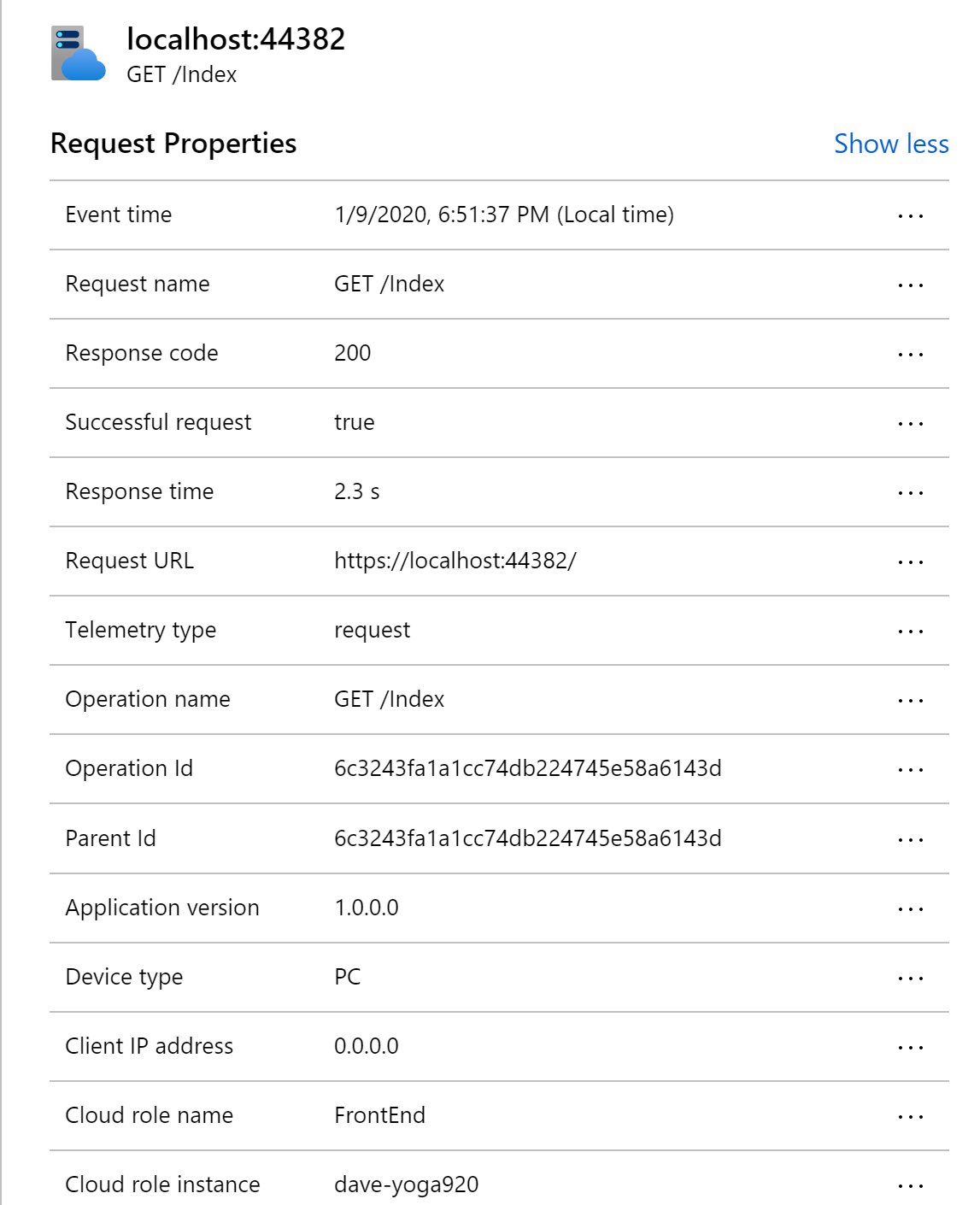
    
    </summary>
    
      <category term="Development" scheme="https://westerndevs.com/categories/Development/"/>
    
    
      <category term="ASP.NET Core" scheme="https://westerndevs.com/tags/ASP-NET-Core/"/>
    
      <category term="Entity Framework" scheme="https://westerndevs.com/tags/Entity-Framework/"/>
    
      <category term="Testing" scheme="https://westerndevs.com/tags/Testing/"/>
    
  </entry>
  
</feed>